


A coupon only makes money when three things go right. You create the right discount, shoppers actually see it, and it reaches them before they leave. Most WordPress coupon plugins handle just one of those jobs.
Here is the short answer. ShopEngine is the best coupon plugin for WooCommerce stores that need targeted and bulk coupons. ElementsKit is the best way to display coupon codes on Elementor pages. PopupKit is the best way to deliver coupons with spin-to-win wheels and exit-intent popups.
Below, you will find all nine plugins compared side by side, with honest notes on where each one shines and where it falls short.
Quick Overview
This guide compares the 9 best WordPress coupon plugins for 2026, sorted by the job each one does best: creating coupons, displaying them, or delivering them to shoppers. Each entry covers key features, who it suits, and pricing.
Top picks
ShopEngine: Best for WooCommerce stores that need location-based coupons, bulk codes, and flash sale countdowns.
ElementsKit: Best for displaying coupon codes on Elementor pages with click-to-reveal and one-click copy.
PopupKit: Best for delivering coupons through spin-to-win wheels, exit-intent popups, and countdown timers.
Also covered: Advanced Coupons, Smart Coupons for WooCommerce, Discount Rules for WooCommerce, WP Coupons and Deals, Coupon Affiliates, and Coupon Creator.
Coupon plugins do three different jobs
Before you compare features, decide which job you need a plugin for. This one decision keeps you from installing three plugins that do the same thing.
- Create and control coupons. Set who can use a code, where it works, how many times it can be used, and how many codes you need.
- Display coupons. Show a clean, clickable coupon on a landing page, product page, or deals page, with an expiry date and a copy button.
- Deliver coupons. Use popups, spin wheels, and countdowns to put the code in front of a shopper at the right moment.
WooCommerce already lets you create percentage, fixed cart, and fixed product discounts with expiry dates, usage limits, and minimum spend. A plugin earns its place when you need more control, better presentation, or more people actually redeeming your codes. New to coupons? Start with how to create a coupon code in WordPress.
Best WordPress coupon plugins at a glance
| Plugin | Main job | Best for | Free version | Pro price |
|---|---|---|---|---|
| ShopEngine | Create and control | WooCommerce stores that need location-based and bulk coupons | Yes | From $59/year |
| ElementsKit Coupon Code widget | Display | Coupon blocks on Elementor landing, product, and deal pages | Yes (widget in Pro) | From $49/year |
| PopupKit | Deliver | Spin-to-win, exit-intent, and countdown coupon popups | Yes | From $49/year |
| Advanced Coupons | Create and control | BOGO deals and auto-applied coupons | Yes | Paid plans |
| Smart Coupons for WooCommerce | Create and control | Gift cards and URL coupons | Yes | Paid plans |
| Discount Rules for WooCommerce | Automatic discounts | Tiered and bulk pricing without codes | Yes | Paid plans |
| WP Coupons and Deals | Display | Affiliate and deal blogs | Yes | Paid plans |
| Coupon Affiliates | Affiliate tracking | Coupon-based affiliate and influencer programs | Yes | Paid plans |
| Coupon Creator | Display | Printable coupons for local businesses | Yes | Paid plans |
Prices are single-site starting prices at the time of writing. Check each pricing page before you buy.
9 Best WordPress Coupon Plugins
1. ShopEngine (Advanced Coupon module)

ShopEngine is a complete WooCommerce builder for Elementor and Gutenberg, active on 100,000+ stores. Its Advanced Coupon module adds the coupon controls WooCommerce leaves out, and the rest of ShopEngine helps the discount convert on your product, cart, and checkout pages.
The standout feature is location-based coupons. You can make any code valid only in chosen countries or states, based on the shopper’s shipping address. Regional launches, local holiday sales, and shipping-zone promotions become a few clicks instead of custom code.
What you can do with it
- Location-based coupons: Limit a coupon to specific countries and states.
- Bulk coupons: Generate many unique codes at once for email campaigns, influencers, or printed inserts.
- Flash sale countdown: Run timed sales with a live countdown using the Flash Sale Countdown module.
- Discount badges: Show sale badges on products with the Badges module, so the deal is visible long before checkout.
- Custom cart and checkout: Design the coupon field and the full checkout with drag and drop.
How to create a location-based coupon in ShopEngine
✅ Go to ShopEngine > Modules > Advanced Coupon and enable the module.
✅ Go to Marketing > Coupons and click Add coupon.
✅ Set the discount type, amount, and expiry date under Coupon data.
✅ Choose the countries and states where the coupon should work, then publish.
For screenshots of every step, follow the ShopEngine Advanced Coupon guide or this tutorial on creating a WooCommerce advanced coupon.
Best for: WooCommerce stores that want targeted, bulk, and time-limited coupons in the same plugin that designs their store.
Pricing: Free version available. Advanced Coupon, Flash Sale Countdown, and Badges are part of ShopEngine Pro, which starts at $59/year for one site. A lifetime plan is also available.
2. ElementsKit Coupon Code widget
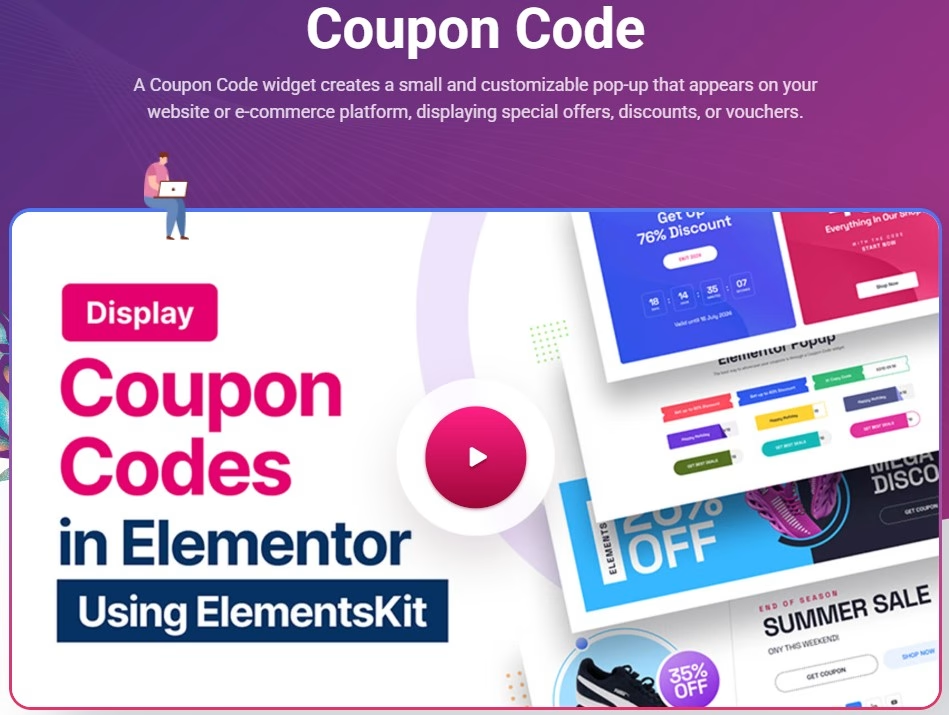
Creating a coupon is half the work. The other half is showing it in a way people notice and use. The ElementsKit Coupon Code widget turns any code into a polished, clickable coupon inside Elementor.
Shoppers click to reveal the code, copy it in one tap, and see exactly when the offer ends. You can build a full deals section on a landing page, add a coupon to a product page, or place one inside an Elementor popup.
What you can do with it
- Click-to-reveal coupons in popup or slide styles
- One-click copy to clipboard
- Expiry date and countdown to add urgency
- Ready layouts with full control over colors, borders, shadows, and alignment
- Works with any code: WooCommerce coupons, other stores, or affiliate offers
Best for: Elementor sites, deal pages, and affiliate sites that want coupons to look as good as the rest of the page.
Pricing: The Coupon Code widget is part of ElementsKit Pro, which starts at $49/year for one site and includes 90+ widgets, the header and footer builder, and the mega menu builder.
3. PopupKit (coupon popups and spin-to-win)
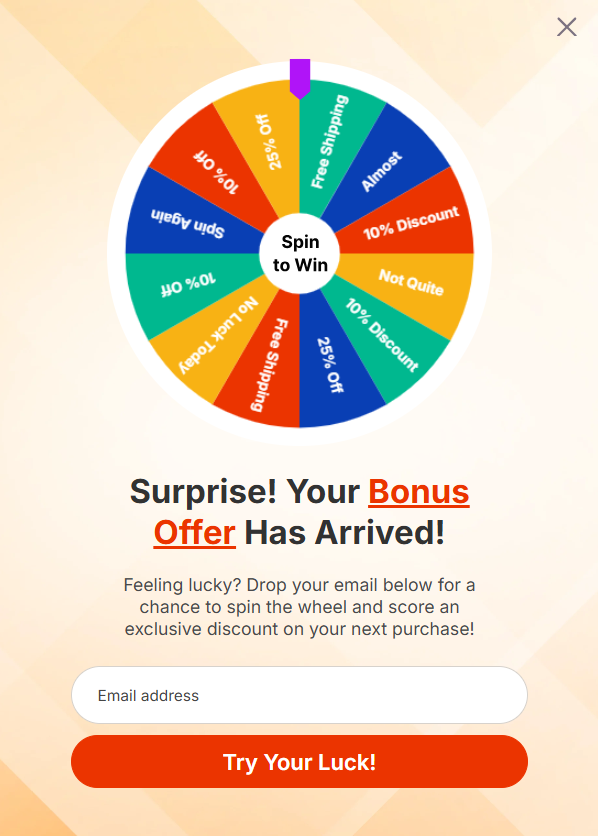
A great coupon does nothing if the visitor leaves before seeing it. PopupKit puts your offer in front of shoppers at the moment it matters: as they move to leave, after they browse for a while, or when they land on a product page.
Its gamified spin wheel lets visitors spin, win a discount, and get the code instantly, so you hand out coupons and grow your email list at the same time. Pair it with a countdown timer and the offer feels urgent rather than optional.
What you can do with it
- Spin-to-win wheels that reward visitors with coupon codes
- Exit-intent and other advanced triggers to catch visitors before they leave
- Countdown timers for flash sales and holiday campaigns
- Page-level and geolocation targeting, so each audience sees the right offer
- 270+ ready templates and integrations with email tools such as Brevo, GetResponse, and Omnisend
- Campaign analytics to see which popup converts best
Looking for campaign ideas? Browse these popup ideas for ecommerce websites.
Best for: Stores that want more shoppers to actually redeem their coupons, and grow an email list while doing it.
Pricing: Free version available. PopupKit Pro starts at $49/year for one site, with no monthly fees.
💡 Using all three? The Elementor Bundle includes ShopEngine, ElementsKit, PopupKit, MetForm, and EmailKit for $349/year on unlimited sites. See bundle pricing.
4. Advanced Coupons

Advanced Coupons extends WooCommerce coupons with buy one, get one (BOGO) deals, coupons that apply automatically, and cart conditions that decide who qualifies. Its premium plans add store credit and loyalty features.
- Good for: Stores whose main promotion is a BOGO offer or an auto-applied discount.
- Keep in mind: It handles coupon logic only. You still need a way to display and deliver your codes, which is where ElementsKit and PopupKit come in.
Pricing: Free version on WordPress.org, with paid plans for advanced features. View on WordPress.org
5. Smart Coupons for WooCommerce

Smart Coupons for WooCommerce adds BOGO coupons, giveaway products, and URL coupons that apply when a shopper clicks a link. Gift cards are available in the premium version.
- Good for: Gift cards and click-to-apply coupons in email campaigns.
- Keep in mind: Check which features sit in the free version before you plan a campaign around it.
Pricing: Free version on WordPress.org, with paid plans for advanced features. View on WordPress.org
6. Discount Rules for WooCommerce

Discount Rules for WooCommerce applies discounts automatically based on rules, with no code to type. It covers bulk and tiered pricing, BOGO offers, and discounts by category, cart total, or user role.
- Good for: Wholesale-style tiered pricing and automatic cart discounts.
- Keep in mind: It is a pricing engine, not a way to promote offers. Shoppers will not know about a discount unless you show it with badges, a coupon block, or a popup.
Pricing: Free version on WordPress.org, with paid plans for advanced features. View on WordPress.org
7. WP Coupons and Deals

WP Coupons and Deals is built for bloggers and affiliate sites. It displays coupon boxes with click-to-reveal codes, expiry dates, and one-click copy.
- Good for: Affiliate content sites that publish deals from many brands.
- Keep in mind: It does not create WooCommerce coupons. If your site runs on Elementor, the ElementsKit Coupon Code widget gives you more design control inside the editor you already use.
Pricing: Free version on WordPress.org, with paid plans for advanced features. View on WordPress.org
8. Coupon Affiliates
Coupon Affiliates turns WooCommerce coupons into an affiliate program. Each affiliate or influencer gets a personal code and a dashboard that shows usage, referred orders, and commission earned.
- Good for: Influencer, ambassador, and refer-a-friend programs built around coupon codes.
- Keep in mind: It tracks codes rather than creating campaigns. Pair it with ShopEngine bulk coupons when you need to issue many codes at once.
Pricing: Free version on WordPress.org, with paid plans for advanced features. View on WordPress.org
9. Coupon Creator

Coupon Creator builds printable coupons and simple coupon boxes that you place with a shortcode. It suits local businesses such as restaurants and salons that hand out offers in person.
- Good for: Printable coupons and simple in-store offers.
- Keep in mind: It is not built for WooCommerce checkout logic, so online stores will outgrow it quickly.
Pricing: Free version on WordPress.org, with paid plans for advanced features. View on WordPress.org
Which WordPress coupon plugin should you choose?
Match the plugin to your goal, not to the longest feature list.
- You run a WooCommerce store and want targeted or bulk coupons: ShopEngine.
- You build with Elementor and want coupons that look designed: ElementsKit Coupon Code widget.
- You have coupons, but few people use them: PopupKit.
- Your main offer is BOGO: Advanced Coupons or Smart Coupons, displayed with ElementsKit.
- You want discounts to apply without a code: Discount Rules for WooCommerce.
- You run an affiliate or influencer program: Coupon Affiliates.
- You publish a deals or affiliate blog: WP Coupons and Deals, or ElementsKit if you build with Elementor.
How to set up a Black Friday coupon campaign in WordPress
Black Friday is where all three coupon jobs come together. This setup works for most WooCommerce stores and takes an afternoon.
- Create the codes in ShopEngine. Make one public code for the sale, plus unique bulk codes for your email list. Give every code a hard expiry date.
- Add urgency to your products. Turn on Flash Sale Countdown and discount badges, so the deal shows on every product page.
- Show the code on your sale page. Add the ElementsKit Coupon Code widget with a countdown and a copy button.
- Catch visitors before they leave. Launch a PopupKit exit-intent popup or spin wheel that hands out the code.
- Check redemptions every day. Review usage under Marketing > Coupons in WooCommerce and retire any code that leaks to coupon sites.
Shopping for your own toolkit this season? See our roundup of the best WordPress Black Friday and Cyber Monday deals.
Coupon best practices that protect your margin
- Give every code an expiry date. Open-ended coupons tend to end up on coupon sites.
- Limit usage per customer for welcome and first-order discounts.
- Use unique codes for email and influencer campaigns, so you can track each one and switch it off if needed.
- Set a minimum spend so a discount raises order value instead of only cutting it.
- Show the deal before checkout. An empty coupon field with no code nearby can send shoppers off to search for one.
Frequently asked questions
Q: What is the best coupon plugin for WordPress?
For WooCommerce stores, ShopEngine is the best all-round choice because it handles location-based and bulk coupons inside the same plugin that builds your store pages. To display coupon codes on Elementor pages, the ElementsKit Coupon Code widget is the strongest option, and PopupKit is the best way to deliver codes through popups.
Q: Does WooCommerce have built-in coupons?
Yes. WooCommerce lets you create percentage, fixed cart, and fixed product discounts under Marketing > Coupons, with expiry dates, usage limits, spend limits, and product restrictions. A coupon plugin adds what WooCommerce lacks, such as location targeting, bulk codes, BOGO deals, and better ways to display and deliver codes.
Q: How do I generate bulk coupon codes in WordPress?
Use a plugin with bulk coupon generation. In ShopEngine, enable the Advanced Coupon module, then use the Bulk Coupon option under Marketing > Coupons to create many unique codes at once. Unique codes suit email campaigns and influencers, because you can track each code and switch it off individually.
Q: How do I show a coupon code on my WordPress site?
If you build with Elementor, add the ElementsKit Coupon Code widget to any page, enter your code, and pick a layout. Visitors can reveal and copy the code with one click. To show a coupon to visitors who are about to leave, use a PopupKit exit-intent popup or spin wheel.
Q: Can I limit a WooCommerce coupon to a specific country or state?
Not with WooCommerce alone. The ShopEngine Advanced Coupon module adds country and state settings to your coupons and checks them against the shopper’s shipping address. It is ideal for regional sales, local holidays, and promotions tied to specific shipping zones.
Q: Is there a free WordPress coupon plugin?
Yes. ShopEngine, ElementsKit, PopupKit, Advanced Coupons, Smart Coupons for WooCommerce, and Discount Rules for WooCommerce all offer free versions. The Advanced Coupon module in ShopEngine and the ElementsKit Coupon Code widget are Pro features, with plans starting under $60 a year.
Wrap Up
Choose a coupon plugin by the job it has to do. Create and control coupons with ShopEngine, display them with ElementsKit, and deliver them with PopupKit.
Together, they cover the full path from discount to redeemed order, built and supported by one team. Start with the job that is costing you the most sales today, then add the others as your campaigns grow.


Leave a Reply