
 Polish
  English
  German
  Spanish
  Italian
  French
  Danish
  Portuguese
  Swedish
  Korean
  Japanese
 Dziękuję Strona #
Po przesłaniu formularza z płatnością, niezależnie od tego, czy została ona pomyślnie zrealizowana, czy nie, Metform przekieruje Cię na stronę z podziękowaniami, na której Użytkownik będzie mógł zobaczyć szczegóły/status płatności.
Zaczynaj #
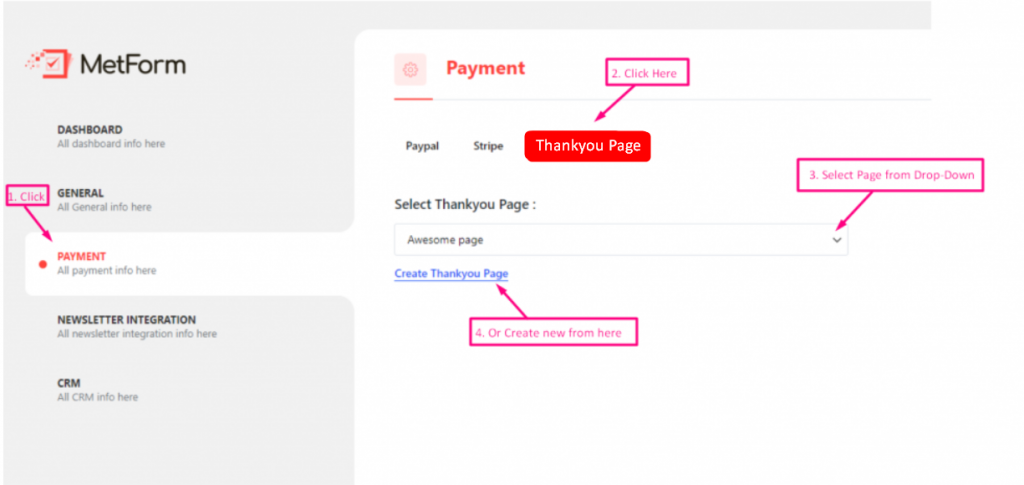
Iść do Metform=> Ustawienia=> Zapłata=>Dziękuję Strona=> Wybierz Twoja strona Z listy rozwijanej/ LUB Kliknij Utwórz stronę z podziękowaniami stworzyć nowe
Dodaj krótki kod #
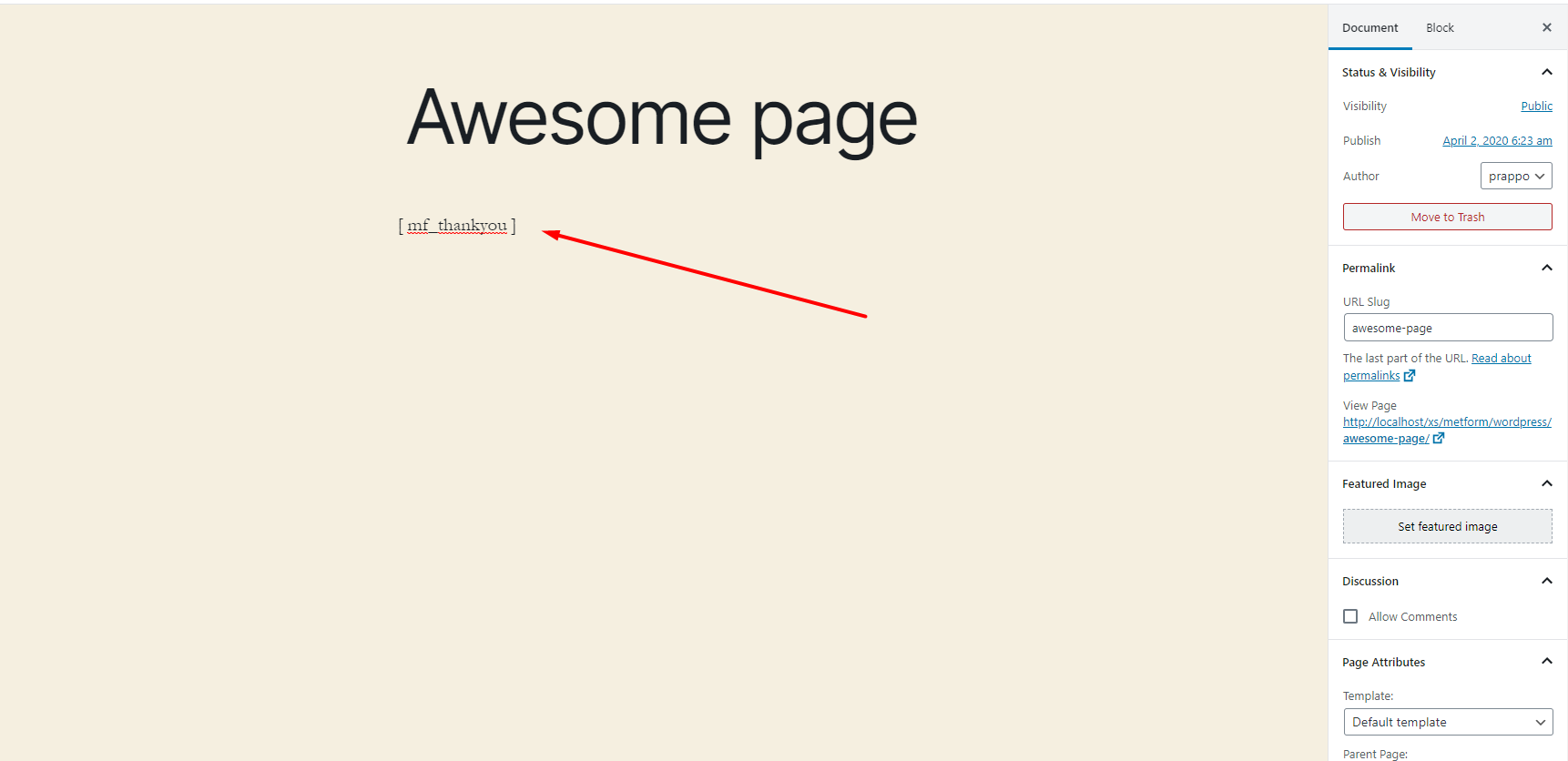
Dodaj krótki kod do strony, którą wybrałeś dla WordPress Dziękuję strona
Wynik #
Możesz zobaczyć WordPressa Dziękuję Strona Po dowolnej transakcji

Osiągnięcie #
- Możesz dodać więcej funkcji do swojej strony z podziękowaniami WooCommerce. Oto kilka krótkich kodów, które stworzą niesamowitą stronę z podziękowaniami WooCommerce.
Domyślna wiadomość z podziękowaniami #
Jeśli chcesz wyświetlić nazwę wraz z Domyślna wiadomość z podziękowaniami następnie przekaż imię z nazwą pola, aby utworzyć niestandardową stronę z podziękowaniami dla WooCommerce
Przykład #
[mf_dziękuję fname='fname_field']**Notatka: pole_nazwy to nazwa pola pochodzi z formularza Metform
Status płatności #
Jeśli chcesz wyświetlić status płatności, możesz użyć tego krótkiego kodu
Przykład #
[status_płatności mf]Identyfikator transakcji #
Jeśli chcesz pokazać identyfikator transakcji, możesz użyć tego krótkiego kodu.
Przykład #
[mf_transaction_id]Pokaż dane pola/wartość #
Jeżeli chcesz wyświetlić dowolne dane/wartość pola z pliku formularz następnie postępuj zgodnie z tym krótkim kodem
Przykład #
[pole mf='fname']imięto nazwa pola formularza
.png?alt=media&token=d9a72de8-bf58-455b-b93f-6e018b36215e)


