






Nienawidzę wypełniać formularzy! Jak o tobie?
Czy Ty też nie lubisz wypełniać formularzy?
A więc jest nas para!
Facebook login lets users sign in to a WordPress website using their Facebook account instead of creating yet another username and password.
And no, we are not alone in feeling this way. Forcing users to remember another login causes friction and directly impacts your website’s conversions. Just look at The Cost of Password Fatigue in 2026:
- Abandoned Logins: 55% of users have abandoned an account or created a new one simply to avoid going through a frustrating password reset process.
- Account Overload: The average internet user now manages between 100 and 150 online accounts.
- Password Reuse: An alarming 94% of passwords are reused or duplicated across multiple accounts, leading to severe security vulnerabilities.
Czy jesteś właścicielem witryny i doświadczasz wysokiego współczynnika odrzuceń ze strony logowania? Cóż, najprawdopodobniej możesz go w dużym stopniu zmniejszyć, integrując logowanie z Facebooka na swojej stronie internetowej.
Jeśli jesteś tutaj, aby dokładnie wiedzieć, jak dodać Facebook do witryny WordPress, jesteś na właściwej stronie.
This guide shows how to configure Facebook login in WordPress using a plugin and Facebook Developer settings. Seems interesting? Let’s go ahead then.
Adding Facebook Login to WordPress – Quick Overview
Adding Facebook login to WordPress allows users to sign in using their Facebook account instead of creating a new username and password. This reduces registration friction and can increase login conversions for membership sites, community platforms, and online stores.
The feature works through Facebook’s OAuth authentication system. When a visitor clicks the “Login with Facebook” button, the website redirects them to Facebook for authentication. After approval, Facebook sends basic profile information back to the WordPress site and the user is logged in automatically.
Most WordPress websites implement Facebook login using a plugin because it simplifies the setup process and manages API changes from Facebook.
The typical setup process includes:
1. Install a social login plugin such as WP Social.
2. Create a Facebook Developer account.
3. Create a Facebook App and enable Facebook Login.
4. Add your WordPress site’s OAuth redirect URL to the app settings.
5. Enter the App ID and App Secret into the plugin settings.
6. Test the login button to confirm everything works.
Facebook login should be offered as an optional login method alongside email login, since social platforms may change policies or permissions.
What Is Facebook Login in WordPress
Facebook login for WordPress allows visitors to sign in to a website using their Facebook account instead of creating a separate username and password. The feature works through Facebook’s OAuth authentication system, where the user verifies identity on Facebook and WordPress receives basic profile information such as name and email to create or log in to the account automatically.
Ways to Add Facebook Login on a WordPress Website
Tam są three common ways to add Facebook login to a WordPress website. The right approach depends on how much control you need and how comfortable you are with ongoing maintenance.
- The most common option is using a social login plugin. This method handles authentication, permissions, and API changes for you. It is suitable for most WordPress websites.
- Another option is manual integration using Facebook’s SDK. This approach requires custom development and direct handling of app credentials, redirect URLs, and user data.
- Some websites also rely on third-party identity providers that sit between Facebook and WordPress. These services simplify setup but add an external dependency.
In this guide, the focus is on the plugin-based method using WP Social, which works well for most WordPress use cases.
Why Should You Add Facebook Login on Your WordPress Website?
Most internet users already have Facebook accounts, but that alone is not why Facebook login works well.
The real advantage is convenience. When visitors can log in with Facebook, they avoid creating another username and password. This reduces zmęczenie hasłem, which happens when users are forced to remember credentials for many different websites.
It also removes the need to fill out long registration forms. Instead of spending time entering details, users can sign in quickly and start exploring your website right away.
In practice, Facebook login works best for content-driven platforms, membership sites, and online communities where fast access improves user engagement. However, it should be considered carefully because it introduces dependency on a third-party platform.
The real advantage is convenience. Users can log in quickly without creating another account or remembering another password.
Here are some key reasons for Facebook integration on WordPress website:
- Reduced password fatigue since users do not need to create another password
- Faster login and registration without long forms
- More reliable profile information such as verified names and email addresses
- Better onboarding experience for first-time visitors
Recommendation:
Use Facebook login as an optional shortcut, not a replacement for email login. This keeps flexibility without dependency.
Więc na co czekasz? Czytaj dalej ten post do końca, aby poznać wszystkie kroki, które musisz wykonać, aby dodać login do Facebooka na swojej stronie WordPress.
Before You Continue: Is Facebook Login Right for Your Site?
Before moving forward, it is important to decide whether Facebook login actually fits your website.
Facebook login works well if your site targets general users, communities, or content-based platforms where quick access matters more than strict user qualification.
However, if email ownership is critical to your business, or if your site operates under strict compliance requirements, relying too much on social login may create issues later.
If your audience values speed and convenience, continue with the setup.
If control and data ownership matter more, use Facebook login for WordPress carefully and always keep alternatives available.
Oto, czego potrzebujesz
If you do not have deep coding knowledge, it is better for you to choose a social login plugin to add a Facebook login to your site.
Wp Social is one of the best social media plugins for WordPress that can help you achieve your goal. The decision-making and setup principles explained in this guide apply regardless of the plugin you choose. Apart from letting you add a Facebook login button at any place on your website, it also features social share and social count options. So, if you get Wp Social, you are actually getting a 3-in-1 plugin. The video below walks through the same setup process visually on how to add social login for WordPress.
Best Plugins to Add Facebook Login to WordPress
Before setting up Facebook login, it helps to understand which plugins can handle the integration. Several WordPress plugins support social login, but they differ in features, supported networks, and ease of setup.
| Podłącz | Darmowa wersja | Supported Networks | Najlepszy dla |
|---|---|---|---|
| WP Społeczny | Tak | All major platforms | Easiest setup and additional features like counter, commenting etc. |
| Nextend Social Login | Tak | Major platforms but mostly on paid version | Popular option with no additional capabilities beyond social login. |
| miniOrange Social Login | Ograniczony | Many providers but mostly on paid version | Enterprise environments with 40+ app integration. |
Jak dodać login Facebooka do witryny WordPress (krok po kroku)
If you want to know how to integrate the Facebook login on your WordPress website seamlessly with a plugin, I am going to give you a step-by-step detailed guideline now using Wp Społeczny. Follow the steps properly and add Facebook to WordPress for login.
Chodźmy naprzód:
Step 1: Install a Facebook Login Plugin for WordPress
To install the Facebook login plugin for WordPress:
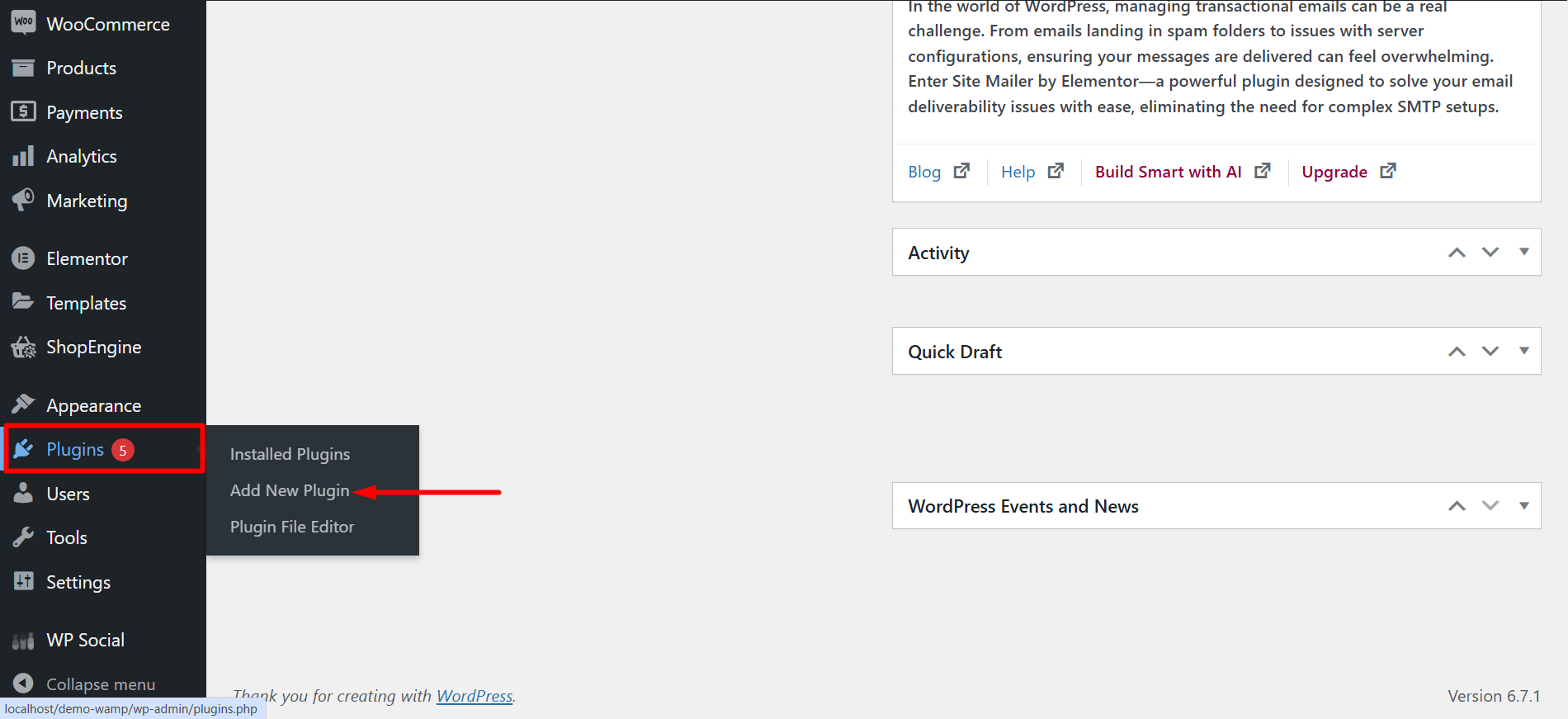
● Zaloguj się do obszaru panelu administracyjnego swojej witryny WordPress.
● Przejdź do Wtyczki ➔ Dodaj nowe
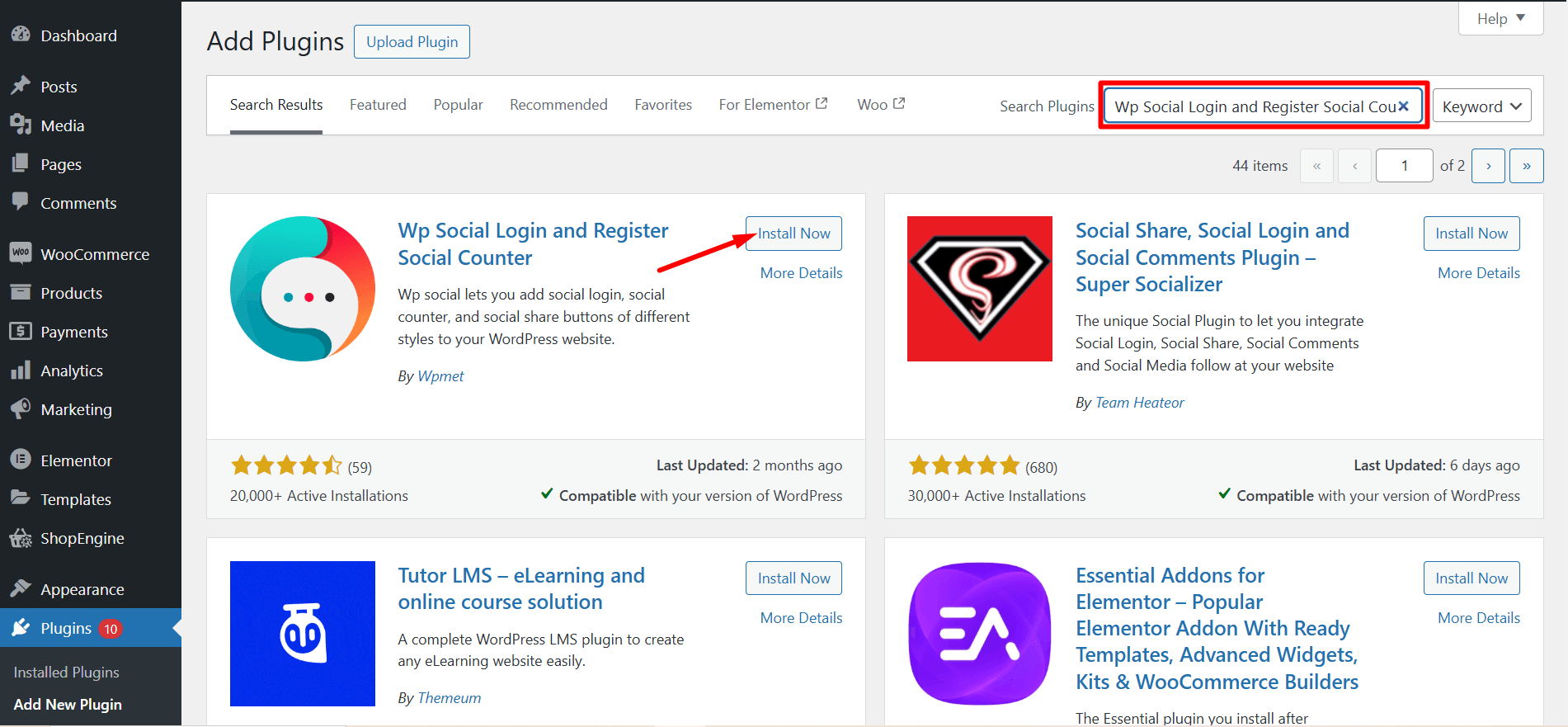
● Wpisz „Wp Social” w polu wyszukiwania.

- Znaleźć "Wp Logowanie i rejestracja społecznościowo-społeczna, udział społecznościowy, licznik społecznościowy” z wyniku wyszukiwania. Teraz kliknij „Zainstaluj teraz”
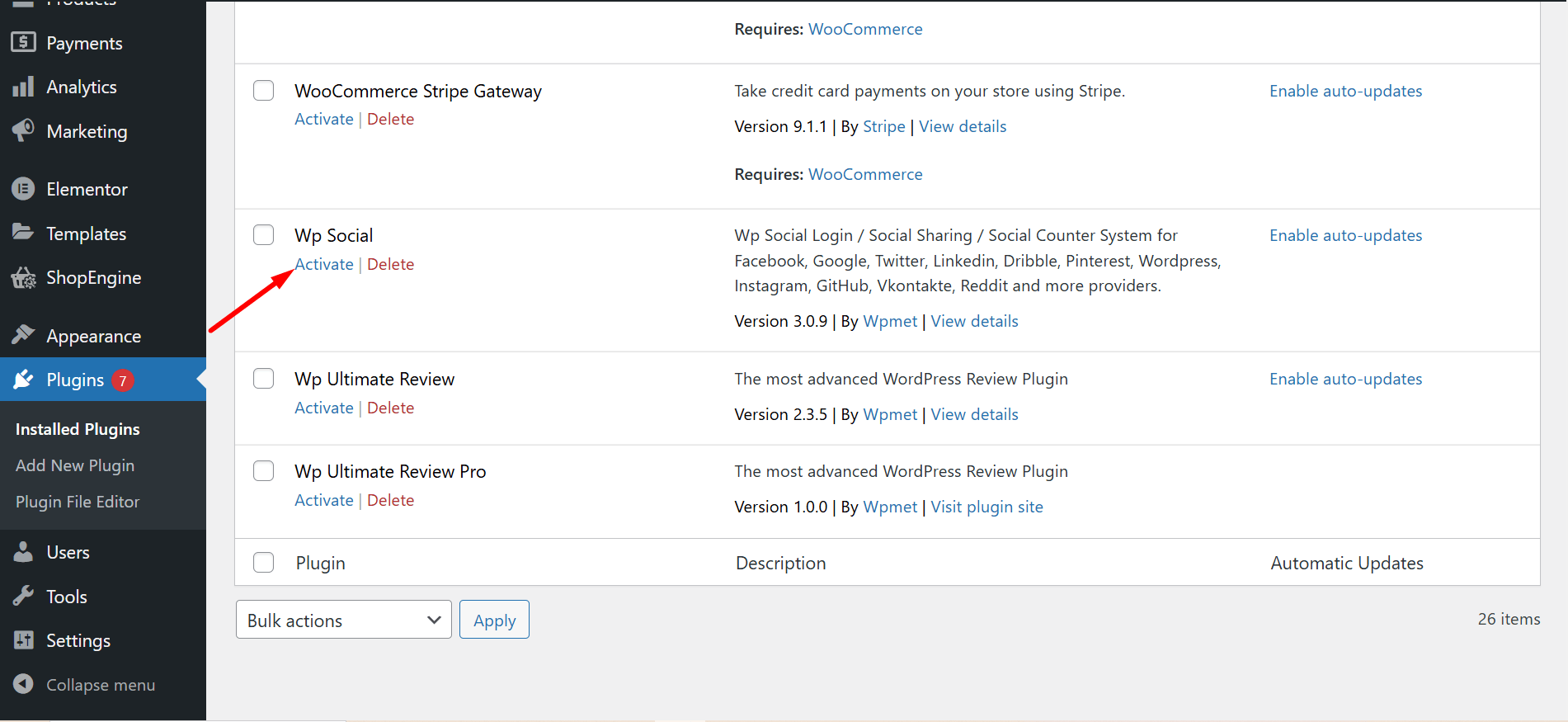
- After the end of the installation process, activate the plugin.
Krok 2: Utwórz konto programisty na Facebooku
- Nawigować do https://developers.facebook.com/apps/
- Login to your Facebook account If you are logged out.
- Click on the “Get Started” section to start creating your developer’s account. Follow the instructions step-by-step to complete your registration process for a Facebook developer account.

Krok 3: Utwórz aplikację na Facebooku
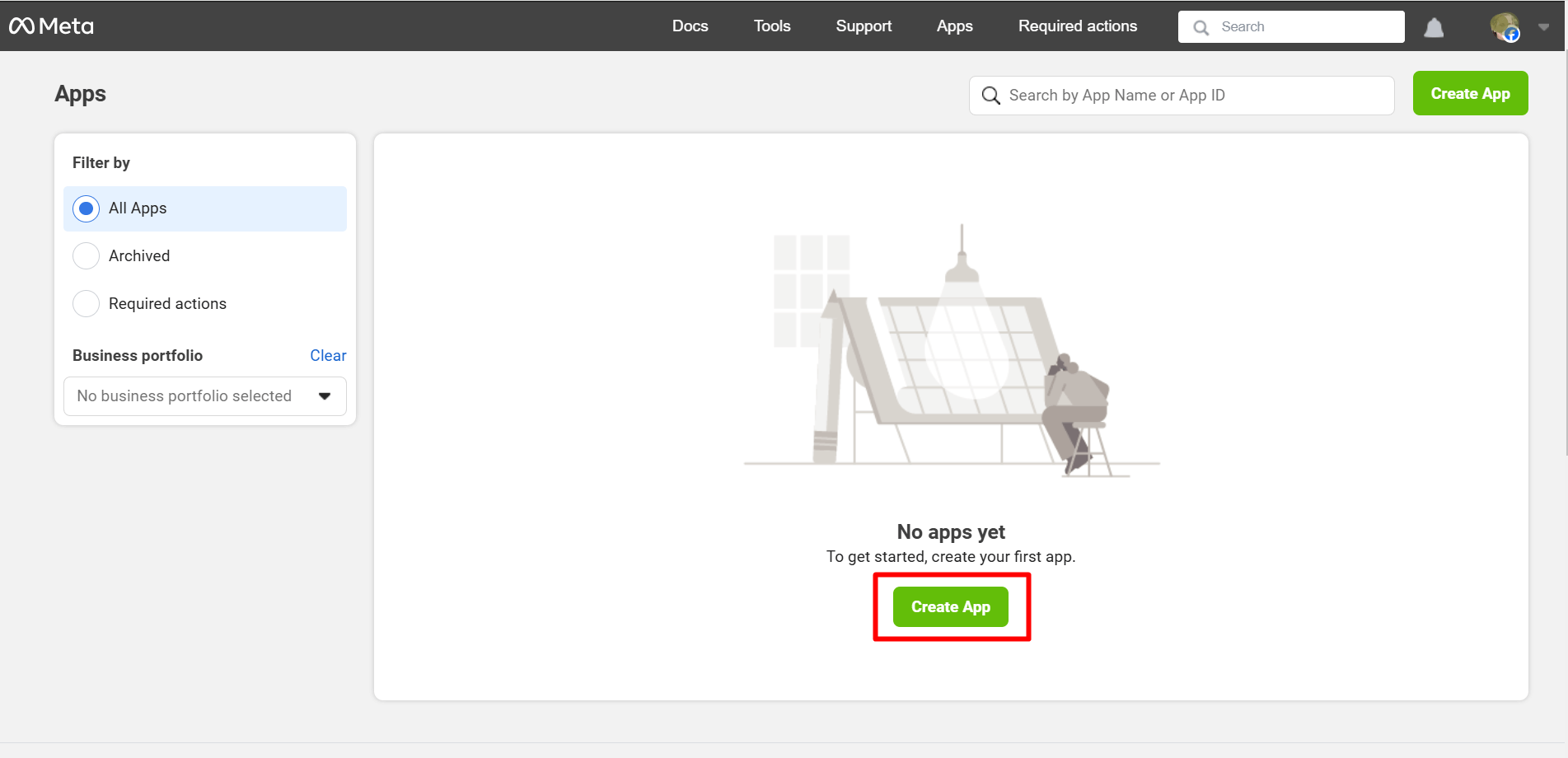
- After completing your registration as a developer, you’ll be redirected to the Facebook app creation page. Click on “Utwórz aplikację" iść do przodu
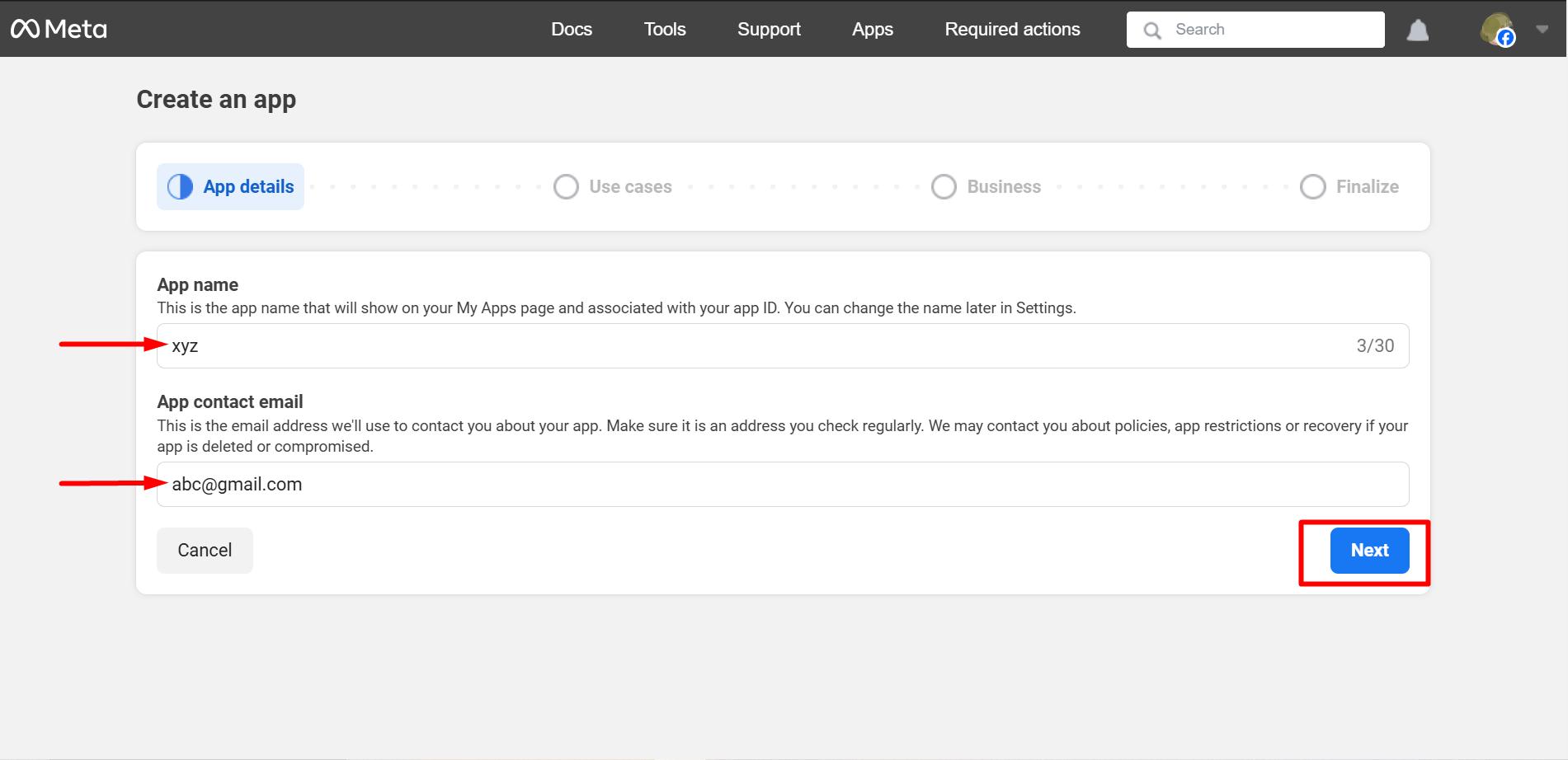
- At this step of app creation, set a meaningful App Name and Add contact email. After that, click on “Next”.
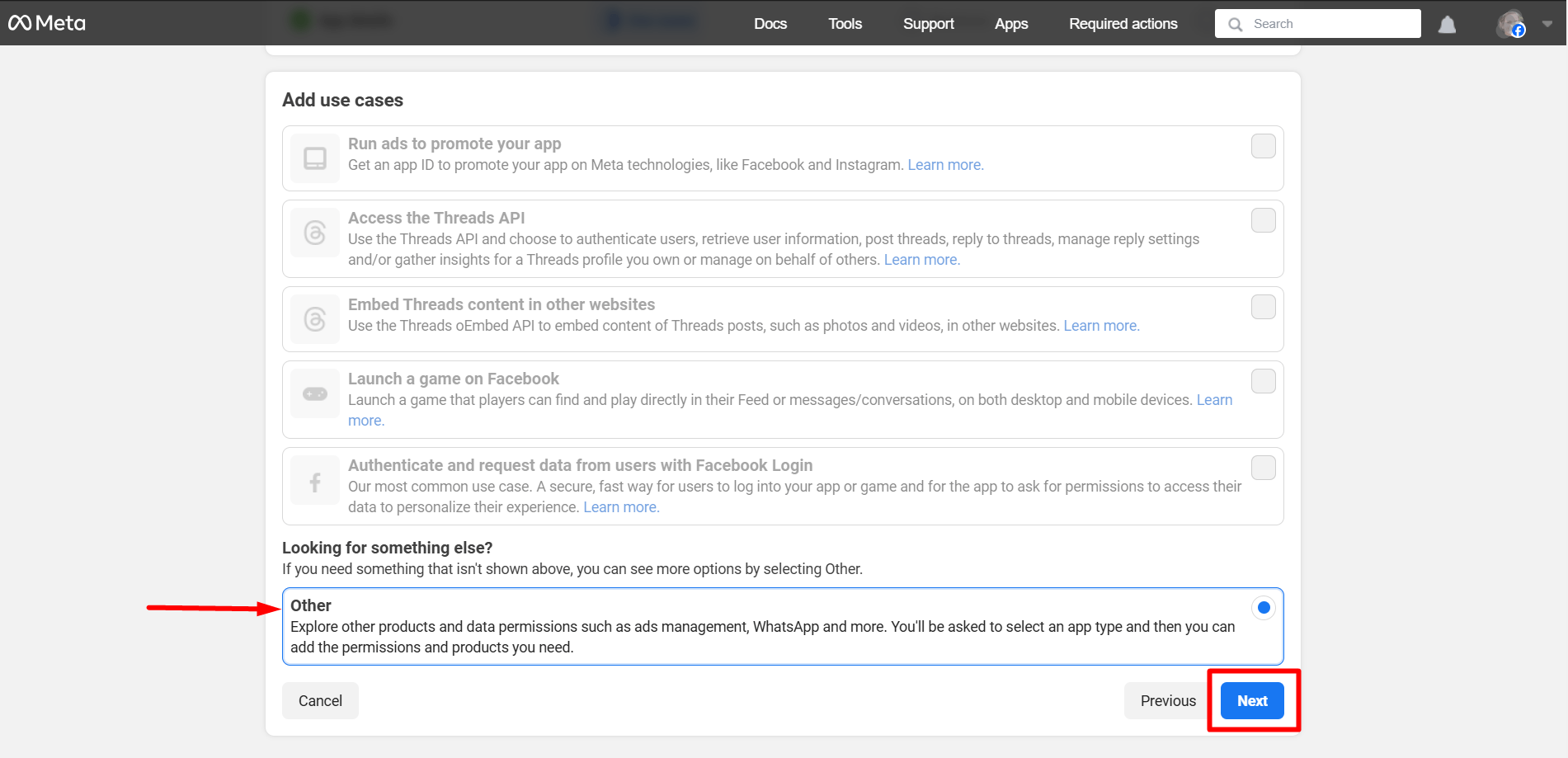
- You must select ‘Other’ as the use case here. Click on ‘Next’ when you are done.
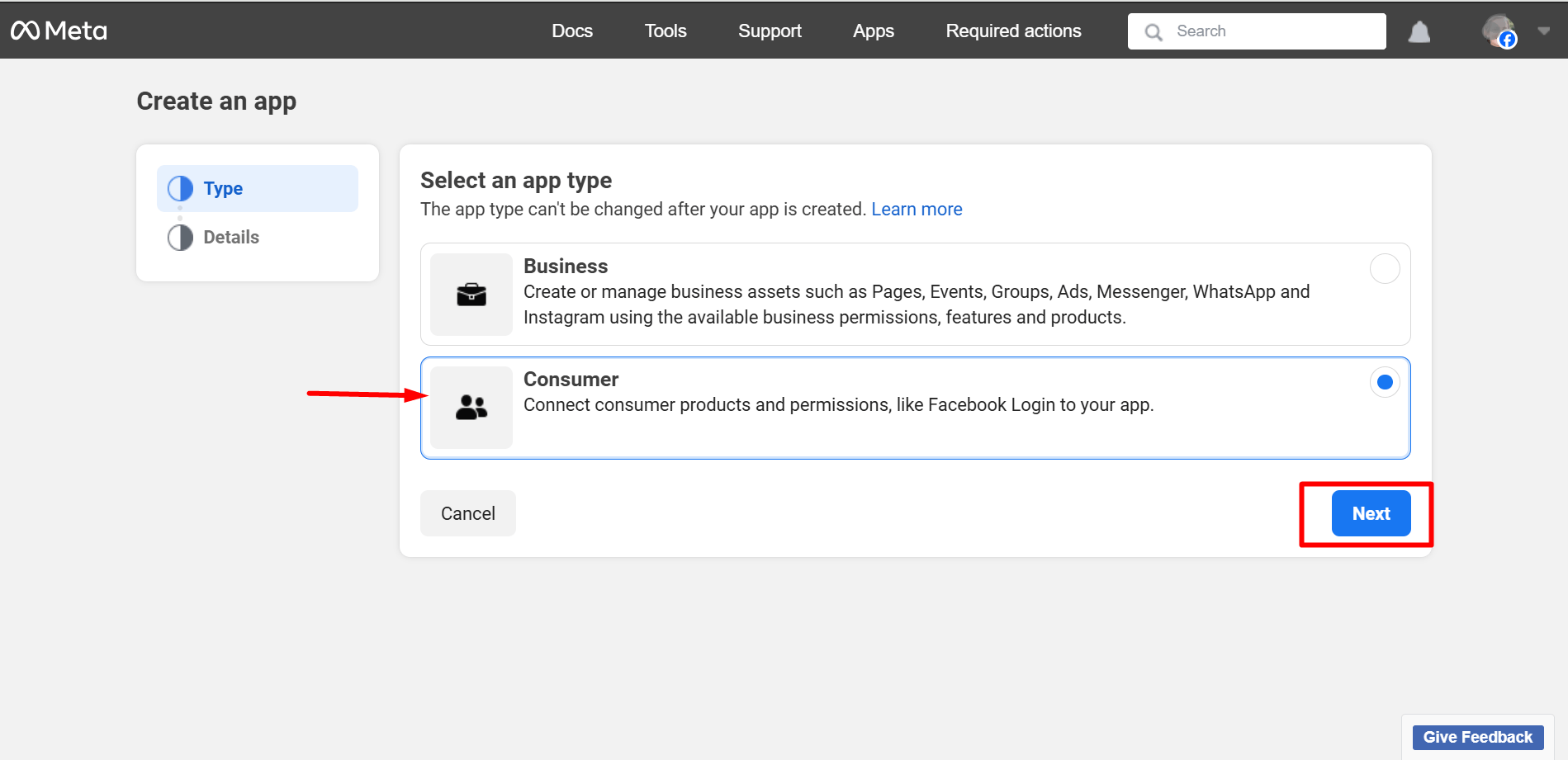
Now, select Consumer and press the ‘Next’ button.
In this step, you can check the whole details again and press the ‘Next’ button.
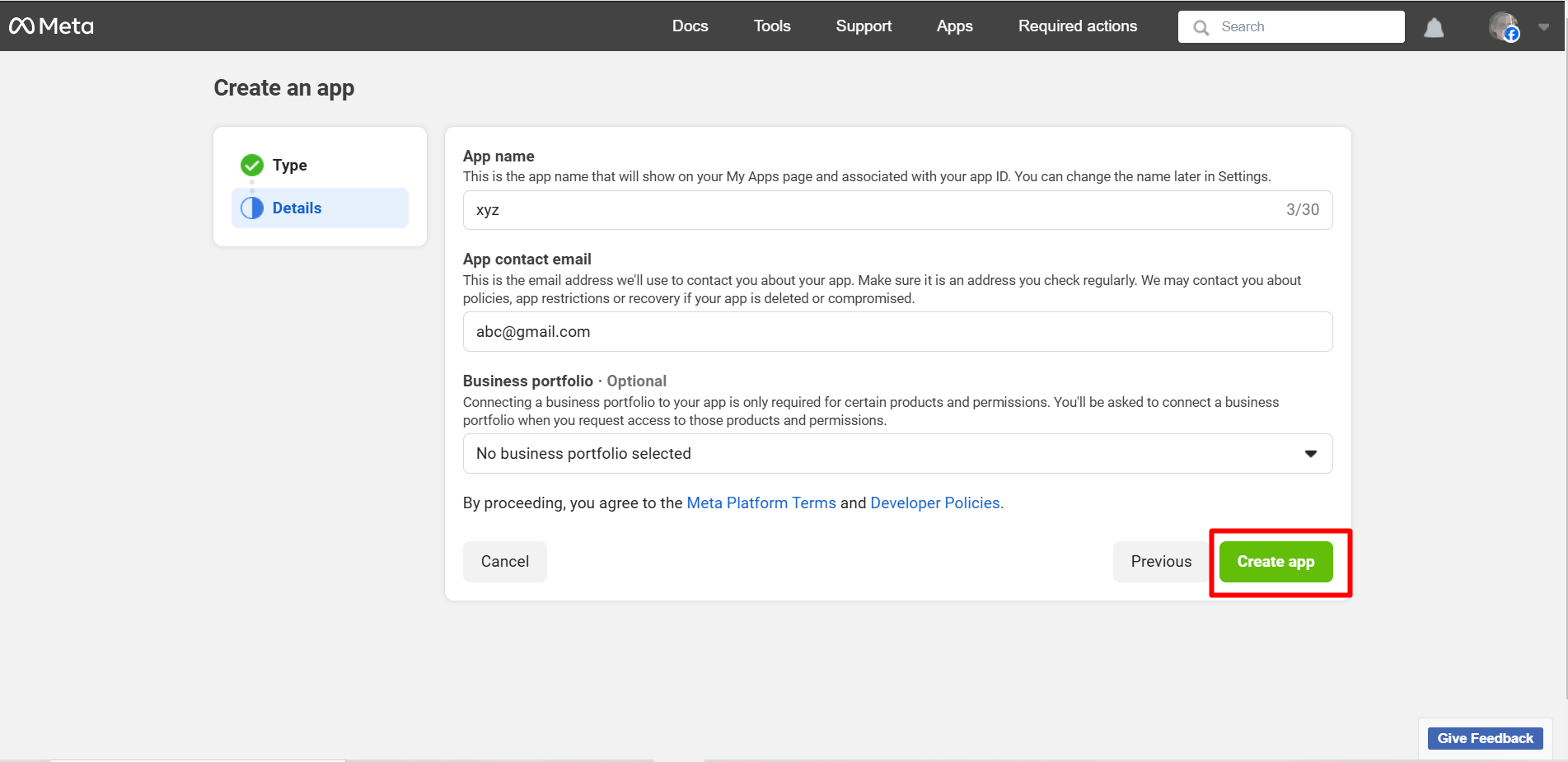
After that, you may be required to log in to your Facebook account again.
Krok 4: Skonfiguruj logowanie na Facebooku
Once the app is created, you will see the Facebook App dashboard.
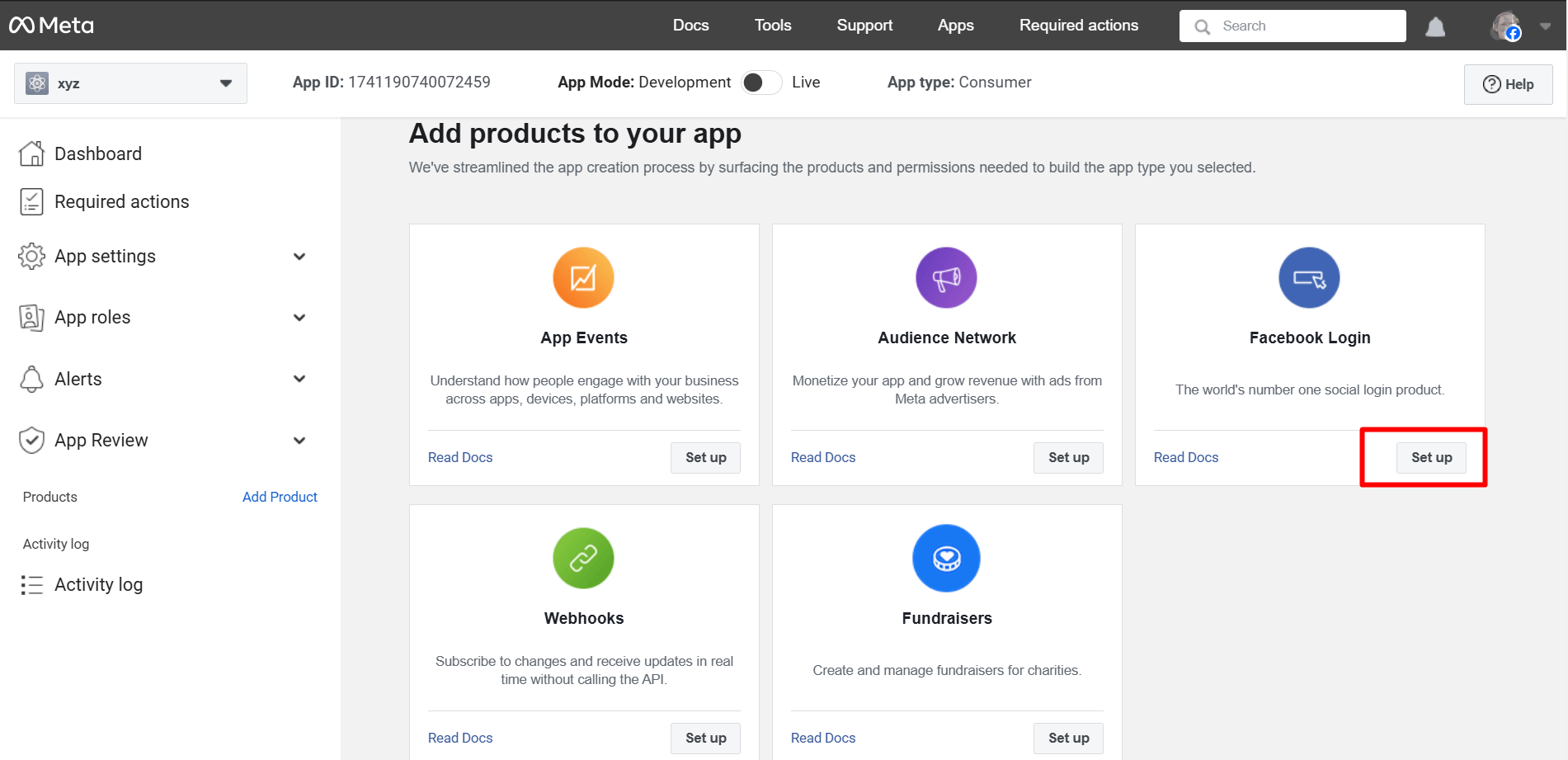
After the process mentioned above, you’ll be taken to the ‘Products’ page located under Dashboard. Click on the ‘+’. Find out ‘Facebook Login’ from the list and click on ‘Set Up’.
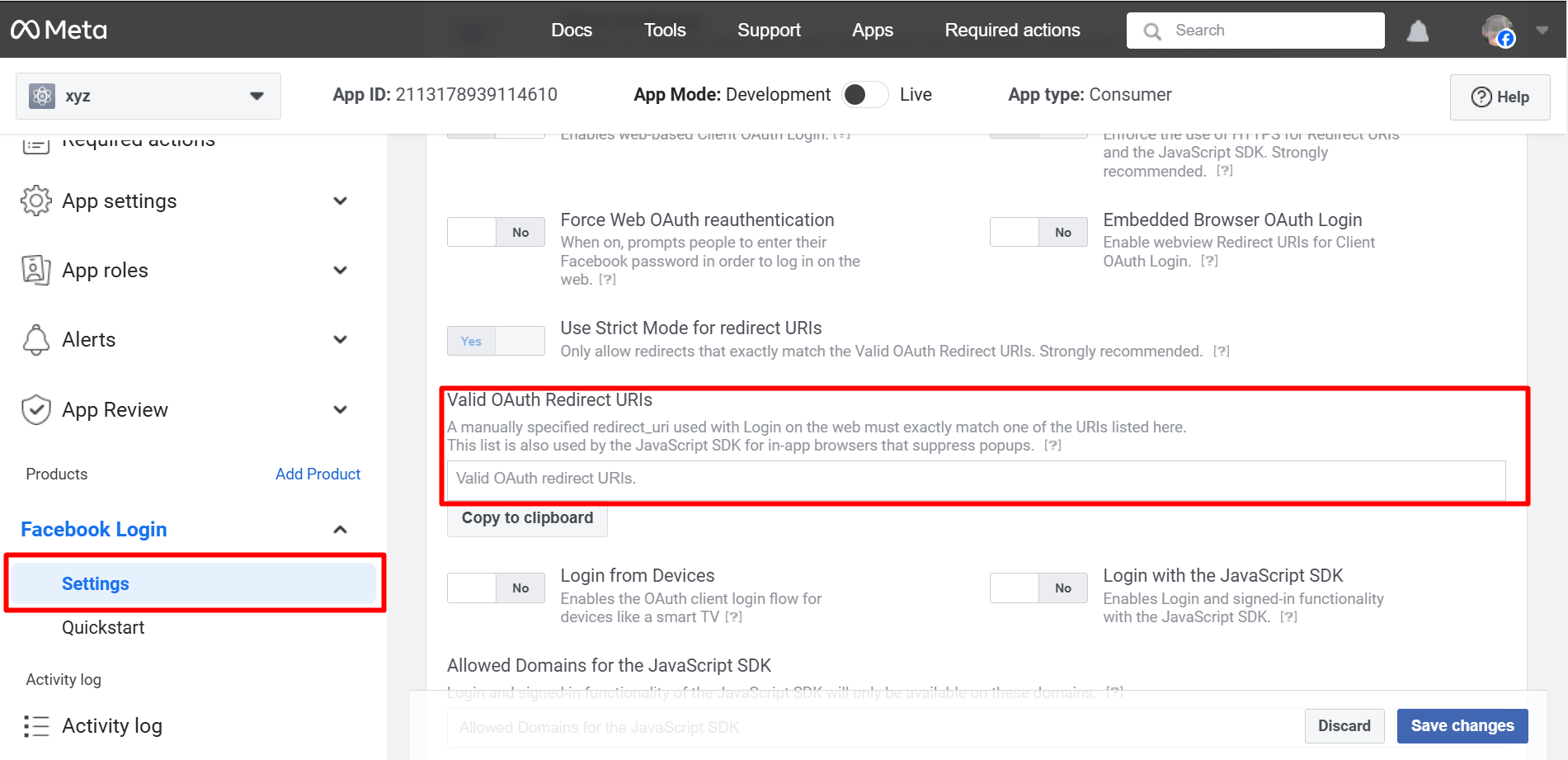
Go to Settings under the Facebook Login app. You have to enter Valid OAuth Redirect URIs under Client OAuth Settings.
To get the Valid OAuth Redirect URIs, you have to go to your WordPress admin area.
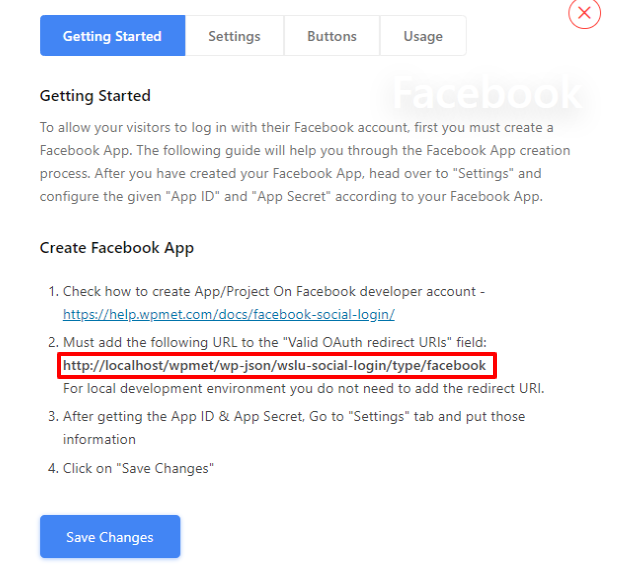
Navigate to WP Social ➔ Social Login ➔ Providers➔ Facebook➔ Click on the toggle button or Getting Started.
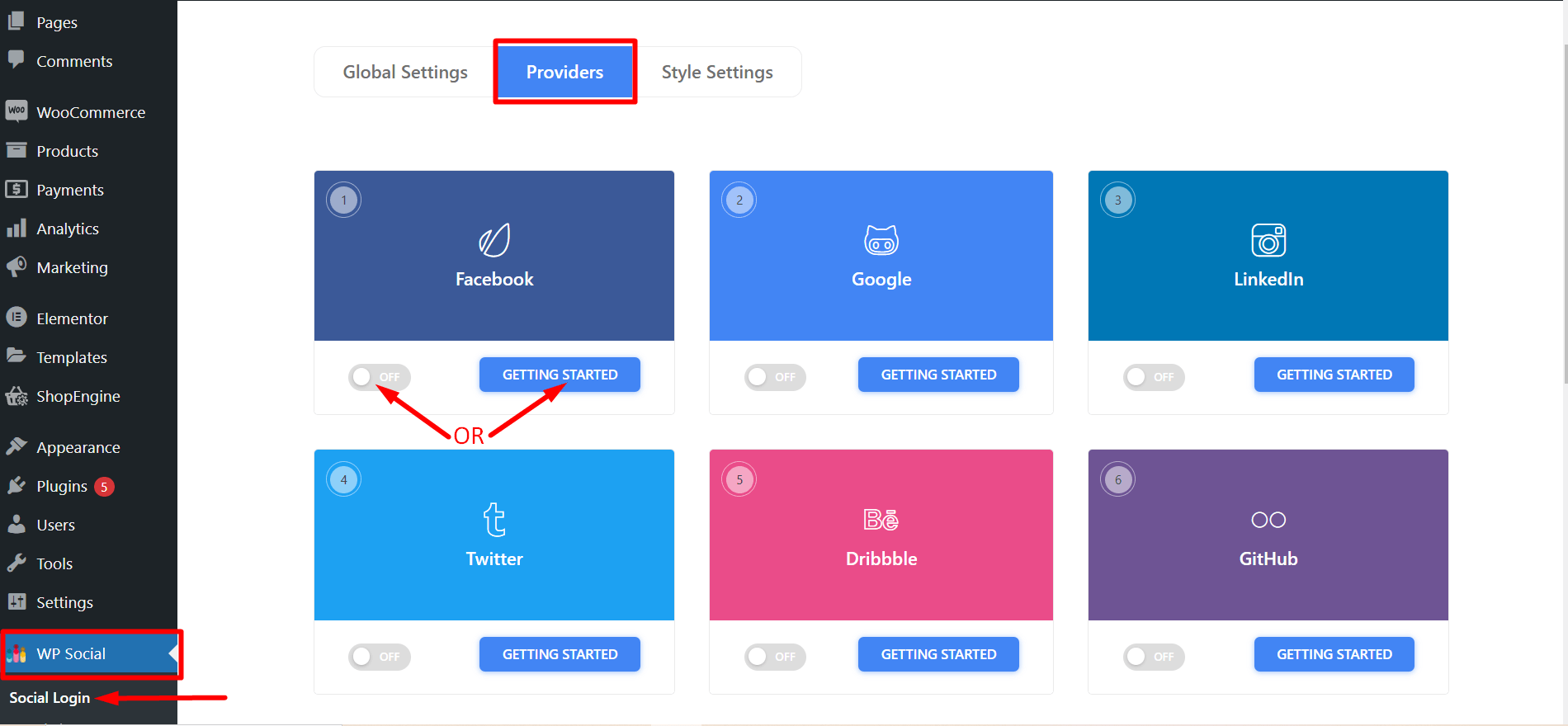
- You’ll now see a link to be used as Valid OAuth Redirect URIs. Copy it and go back to Facebook Login app settings to paste that on the ‘Valid OAuth Redirect URIs’ field.
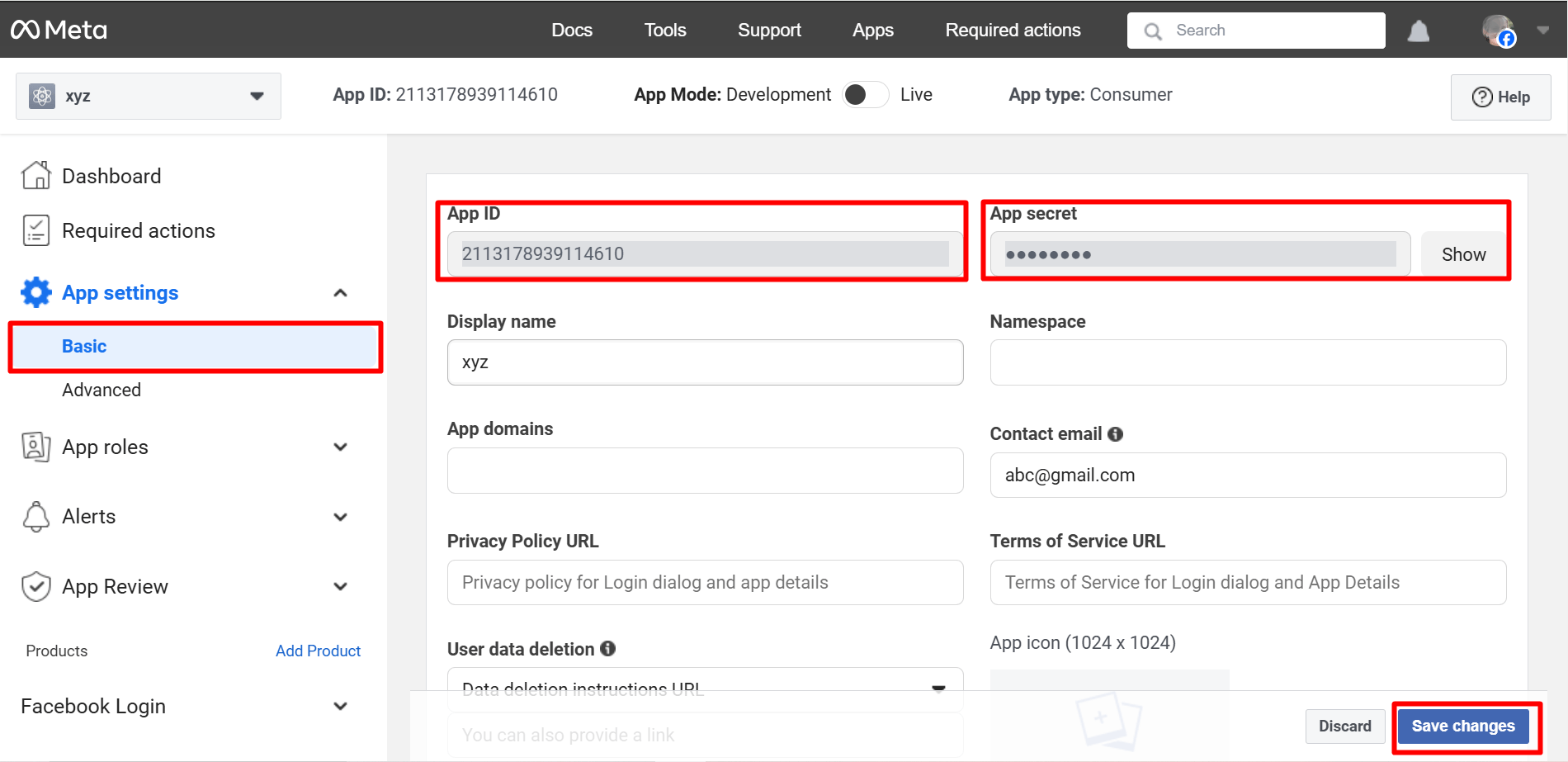
- Now, go to the ‘Basic’ submenu under Settings. Copy the App ID and App Secret for using those in the Wp Social app. Fill up other fields and click on ‘Save Changes’ when you are done.
Important Setup Insight (Often Missed)
Many Facebook login setups appear to work but fail in real usage.
This usually happens because of small configuration issues that are easy to overlook. For example, a mismatched OAuth redirect URI or unnecessary permission requests can silently break the login process.
Always make sure that:
- Your Facebook app is set to Tryb na żywo
- The OAuth redirect URI matches exactly
- Only the required permissions are requested
A visible login button does not always mean the login flow is working correctly. Testing matters more than installation.
Krok 5: Użyj identyfikatora aplikacji i sekretu aplikacji w Wp Social
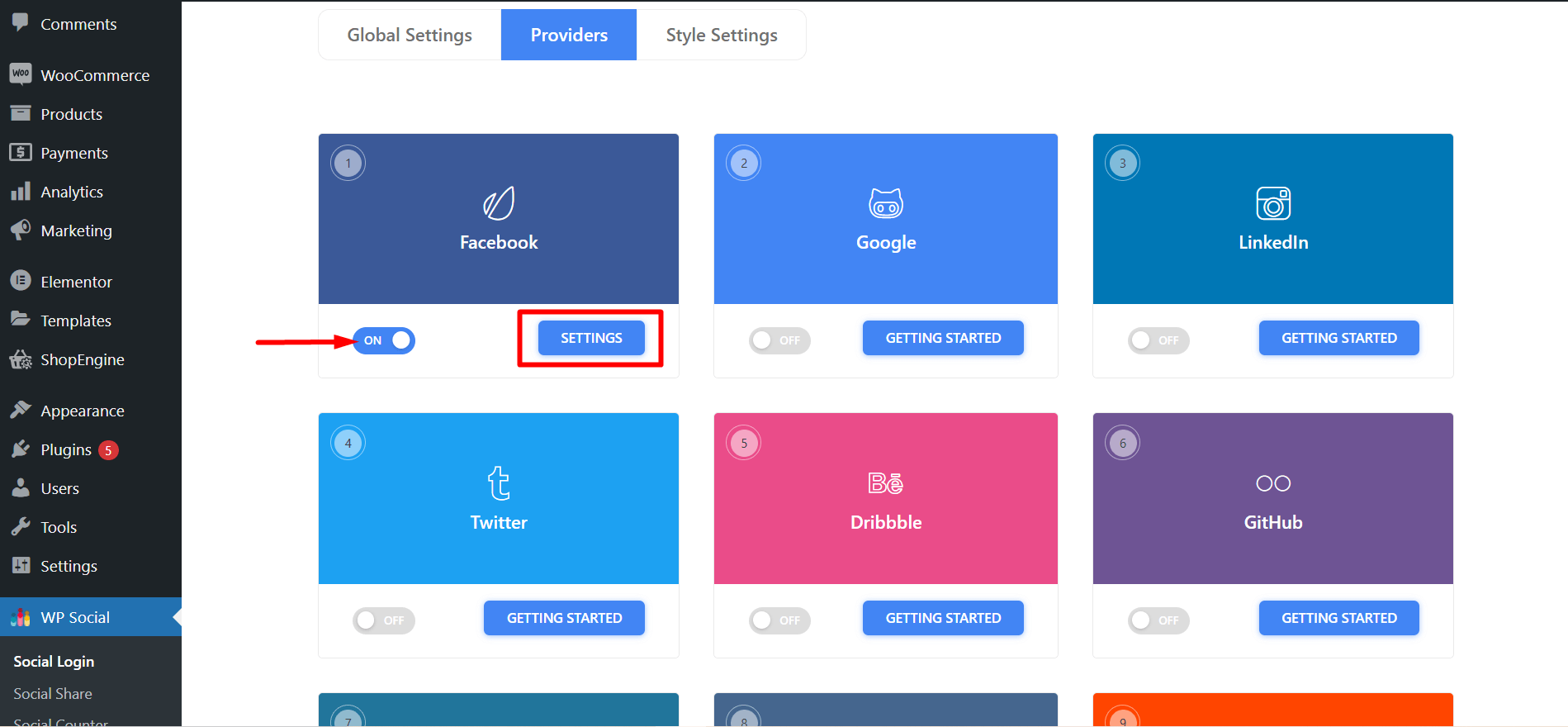
- Once you’ve completed creating an app on Facebook, go to the WP Social login from the WordPress dashboard. Navigate to Social Login ➔ Providers. Switch the left button below Facebook ‘ON’ and then click ‘Settings’.
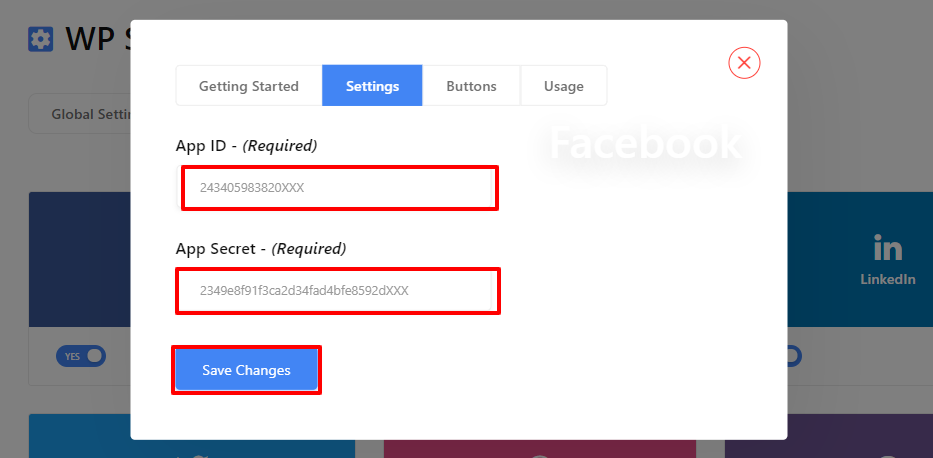
- Enter on the Settings tab and paste the App ID and App Secret received from Facebook. Once you are done, click on ‘Save Changes’.
Krok 6: Skonfiguruj ustawienia wtyczki WP Social
- ● Przejdź do ustawień globalnych logowania społecznościowego i wybierz stronę, na której chcesz umieścić login do Facebooka i w jakiej pozycji. Po zakończeniu zapisz zmiany.
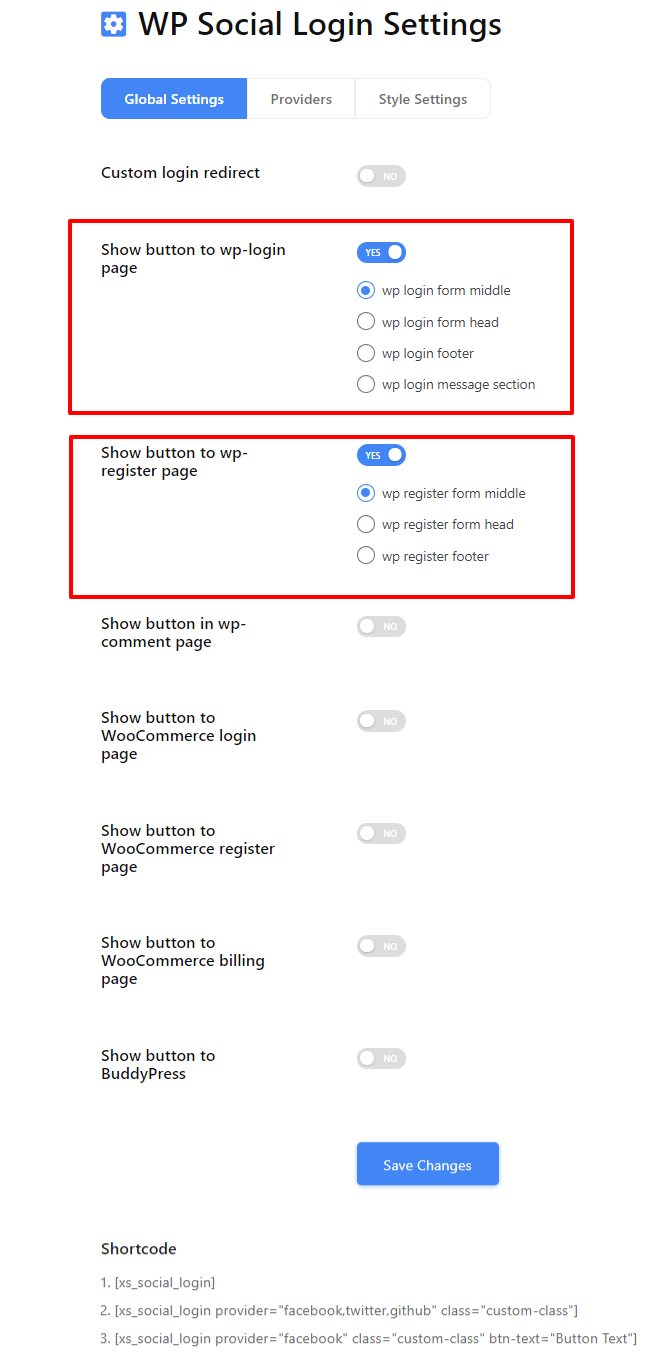
Otrzymasz także listę skrótów logowania społecznościowego, których możesz użyć w innym miejscu na swojej stronie WordPress.
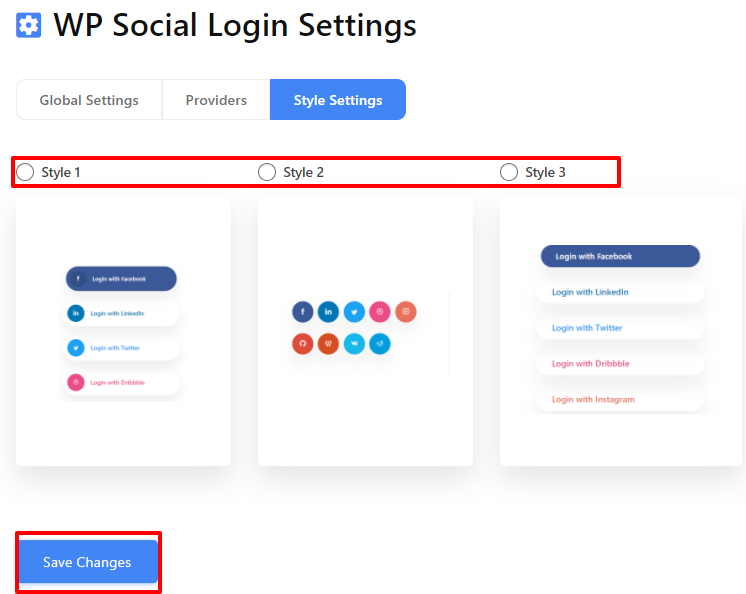
● Następnie przejdź do ustawień stylu, wybierz swój ulubiony styl i kliknij „Zapisz zmiany', aby wdrożyć swój wybór.
How to Know Your Facebook Login Is Working
After completing the setup, do not stop at seeing the login button.
You should test whether:
- New users can log in and get WordPress accounts created
- Existing users can log in again without errors
- Facebook login works properly on mobile browsers
- Logout and re-login works as expected
When configured correctly, Facebook login usually results in faster first-time access and fewer abandoned registrations. If login numbers increase but engagement drops, placement and usage should be reviewed.
To wszystko. Możesz teraz zobaczyć logowanie na Facebooku dokładnie tam, gdzie chcesz na swojej stronie WordPress, w swoim ulubionym stylu. Masz więc pomysł, jak dodać Facebooka do WordPressa w kilku prostych krokach. Teraz, jeśli chcesz dodać login społecznościowy do swojej witryny, możesz to zrobić zobacz ten post.
Manual Facebook Login Integration (Advanced Method)
Facebook login can also be added manually without using a plugin. This approach is typically used when a site needs full control over the authentication flow. It requires implementing Facebook’s OAuth flow using the Facebook SDK and handling authentication in WordPress.
You will have to work directly with Facebook’s JavaScript or PHP SDK. Means you must configure the App ID and App Secret securely, set correct redirect URIs, and manage permission scopes such as public profile and email.
This method also requires ongoing maintenance. Facebook API changes, permission reviews, and security updates must be handled manually.
Because of this complexity, manual integration is generally recommended only for developers or highly customized WordPress setups.
Common Facebook Login Issues and Fixes
Facebook login on WordPress issues are often caused by configuration mismatches rather than plugin errors.
A redirect URI mismatch usually occurs when the callback URL in Facebook Developer settings does not exactly match the WordPress login URL.
If login works only for admins, the Facebook app may still be in development mode and not publicly available.
Some users may not receive an email address if the email permission is not approved or available on their Facebook account.
Login buttons may not appear if page caching or CDN settings block dynamic scripts.
Facebook login on WordPress also requires HTTPS. Sites without a valid SSL certificate may fail authentication.
Here is a table showing the cause and solution of specific issues.
| Issue | Cause | Rozwiązanie |
|---|---|---|
| Redirect URI mismatch | incorrect callback URL | update redirect URL in Facebook developer settings |
| Login works only for admin | app still in development mode | switch app to live mode |
| Email not returned | email permission disabled | enable email scope |
| Login button not working | caching or script conflict | clear cache and test again |
Security and Privacy Considerations
When configuring social login plugins, ensure they comply with the IETF OAuth 2.0 Security Best Current Practice I OWASP Authentication Guidelines to protect your WordPress site from credential stuffing and token hijacking.
Facebook login uses OAuth authentication, which means your WordPress website does not store the user’s Facebook password. Facebook verifies the user’s identity and shares limited profile information with your website.
However, website owners should:
- request only necessary permissions
- keep traditional email login available
- mention social login in their privacy policy
Końcowe przemyślenia
Facebook login is one of the easiest ways to reduce registration friction on WordPress websites. By allowing users to sign in using an existing social account, websites can improve user onboarding and reduce abandoned registrations.
However, here are some key points that you should keep in mind –
- Keep email login available
- Request minimal permissions
- Test every login scenario
Finally, when Facebook Login is used as a shortcut, it improves access. However, when used blindly, it creates silent drop-offs. So, choose based on your audience, not trends.
Now that you know how to integrate Facebook social login on your website, it is time to check and try. Follow the steps mentioned above and you’ll get things done. Hope that you’ll be successful in adding a Facebook login for WordPress. The exact plugin may change over time, but the decision factors and setup checks covered here remain the same.
Frequently Asked Questions (FAQ) on Login with Facebook on WordPress
Czy mogę użyć PHP, aby dodać Facebooka do witryny WordPress?
Tak, jeśli masz wystarczającą wiedzę techniczną, możesz również skorzystać z PHP, aby dodać login Facebook do swojej witryny WordPress. Zajmie to jednak sporo czasu, ponieważ będziesz musiał zainstalować w projekcie pakiet SDK Facebooka dla PHP.
Na szczęście tak! Wp Social oferuje krótkie kody umożliwiające korzystanie z przycisku logowania do Facebooka w dowolnym miejscu na stronie WordPress.
Is Facebook login still relevant today?
Yes, but it should be used selectively. It works best as a secondary login option rather than the primary one.
What happens if Facebook is blocked or down?
Users will not be able to log in with Facebook. That is why email or username-based login should always remain available.
Is Facebook login safe?
Yes, when configured correctly. However, you should request minimal permissions and clearly inform users about what data is being accessed.
Can the same Facebook App be used on multiple WordPress websites?
Yes. A single Facebook App can be used on multiple websites as long as all domains are added to the app settings and the redirect URIs are configured correctly.
What permissions are required for Facebook login?
At minimum, Facebook login requires access to the public profile. Email permission is commonly requested but may require review and is not guaranteed for all users.
Does Facebook login work with WooCommerce or membership plugins?
Yes. Facebook login works with WooCommerce and most membership plugins as long as user registration is enabled and the plugin supports standard WordPress authentication.

Dodaj komentarz