




WordPress を新しいドメインに移動する方法が心配ですか?それでは、ここで解決策をご紹介します。
Your website SEO and ranking are related to your website domain name. If you follow the wrong process, then there is a higher chance to damage your website’s search results. This will put all your effort in vain.
そこでこのブログでは、正しい方法を紹介します。 WordPress サイトを新しいドメインに移行する SEO を損なうことなく。
Quick Overview
You can move WordPress to a new domain with minimal SEO impacts by following the step-by-step method mentioned below:
Here are the steps to follow:
Step 1: Add the new domain to hosting
Add the new domain from cPanel using Addon Domains and set the correct document root.
Step 2: Copy WordPress files
Copy all WordPress files from the old domain folder to the new domain directory using File Manager or FTP.
Step 3: Update site URL
Edit the wp-config.php file to define the new WP_SITEURL and WP_HOME values.
Step 4: Update database details (if required)
Change database credentials in wp-config.php only if you are moving to a new hosting account.
Step 5: Replace old URLs
Use a search-and-replace plugin to update all old domain URLs to the new domain in the database.
Step 6: Clear cache
Clear WordPress, server, and CDN cache to prevent loading or display issues.
Step 7: Set up 301 redirects
Add a permanent 301 redirect in the old domain’s .htaccess file to preserve SEO.
After Migration
- Add the new domain to Google Search Console
- Submit a fresh XML sitemap
- Monitor indexing, rankings, and crawl errors for 2–4 weeks
Will changing the domain name bring any good?
ドメイン名はSEOに影響しますか?これは多くの WordPress ユーザーの疑問です。答えは します。なぜなら ドメイン名、SEO、ランキング すべては相互に接続されています。実際、ドメインを頻繁に変更するとブランドが消滅する可能性があります 人気。ただし、ドメイン名を決して変更できないわけではありません。実際に変更する必要がある場合は変更できます。
ここでは、ドメインを変更することが良い考えとなる状況をリストします。
- もっと良いものを見つけるとき 強力なドメイン名 あなたのビジネスのために。たとえば、domain.net から domain.com へ。
- ドメイン名を変更する場合は、 ブランディングに必要な.
- ドメイン名も判明 高い あなたのビジネスのために。
- WordPress サイトを新しいドメインに移動します。 ローカルホスト上に構築.
There might be other situations where changing the domain name becomes necessary. In these cases, you can change the domain name and transfer WordPress website to a new domain. But don’t change it too often as it is a bad practice. In the next part, I will guide you on how to change your domain name on WordPress without losing SEO.
WordPress を新しいドメインに移動する前に行う必要があること
WordPressサイトを新しいドメインに移す前に、いくつかの点を確認する必要があります。これにより、WordPressサイトを問題なく安全に移転することができます。何らかのトラブルに巻き込まれたとしても、最終的には バックアップを取ってその問題を克服する.
ドメイン名を変更する前に行う必要があることは次のとおりです。
- Cpanel にアクセスできること: WordPress サイトを新しいドメインに移動するには、Cpanel アクセス権が必要です。 localhost には Cpanel がないためです。
- 新しいドメイン (ブランド可能なドメイン) を選択します。 WordPress サイトにどのドメイン名を選択するかを考えてください。以前のドメイン名よりもブランド性の高いドメイン名を選択してください。
- 新しいドメインに移行する前に、WordPress サイトのバックアップを準備します。 ここで最も重要な予防策は、WordPressが新しいドメインに移行するときです。突然の災害を防ぐためにサイトのバックアップを準備します。WordPressサイトのバックアップに役立つWordPressプラグインはたくさんあります。たとえば、 上昇気流プラス, バックアップバディ, ジェットパック, and so on. Use one of these plugins for backing up your WordPress site before moving your WordPress site from one domain to another.
When is this manual migration suitable? When not?
This manual migration is suitable only when your site meets the following scenarios:
- If you want full access to files, database changes, and redirects.
- のために small to medium size site with a standard WordPress setup.
You should rely on plugin-based migration or hosting services if your site has:
- Complex serialized data.
- Heavy WooCommerce usage.
- Multisite configuration.
- Very large databases.
However, compared to plugin migration, manual migration is simpler and more precise.
WordPress を新しいドメインに移動するためのステップバイステップ ガイド
ここでは、プラグインを使用せずに WordPress サイトを新しいドメインに移行するためのステップバイステップのガイドを示します。これは、数分以内にドメイン アドレスを変更できる最も簡単な方法です。次の 7 つの手順に従うだけで、SEO を損なうことなく WordPress サイトを新しいドメインにコピーして転送できます。
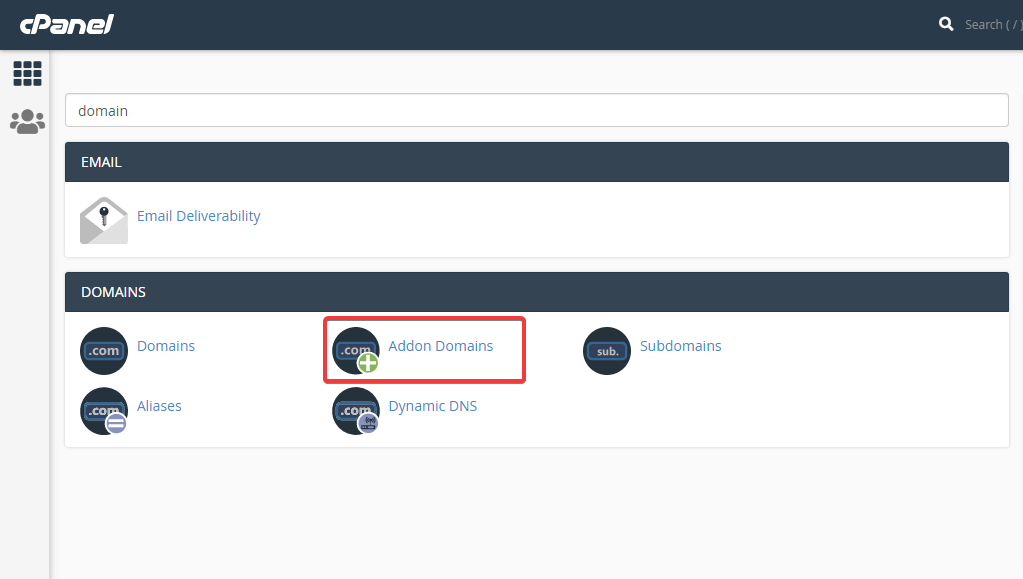
ステップ #1: 選択したドメインをホスティングに追加します。
最初のステップでは、選択したドメイン名を Cpanelを介したホスティング WordPress サイトを新しいドメインに移動するため。簡単に行うことができます Cpanelに行く その後 アドオンドメインをクリック.
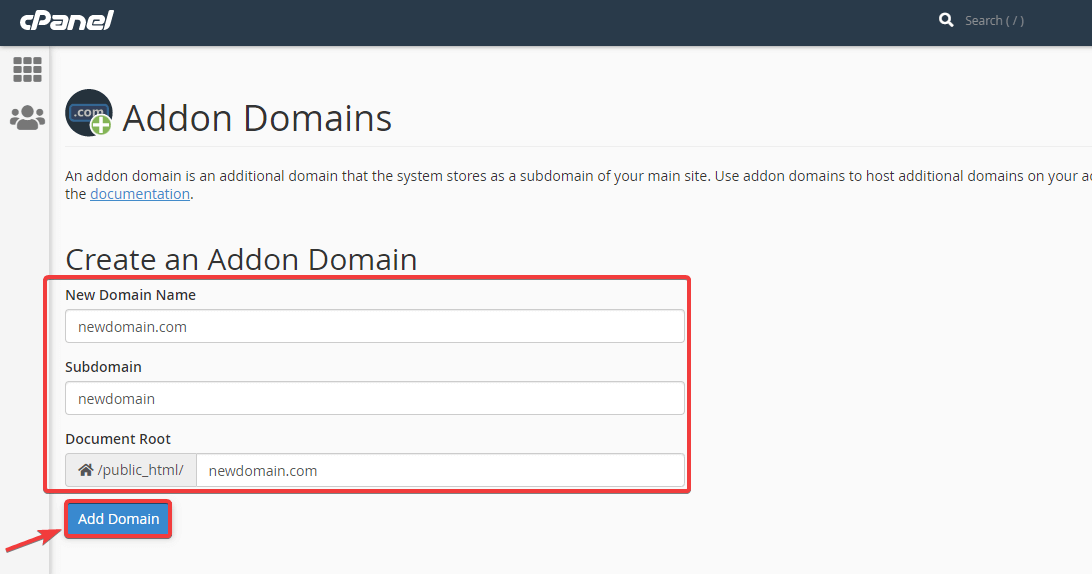
さあ、新しいものを入力しましょう ドメイン名, サブドメイン、 そして ドキュメントルート 新しいドメインをホスティングに追加するため。この情報を追加した後、 ドメインの追加ボタンをクリックします コピーして、 WordPress サイトを移行する 新しいドメインに。
ステップ #2: 以前のドメイン フォルダーをコピーし、新しいフォルダーに貼り付けます。
このステップでは、次のことを行う必要があります。 以前のドメイン フォルダーを新しいドメイン フォルダーにコピーします WordPress を新しいホストに転送しない場合。 WordPress を新しいホストにも転送したい場合は、次のことを行う必要があります。 バックアップをダウンロードする。ついに、 FTP に追加します。これらすべてを行うには Cpanel を使用します。
ステップ #3: wp-config.php で新しいドメインのサイト URL を変更します。
必要がある 新しいドメインフォルダーを開きます そして wp-config.phpを編集する 新しいドメインのサイト URL とホームページを定義するためのファイル。サイトの URL とホームページを定義するには、次のことができます。 次のコードを使用してください:
定義('WP_SITEURL', 'http://newdomain.com');定義('WP_HOME', 'http://newdomain.com');ステップ #4: ホスティングも変更する場合は、データベース情報を更新します。
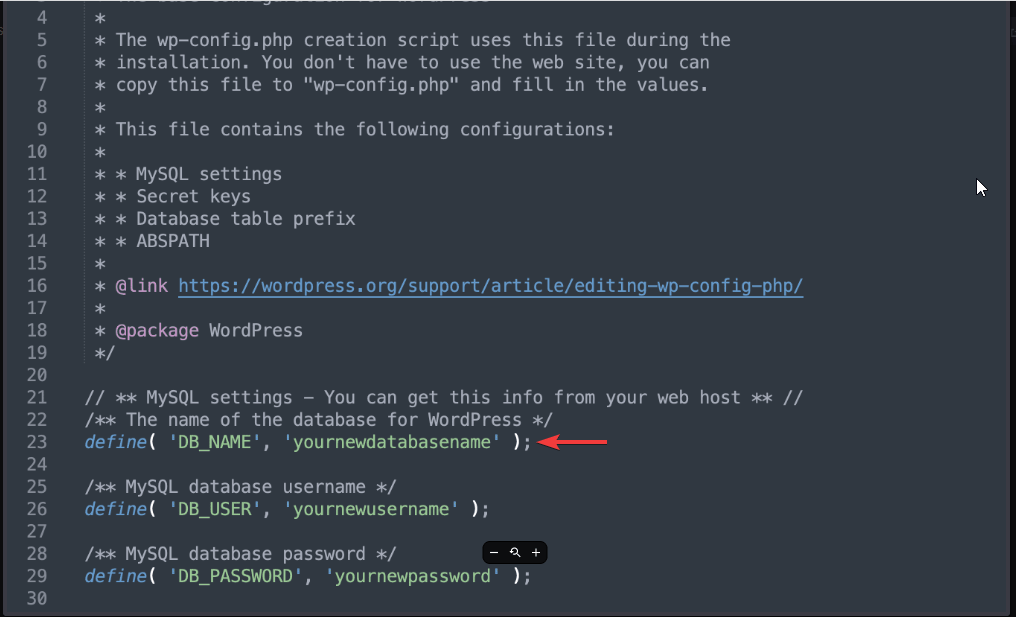
ホスティングを変更する場合もデータベースを更新する必要がありますが、それ以外の場合は変更する必要はありません。更新するには、 wp-config ファイルに移動します WordPressのインストールについて。
ただ ログイン あなたのパネルに、そして ファイルマネージャーを押す WordPress サイトを別のドメインに移行します。
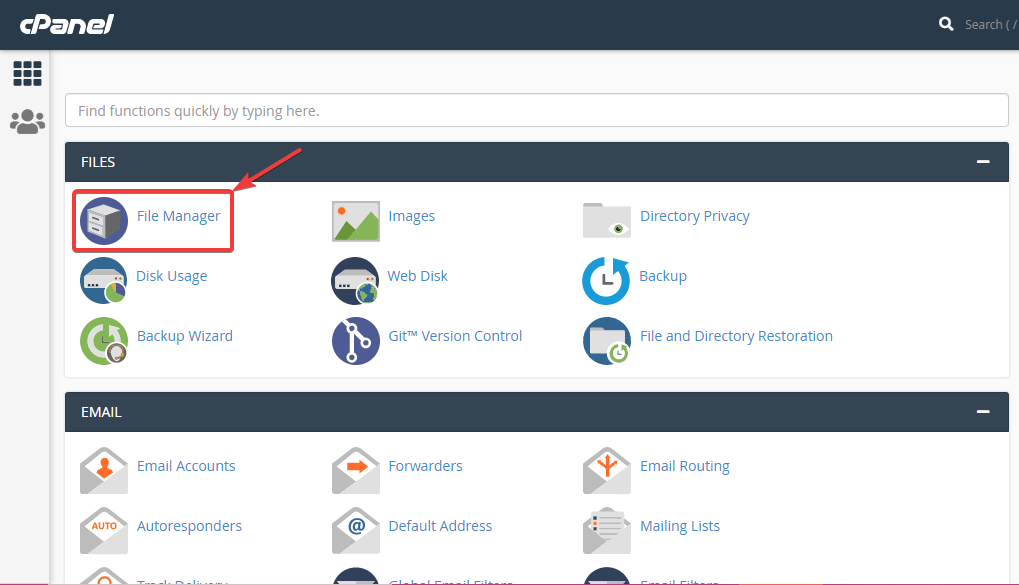
その後、あなたのところに行ってください WordPressのインストール フォルダーと wp-config.phpを右クリックします。 ファイルを選択し、 編集オプション。今すぐ見つけてください データベース名 WordPress サイトを新しいドメインに移動するには、古い名前を新しい名前に置き換えます。
ステップ #5: 検索と置換プラグインをインストールして、WordPress サイトを新しいドメインに移動します。
5番目のステップでは、単純に、 管理者ダッシュボードに移動します 新しいドメインの 検索して置換する プラグイン。このプラグインは、新しいドメインを古いドメインに置き換えるのに役立ちます。
ステップ #6: キャッシュをクリーンアップします。
~によって自分自身の安全を確保してください キャッシュをクリアする。掃除が終わったら、ただ、 リフレッシュする ブラウザで新しいドメインのホームページにアクセスし、WordPress Web サイトを新しいドメインに転送する最後のステップを実行します。
ステップ #7: ドメインをリダイレクトします。
次に、WordPress サイトを新しいドメインに移動する最後のステップを実行する必要があります。これにより、古いドメイン名が新しいドメイン名に永久にリダイレクトされます。これは、301 リダイレクトである永続的なリダイレクトを実行することを意味します。これは、SEO を損なうことなく、WP サイトを新しいドメインに移動するのに役立ちます。
それをするために、 Cpanelにログインします をクリックして、 ファイルマネージャー をクリックして Web サイトのフォルダーを開きます。ファイルフォルダーを開いて、 .htaccess ファイルを右クリックします を押して編集を選択します。
その後、 以下のコードを追加します WordPress サイトを新しいドメインに移動するには、ファイルの先頭にあります。
#Options +FollowSymLinks RewriteRule の RewriteEngine ^(.*)$ http://www.newsite.COM/$1 [R=301,L]newsite.com の代わりに新しいドメイン名を追加することを忘れないでください。
その他の WordPress ガイド ブログ:
WordPressのメモリ制限を増やすにはどうすればよいですか?
Web サイトのセキュリティ上の欠陥をどうやって維持できますか?
コーディングせずに WordPress ウェブサイトにカスタム ユーザー ロールを追加する方法
WordPress サイトに検索バーを追加するにはどうすればよいですか?
SEO impacts you can not avoid
Despite doing everything correctly, you might have to face some SEO risks. For example, moving WordPress to a new domain can cause:
- Rank fluctuation.
- Traffic drops.
However, you can minimize these risks by using 301 redirects, avoiding multiple migrations, and keeping URL structure unchanged. By properly maintaining these, you can avoid long-term impact. For larger sites, crawling budget matters as search engines can’t crawl all redirects instantly.
Issues that don’t show up during migration
Users mostly follow the basic migration process, and don’t take steps to solve issues that come along when search engines begin to crawl. Here are the mistakes you should avoid while moving Wa ordPress site to a new domain:
- Ignoring Google Search Console update can delay reindexing.
- Having backdated internal links.
- Search-and-replace plugins can corrupt serialized data if used without cross-checking.
- Clearing cache without checking the CDN settings shows false “site-broken” signal.
ボーナスステップ: 新しいサイトを確認してください!
WordPress サイトが新しいドメインで公開されたら、すべてが問題なく安全に実行されていることを確認する必要があります。訪問者が望ましくない変更に気付かないようにする必要があります。最善の方法は、できるだけ多くの投稿やページをテストして、Web サイトの移行が適切であることを確認することです。
少なくとも次の点に注意してください。
ウェブサイトの健全性をチェックしてください: ウェブサイトの健全性をテストすることで、どんな小さな問題でも見つけ出すことができます。そのためには、 WordPress ダッシュボード、 ツール セクションで、WordPress ウェブサイト全体の健全性を確認します。
セキュリティ上の問題がないか確認します。 もう一つ重要なことは、 ウェブサイト上の脆弱性やマルウェアWordPress を新しいドメインに移行すると、Web サイトが危険にさらされる可能性があります。
セキュリティ スキャン プラグインを利用することもできますし、ホスティング プロバイダーがセキュリティ スキャナーを提供している場合もあります。
WordPress ウェブサイトを整理する: 古くて不要なファイルやデータベースを取り除いたり削除したりすることは良い習慣です。プラグイン、画像、ファイル、古くなった壊れたリンクなど、関係のないスペースを占めているものはすべてウェブサイトから削除する必要があります。そうすることで、 より速く効率的な体験 WordPress が新しいドメインに移行するためです。
Post-migration SEO checklist (Must follow)
After migrating WordPress site to a new domain name, you must follow the SEO checklist referred below:
- Add the new domain to Google Search Console.
- Submit a fresh XML sitemap for the new domain.
- Check coverage and page indexing reports for errors.
- Update internal links where necessary.
- Monitor rankings and crawl errors for at least 2 to 4 weeks.
WordPress ウェブサイトの移行にはどのくらい時間がかかりますか?
通常、WordPress Web サイトを別のドメインに移行するには時間がかかります 30~60分。ただし、最大で 24時間 対処すべき技術的な問題がある場合。ただし、深刻な問題がなければ、ほとんどの場合、WordPress をあるドメインから別のドメインに数時間以内に正常に移行できます。
WordPress を新しいドメインに移動するとどうなりますか?
WordPress Web サイトを別のドメインに移行した後、Web サイトはしばらくインデックスが作成されません。したがって、その期間中、ウェブサイトのトラフィックとコンバージョンは減少します。新しいドメインのインデックスが作成されるまで、この問題に直面することになります。したがって、これが WordPress を新しいドメインに移動した後に直面する唯一の大きな問題です。
新しいドメイン アドレスのまとめ:
If you want to migrate your WordPress site without relying on plugins, this is the right approach. Following these steps carefully will allow you to move your site with minimal SEO impact.
However, this is not a suitable method for heavy WooCommerce data, multisite usage, complex serialized data, and large databases. In such cases, a plugin migration or other professional approach is a safe option.
So, follow the guide if it matches your criteria and migrate your WordPress site to a new domain. Let us know if you’re following this or any other process.


コメントを残す