




Your WordPress popups are converting. That’s great! But here’s the critical question: Are they converting at their absolute peak potential?
The truth is, even a “good” conversion rate might be leaving significant revenue on the table. Sometimes, the smallest tweak, like changing the Call-to-Action button color, adjusting the timing, or adding a simple countdown timer, can unlock surprisingly higher conversion rates.
You don’t need to rely on guesswork or design trends to find this peak performance. You need data.
That’s where Popup A/B Testing comes in. It is a simple, data-driven process that allows you to compare one popup version against another to find the most effective combination of design and copy for your audience.
In this step-by-step guide, we will walk you through exactly how to do A/B testing for popups in WordPress. Let’s start with the basics.
Quick Overview
This tutorial includes lorem ipsum dolor sit amet.
Recommended Plugins: PopupKit – A Comprehensive Plugin for creating popups, tracking campaign data, and optimze with A/B testing.
General Step-by-Step Guide of A/B Testing for Popups
✅ Define a goal for doing A/B testing.
✅ Create your popup Variants A & Varient B with PopupKit templates.
✅ Change only one element to compare between two variants.
✅ Split traffic of your website between two variants.
✅ Monitor and analyze results to decide the Winning popup variant.
For a time-saving & effortless A/B Testing process, use the PopupKit Automatic A/B testing feature. With this popup plugin, you can automate the winning popup implementation.
What is Popup A/B Testing?
In simplest terms, A/B testing, also known as split testing, is a scientific method to compare two or more versions of design elements. In the case of popup campaign, you can determine which variant performs better.
The workaround is simple: you create two variants, Variant A and Variant B, that are identical except for one single variable or element you want to test. For example, the headline copy, button color, or trigger action.
These two variants are then shown to two randomly selected, concurrent audience segments for the same period. Since the audience and timing are the same, any difference in performance, like the conversion rate, can be confidently attributed to the single change made in Variant B.
The goal is to eliminate guesswork and use real-world visitor data to identify the popup configuration that drives the highest conversions, allowing you to continuously refine and optimize your campaigns for maximum effectiveness.
Key Practices You Should Know Before A/B Testing Popups
A/B testing isn’t just about creating two popups and comparing their designs. A more effective approach is to follow proven best practices that help you run meaningful tests and get reliable results.
Let’s explore these practices to identify truly winning popups, ones that are more accurate, efficient, and drive real conversion growth.
👉 Set a Clear Testing Goal
Before creating your popup, clearly define what success means for your A/B test. Your goal should be specific, measurable, and tied to a clear campaign objective. Instead of a vague aim like “improve the popup,” set a concrete target, such as achieving 25% higher sales from a Black Friday popup. Clear goals keep your test focused and help you make confident, data-driven decisions.
👉 Identify Elements to Test
When running popup A/B tests, always change one element at a time to clearly identify what impacts performance. Testing multiple variables together, like the headline and button color, makes results unreliable. So, it would be better to test a particular high-impact element such as copy, CTA, design, or trigger.
👉 Choose the Right A/B Testing Metrics
Choosing the right metric is crucial for meaningful A/B test results, and it should always align with your goal. In most cases, conversion rate is the best metric, as it compares performance accurately by considering traffic volume. If your popup doesn’t lead directly to a submission, you can also track click-through rate (CTR) to measure engagement. Focusing on the right metric ensures fair and reliable comparisons between variants.
👉 Split Traffic Between Variations
For reliable A/B test results, split traffic evenly between all popup variations and show them to a randomized audience. You can go for a 50/50 traffic split, which is the standard starting point, ensuring each version gets equal exposure. Run the test for a fixed period. One to two weeks to account for daily traffic fluctuations. Avoid concluding your decision based on short-term data, since the results can be misleading.
👉 Optimize Popup Timing & Trigger
Even the best-designed popup can fail if it appears at the wrong time. Popup timing and triggers have a major impact on conversions, making them ideal elements to A/B test. Compare options like exit-intent, scroll depth, or time on page to see what works best for your audience. The right trigger helps maximize conversions without disrupting the user experience.
So, you know what to consider before starting your A/B testing for popups.
/
How to Do A/B Testing for Popups in WordPress
Now, we’ll show you an entire workaround for popup campaign A/B testing in WordPress. At first, you need to have a plugin that supports the A/B testing feature. I opt for the PopupKit, a comprehensive, no-code, multipurpose popup builder solution. This WordPress popup plugin also allows to do A/B testing and access to detailed campaign analytics.
So, let’s get started with our first step:
Step 1: Install & Activate a Popup Plugin

First, go to your WordPress dashboard > Plugins > Add New. Then, search for “PopupKit.” Once you see it, install and activate it.
The A/B testing is included in the Pro version, so connect with the Pro license .
Step 2: Create Popup Variations for Testing
Mostly, marketers run A/B testing between two popup variants. However, if you want to test more variants, PopupKit lets you do A/B testing on as many popup campaigns as you want.
With PopupKit, you can create from scratch or with the help of ready-made templates. Here’s a detailed guide on this if you’re creating popups for the first time.
In my case, I am testing the Black Friday discount popup in two different versions.
The first one has a countdown timer. The other variant has no countdown timer, but instead, I boldly display the discount amount in a large font.
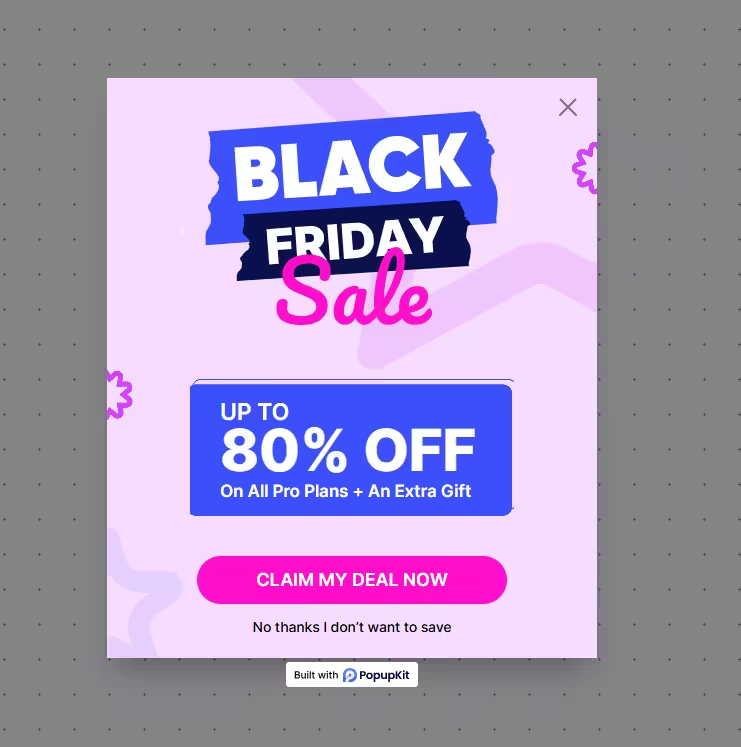
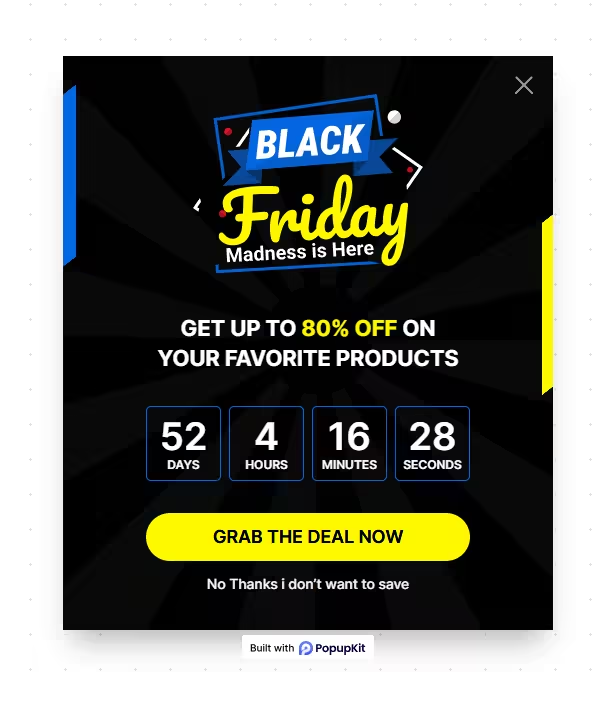
The primary objective here is figuring out two things:
- Does a countdown timer work best during seasonal sales?
- Does a large discount number convert well or not?
That’s why I’m creating two different popup designs, but it doesn’t take much time since I’m using PopupKit’s pre-designed templates. If you’re testing smaller changes, like comparing two CTA button colors, simply create one popup, duplicate it, and adjust the CTA color in the copied version. Then, launch both versions.
Once you have two or more active campaigns, you’re ready to start your popup A/B testing with PopupKit.
Step 3: Enable A/B Testing for Popup
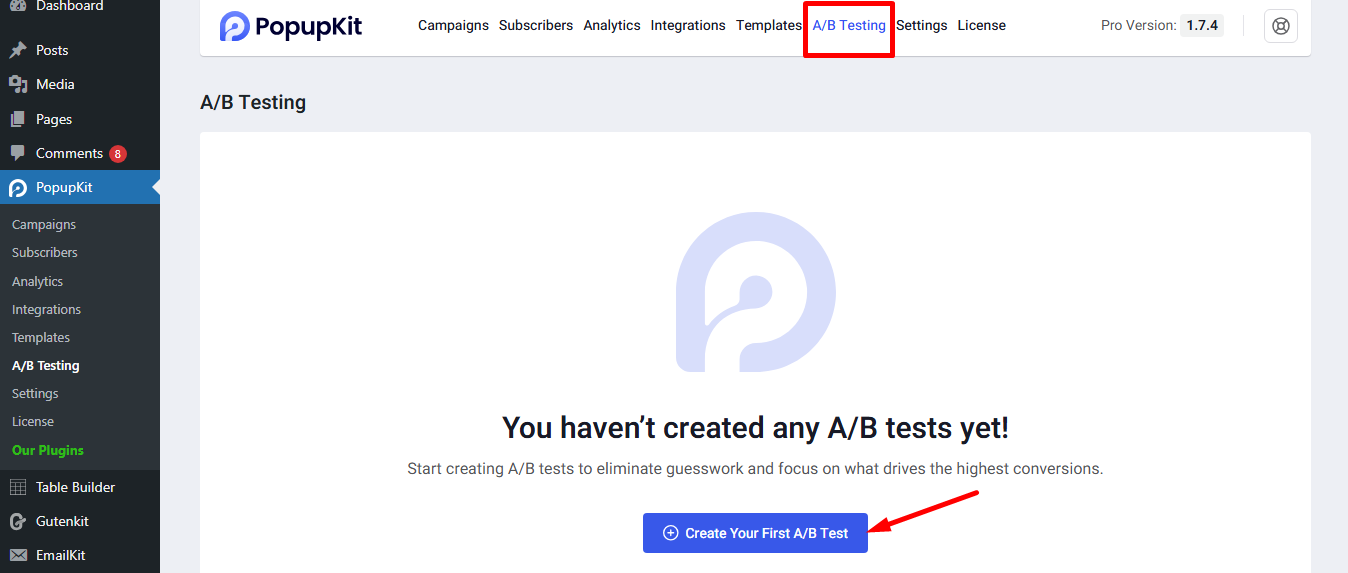
Navigate to the A/B Testing tab within the PopupKit dashboard and hit the “+Create A/B Test” option. Doing this will display the A/B test setting screen.
Here, you need to configure the following settings:
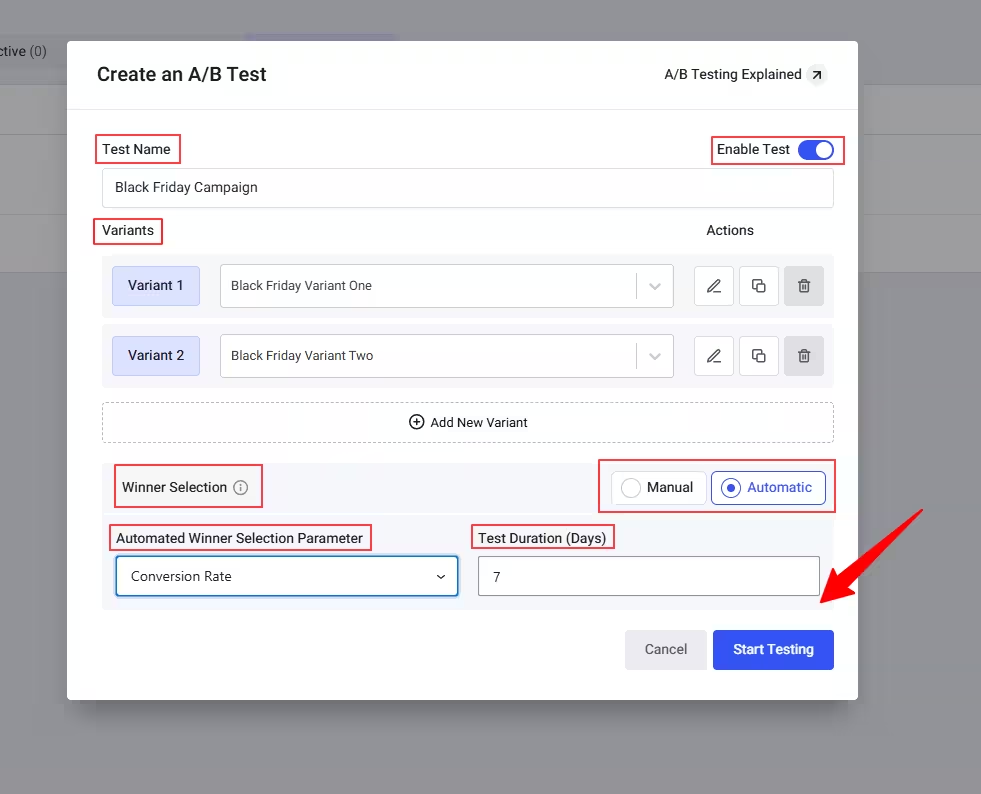
- Enable Test: Toggle the test functionality on.
- Test Name: Give it a clear name (e.g., “Black Friday Popup Test 2025”).
- Variants: Select the two active popup campaigns you created in Step 2. Search by their name or browse from the dropdown.
- Winner Selection: This is where you decide between Manual and Automatic testing. If you select the Automatic option, it will reveal two different settings:
- Automated Winner Selection Parameter: You can select your preferred winning parameter from Total Conversions, Total Views, or Conversion Rate in the dropdown.
- Test Duration (Days): Set the duration of your A/B test in days.
After setting your A/B testing parameters, hit the “Start Testing” button.
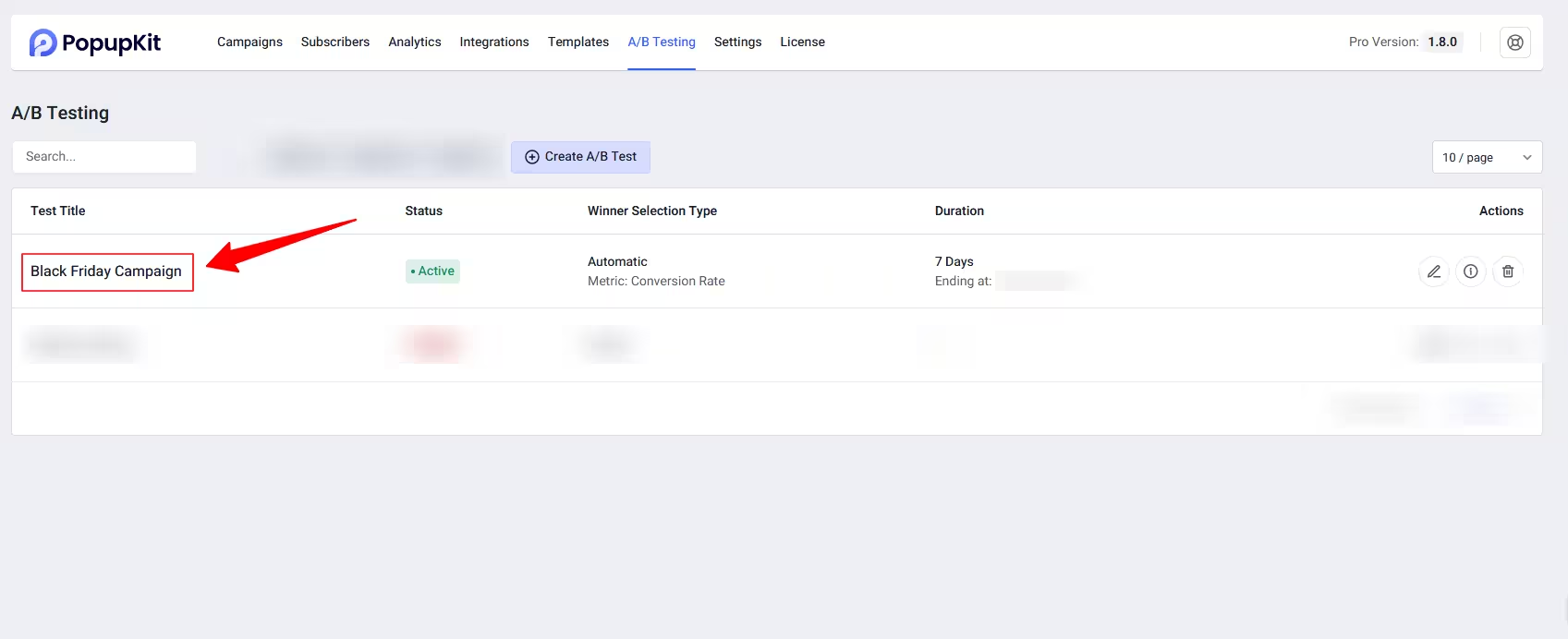
And now you can see my activated A/B testing. Now, wait for visitor interactions to analyze A/B testing.
Step 4: Analyze Popup A/B Test Results
Whether you choose a manual or automatic test, you need to monitor the data to confirm the outcome. In the PopupKit A/B Testing dashboard, you can view the live results for your active tests.
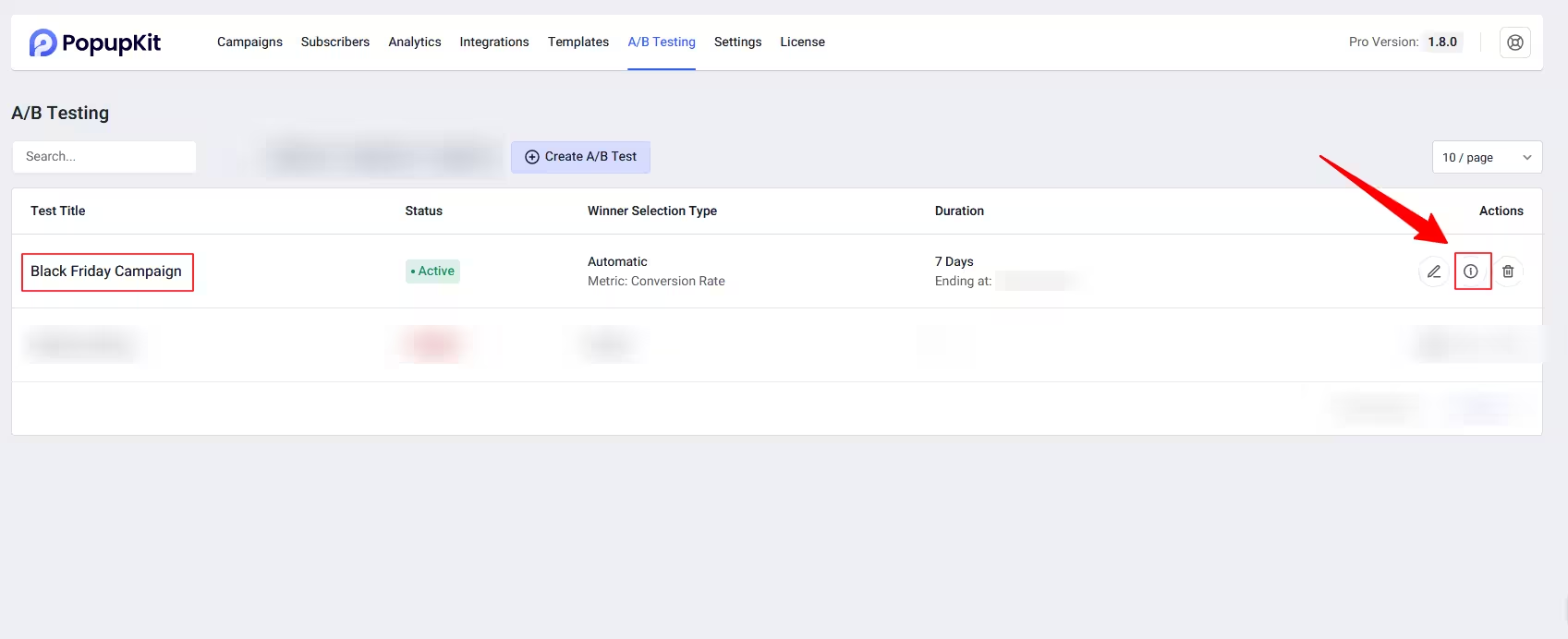
For this, click the info icon, shown in the image above, and a popup will appear with your A/B testing details.
Within the campaign details popup, you check key metrics like:
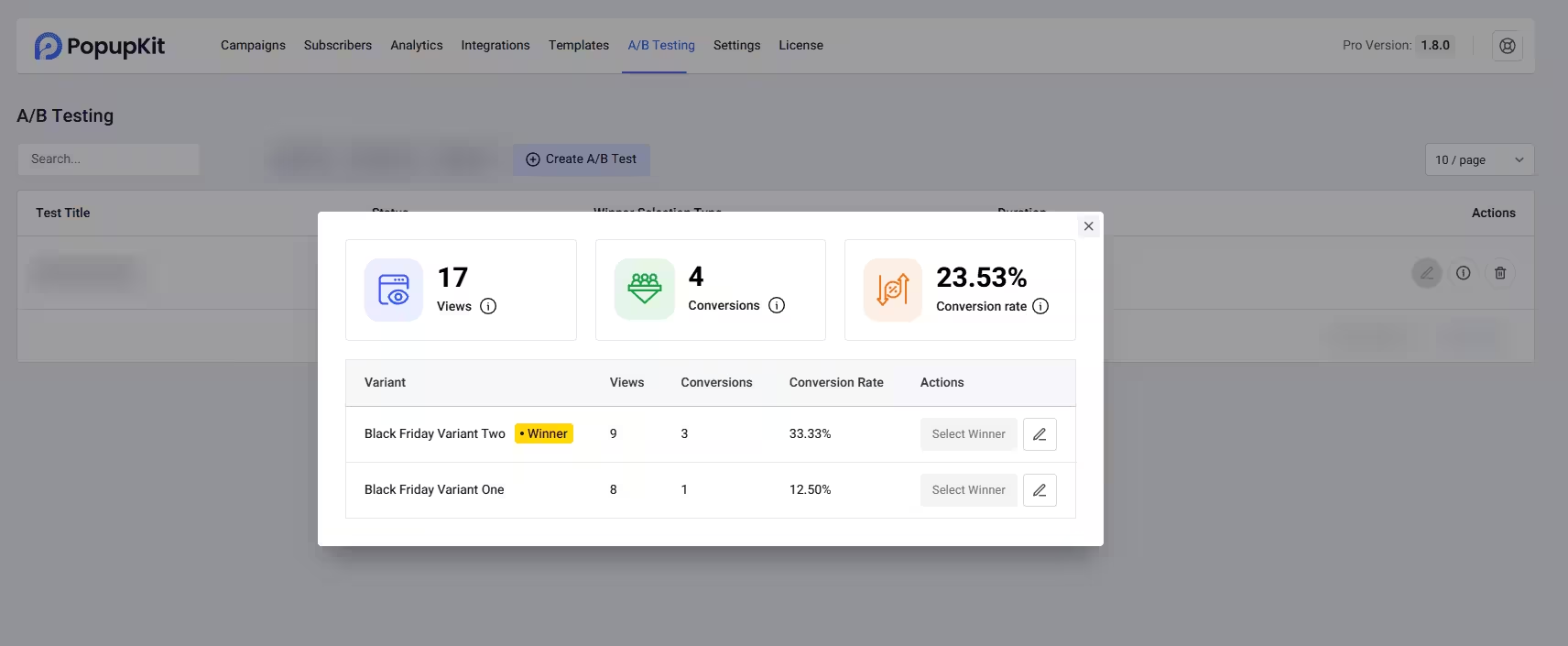
- Total Views
- Total Conversions
- Conversion Rate (The percentage of views that led to a conversion)
Note: If you are running a manual test, you should wait until the conversion rates stabilize and one variant shows a clear, statistically significant lead before proceeding.
Step 5: Publish the Winning Popup Campaign
Once the A/B test is complete and a winner has been identified, you can publish the better and effective version of popup. However, with PopupKit, it depends on your choice:
- Manual Test: Once you’re satisfied with your A/B testing, click into the finished test and manually select the variant with the superior conversion rate.
- Automatic Test: With the Automatic test option, you don’t need to do anything manually. PopupKit automatically selects the better-performing popup based on your chosen winning criteria and test duration.
Your optimization is now complete, and your WordPress site is running the highest-converting version of your popup.
Benefits of A/B Testing Your Popup Campaigns
Implementing a well-planned A/B testing strategy for your popups offers significant advantages that go beyond simply guessing what might work.
Increased Conversion Rates. This is the obvious benefits of doing any type of A/B testing. In case of popup campaigns, you can replace low-performing popups with high-performing ones. Therefore, the percentage of visitors who click the CTA increases whether it’s an email signup popup or a product discount popup.
Optimized User Experience (UX). Another important benefit of A/B testing is that it helps you find a balance between effective marketing and annoying interruptions. Testing different triggers and timings allows you to capture conversions without negatively impacting the user’s flow or frustrating them off your site.
Data-Driven Decisions. Instead of relying on opinions, hunches, or design preferences, A/B testing provides concrete performance data. Especially, while you perform it with efficient tools like PopupKit. You gain verifiable insights into which headlines, colors, offers, and CTAs actually resonate with your targeted audience.
Higher Revenue and ROI. When your popups convert more visitors, the value of your existing traffic increases. This improved conversion efficiency directly translates to a higher return on investment (ROI) for your content creation, advertising, and marketing efforts, as you generate more revenue from the same visitor volume. For example, the A/B testing shown in our tutorial can lead to a higher revenue during Black Friday sale season.
Assist Other Marketing Activities. When you know which elements or customer behaviour help to create high-converting popups. Then, using this deeper audience understanding, you can use these insights for other marketing activities like Ads or the hero section.
For example, testing “Save 15%” against “15% Off Your Order” might reveal that your audience responds better to the benefit of saving rather than the process of getting a discount.
Wrap UP!
Now you know how to run A/B tests for popups on your WordPress site. With PopupKit, creating eye-catching popups is easy, and you can also track detailed campaign analytics and understand your visitors’ behavior.
It’s time to put this into action, test different popup variants, discover the highest-performing version, and boost the success of your next campaign.


Leave a Reply