

Wpmet Flash Sale!

文章
で終わります:
Wpmet シンボル
00
日々
:
00
時間
:
00
:
00
Discount Still Available For You.

How to Boost WordPress Speed & Performance: The Ultimate Guide 2026

How to boost WordPress speed

方法を探していますか? boost WordPress website speed

ウェブサイトの速度は、オンライン ビジネスの成功と失敗を左右します。そう、それほど重要なのです。 

統計によると、あなたは以下に直面することができます コンバージョン率が 4.42% 低下 ロード時間が 1 秒増えるごとに。 

実際、によれば、 Google ウェブマスター, the acceptable threshold for a website’s loading time is just 2 seconds. Because nobody has time anymore to wait for your website to load, while others’ websites load within seconds. 

Now the question is, how long does your website take to load? Are you the owner of a laggy website waiting to lose money on your business? And of course! How to improve WordPress site speed?

No worries! You have found the right blog, which will provide solutions to all the reasons that make your WordPress website slow. Keep reading this blog to find out ウェブサイトの速度を確認する方法とWordPressの速度を上げる方法

How to boost WordPress speed & performance

This tutorial will share the best ways to speed up a WordPress site without using the WordPress page speed plugin. However, this blog recommends utilizing cache plugins to reduce the loading time of your WordPress website.

How to speed up WordPress website:

✅ Faster server.

✅ Cache plugin.

✅ Optimize HTML, CSS, JavaScript.

✅ Remove render-blocking JavaScript and CSS.

✅ Optimized plugins and theme.

✅ Proper image, media, and database optimization.

✅ Disable pingbacks and trackbacks.

✅ Content Delivery Network.

✅ Remove unused plugins and themes.

✅ Minimize post revisions.

✅ Latest PHP version.

Learn details regarding these tactics and convert your site into a high-performance website.

Why do you need to speed up WordPress Websites?

Well, speed is one of the major areas that a website owner should be concerned about. Reasons? There are quite a few reasons why you should consider speeding up your WordPress website. Here are some of them:

  • SERPランクを向上させる: 検索エンジンはあなたのサイトにトラフィックを集めるのに最適な媒体です ビジネスウェブサイト. And if you want to grab those spots on the SERP first page, then you must speed up your website. Because Google and other popular search engines consider speed as a crucial factor while ranking web pages.
  • Reduce Bounce RateWeb サイトにトラフィックを集めても、トラフィックがサイトにかなりの時間滞在して製品/サービスに到達しなければ意味がありません。そして、サイトが遅いと、間違いなく顧客が Web サイトから離れてしまいます。
  • ユーザーエクスペリエンスの向上: A better user experience is important to keep your audiences engaged and increase conversion rate. Having a website with a good loading speed can result in an improved user experience.

Now you can get a somewhat idea about how important speeding up your website is. Let’s move to the next section to find out how you can test your website speed and know if your website needs to up its loading speed or not.

How to test your WordPress Website Speed?

Now the question is, how do you know if your website’s loading speed is good enough? Well, there are many tools available in the market that you can use to test your website speed.

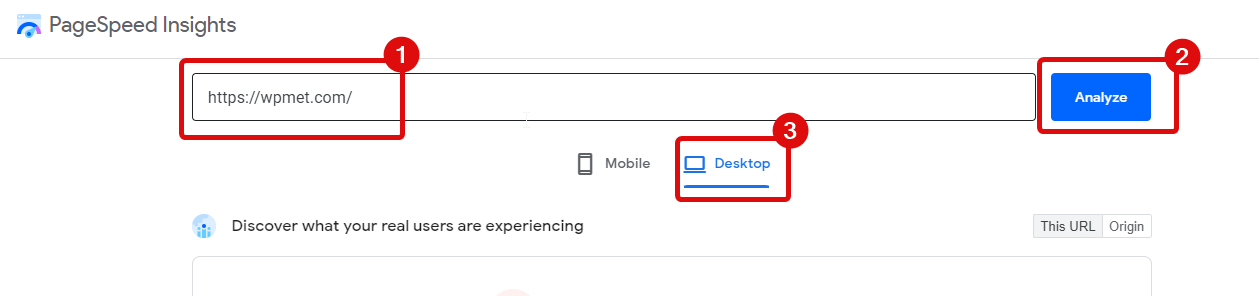
無料のツールをお探しなら、私の提案は次のとおりです。 Google PageSpeed Insight. Using this tool, you can test your website speed separately for desktop and mobile.

This tool is really easy to use. Just provide the URL of your webpage, and hit analyze. Then choose the device on which you want to test the speed.

WordPress のスピードアップに役立つスピードアップのインサイト

Here you will get a performance result which is out of 100. Ideally, you should aim for 90 out of 100 for your website performance. Another great thing about this free tool is that it also provides you with different opportunities to optimize your website by improving your site’s speed. So, do utilize the suggestion given by this tool in order to speed up WordPress loading time.

Tips on How to Boost WordPress Website Speed & Performance

Disappointed with the speed test result of your website? Nothing to worry about, you can always do WordPress page speed optimization to get it up to score your desired performance result.

But how to improve WordPress site speed? Here are the 11 best ways you can speed up your WordPress website:

1. より高速なサーバーを選択します。

By faster server, I mean preferably a dedicated server. In the beginning, it’s very common for people to go for shared hosting as it is cheap. However, with time, once you get popular and get a good amount of traffic to your website, it’s always a better idea to move to dedicated hosting.

Since shared hosting and all the resources are being shared among multiple websites, it has an unavoidable bad effect on your website’s performance. Especially, most shared web hosting fail to provide 99 percent uptime, and in the peak hours website loading speed is not satisfactory.

So I would suggest that if you can afford it, you should switch to a dedicated server for your WordPress hosting that receives a good amount of traffic on a monthly basis.

注記: Also, make sure to choose a server that is located close to the location from where your receive the largest number of website visitors. The location of your server also plays a significant role in your website’s speed because of various factors such as Network Latency, TTFB(time to the first byte), etc.

👉👉 あなたのウェブサイトに適したホスティングを見つけるのに助けが必要ですか?のブログをチェックしてください WordPress に最適なホスティングプロバイダー。

2. キャッシュプラグインを活用する

The caching plugin makes a website fast by skipping many steps while loading a webpage. It does so by making a copy of the page after the first time a page is generated and then uses that copy to serve every subsequent user that visits your WordPress site. 

Since WordPress CMS is dynamic, if you do not use a caching plugin, every time someone tries to access your website, it will repeat all the processes and fetch all the data from your WordPress database, which will put a great deal of load on your server and hence make the site super slow.

これまでのところ最も人気のあるキャッシュ プラグインは次のとおりです。 WPロケット. Due to its top-notch service, people trust them!

So, use the caching plugin on your website to boost WordPress speed. You can also combine advanced caching mechanisms like Varnish with a caching plugin to see a remarkable improvement in your website’s loading speed.

3. Minify HTML, CSS, and JavaScript

While you need HTML, CSS, and JavaScript to build and run your WordPress site, if not optimized, it can make your website somewhat laggy.  And that is the reason, experts recommend always minifying your HTML, CSS, and JavaScript codes. 

Minifying code does not affect how your website functions; it only removes unused code and replaces variable and function names with shorter names. As a result, it reduces load times and bandwidth usage on your websites. So, if your website is currently not using minified code, then minify the code fast to improve WordPress website speed and performance.

4. Remove Render-Blocking JavaScript and CSS

Remove Render Blocking JavaScript and CSS, as the name suggests, blocks your webpage from loading before these scripts are loaded. This is one area of improvement that Google Pagespeed Insights frequently suggests to improve.

Most of the JavaScript is used to add animation or a pop-up on a website, which is not really needed until the site fully loads. These can result in lazy loading for your website. You can remove these render-blocking codes to load later so they have no effect on your website’s actual loading speed. This is an effective way to improve WordPress site speed.

5. Choose a Lightweight and Fast Theme

A website is a visual form of marketing your product and service, and it’s only natural to be tempted to go for a plugin that has too many animations and functions. However, too much animation and additional function if makes your site slow, so it is really of no use.

I am not saying go for a bland website, but make sure loading speed is on your checklist when you choose your WordPress theme. You need to find the right balance between the functionality and animation you want in your website and the loading speed.

👉👉 ウェブサイトに適したテーマを見つけるのにサポートが必要な場合は、次のブログをご覧ください。 Elementor と WordPress に最適なテーマ。

6. WordPress Web サイトの画像、メディア、データベースを最適化する

With time, your website turns into a storehouse of unused images and media that can increase your website size and thus affect the site’s loading speed. The same goes for databases as well. If not optimized, a database stores unnecessary information, which results in bad WordPress site speed.

So, do check if your website is filled with redundant images and media files or not. And if so, do clean them up. Also, it’s always a good idea to optimize your images before uploading. A reduced media size, like an optimized image and database size, will reduce your website speed as well.

👉👉 Both Image optimization and database optimization should be a mandatory task for website maintenance as well. To learn more helpful tips, read our blog on WordPressウェブサイトのメンテナンス.

7. CDN(コンテンツ配信ネットワーク)を利用する

While it’s a good idea to get a Server located near your frequent visitors’ location. This is not enough to cater to all the people who come to your site. And CDN solves that issue for you.

Content Delivery Network (CDN)  keeps a copy of the website in different datacenters located in different parts of the world. This way, you can be assured your website loads at a certain speed, irrespective of the location someone tries to access your site.

注記: 使用できます クラウドフレア CDNサービスとして。

8. ピンバックとトラックバックを無効にする

Pingbacks and Trackbacks are great to find out when one of your blogs or web pages receives a link. While these are great, you need to know that these links can put an unwanted strain on your server. 

Besides, if you turn these two features on, you are always at risk of getting DDoS attacks. So, for WordPress page speed optimization and securing your site from DDoS attacks, make sure to disable pingbacks and trackbacks. You can disable these easily from the WordPress admin dashboard.

Looking to start an eStore? Check out the difference between two of the most popular eCommerce CMS WooCommerce vs OpenCart

9. 使用しないプラグインとテーマをアンインストールする

If you are not currently using plugins or themes, then it’s absolutely unnecessary to keep those files on your server. The bigger the size of your website, the slower it is likely to load. So, uninstall any WordPress plugins and WordPress themes you don’t use.

Along with uninstalling, you also need to keep an eye if your themes and plugins have updates available or not. If so, then make sure you update them.

❌❌ Using a nulled WordPress plugin or theme can put your site at risk. Learn more about why you should stop using a WordPress nulled plugin immediately.

10. 最新バージョンの PHP を使用する

Web サイトの速度を改善する方法のチェックリストから外せないことの 1 つは、Web サイトの速度です。 PHP version.  It is recommended to use the latest version of PHP to maintain your website’s speed.

However, don’t just start using the latest version of PHP because your WordPress theme and other plugins also need to be compatible with the version of PHP you use on your site. So, first, check if themes and plugins are compatible with the latest version of PHP, and then upgrade to that one. 

11. Reduce the number of post-revisions

I know, you probably didn’t think you would find this option in the ” tips on how to improve WordPress site speed” list. A number of post revisions can affect your website’s speed. Each time you save a draft, WordPress saves it indefinitely. These additional versions saved on your website can slow your site down.

ただし、必要なのは 1 つのバージョン、つまり最後で最も最適化されたバージョンだけです。そのため、Web サイトでの投稿のリビジョンの数を最小限に抑える必要があります。プラグインを使用して最小リビジョン番号を設定することも、手動で設定することもできます。 「define( 'WP_POST_REVISIONS', 4 );」を追加します。 wp-config.php 内 ファイル。  

見栄えがよく、読み込み速度が速い Web サイトを構築する最も簡単な方法を知りたいですか?
私たちのブログをチェックしてください on how to create a single-page website with one-page navigation using a lightweight WordPress addon, ElementsKit. 👇👇👇

WordPress で 1 ページのナビゲーションを備えた Web サイトを作成する方法

よくある質問

Why is your WordPress website so slow?

There might be several reasons behind a slow WordPress website. For example, technical problems, using buggy plugins and themes, large media files, etc., can drastically hamper your website’s loading speed.

How to increase WordPress website speed without a plugin?

You can increase your website speed by using optimized themes, plugins, images, media files; uninstalling unused plugins; using a CDN; minifying HTML, CSS, and JavaScript; reducing post revisions, disabling pingbacks and trackbacks, etc.

WordPress の速度についての最後の言葉:

Now you know how to improve WordPress site speed to fix your laggy website and make it super fast. Do try these out to boost WordPress website speed.

Among the tips I have shared to improve WordPress speed may include things you already use. If it’s the case, then you are already on your way, but do try out the other tips mentioned that you are not practicing on your site.

If you follow the steps, you will very likely see great results in increasing your website loading speed and WordPress performance.

A good loading site means a great user experience, and a greater user experience can help achieve higher revenue. So, never underestimate the importance of your Website speed. 

ElementsKit gif をダウンロード

Ataur Rahmanのアバター

アタウル・ラーマン

With over a decade in the WordPress industry, the founder of Wpmet is a true WordPress veteran who has seen everything from the beginning. Through hands-on experience building products used by thousands, he shares exclusive insights, practical strategies, and real-world lessons for WordPress users, developers, and business owners.

コメント

  1. Andy Globeのアバター
    アンディ・グローブ

    WordPress の速度を上げる方法についての非常に役立つヒント、ありがとう!

    1. Dipa Shahaのアバター
      ディパ・シャハ

      ようこそアンディです。ご意見ありがとうございます。

  2. CMARIX Technolabsのアバター
    CMARIXテクノラボ

    素晴らしいブログです!これからももっとブログをシェアしてください。

    1. Dipa Shahaのアバター
      ディパ・シャハ

      ご意見ありがとうございます。

  3. pooran dewanganのアバター
    プーダン・デワンガン

    今日、この投稿は非常に役立ちます。 WordPress の速度向上についての投稿をたくさん見つけましたが、今日ついに役立つ投稿を見つけました。ありがとう。

    1. Dipa Shahaのアバター
      ディパ・シャハ

      プーラン・デワンガンさん、フィードバックをお寄せいただきありがとうございます。ブログが役に立ったと聞いてうれしいです。

コメントを残す

メールアドレスが公開されることはありません。 が付いている欄は必須項目です

目次