






Popups can be powerful conversion tools only when they are shown at the right time and frequency. If your website displays the same popup too often, visitors may feel annoyed and even leave without taking action.
On the other hand, when popup display frequency is set strategically, users are more likely to interact with your offers, stay longer on your site, and take meaningful actions without feeling irritated.
In this guide, you’ll learn how to set popup display frequency in WordPress to create a smoother user experience and improve conversions.
How to set popup display frequency in WordPress
Popup display frequency controls how often a popup appears to the same visitor within a specific time frame or interaction condition. By using a popup builder like PopupKit, you can easily configure frequency rules without coding to prevent user annoyance and improve conversion rates.
Steps to set popup display frequency in WordPress:
- Install and activate PopupKit.
- Add a campaign popup by navigating to the Templates tab and selecting a suitable template.
- Expand frequency settings and set the frequency for your popup display.
- Set Display Options, Display Conditions, Device Visibility, Schedule Date & Time, Geolocation Target, Cookie Targeting, etc for popup.
- Hit the “Save” button to live your marketing popup.
Exempel
An eCommerce website promoting a discount campaign may show a popup only once every 48 hours for returning visitors to ensure users are reminded of the offer without feeling overwhelmed by repeated popups.
Sammanfattning
Setting popup display frequency helps balance user experience and conversion optimization. With tools like PopupKit, you can control how often popups appear, target specific visitor segments, and create well-timed campaigns that increase engagement without annoying your audience.
What is popup display frequency?
Popup display frequency refers to how often a popup appears to the same visitor on your website within a defined period or under specific conditions.
Why set the display frequency for popups?
Here’s why setting up display frequency matters for your popup campaigns:
- Prevents user annoyance: Showing the same popup too often can frustrate visitors and increase bounce rates. Controlled frequency keeps them interactive.
- Improves user experience: Well-timed popups feel helpful by popping out at the right time, at the right place.
- Increases conversion rates: When popups appear at the right interval, users are more likely to take action instead of closing them.
- Smarter targeting: Different visitors respond better to different popup frequencies.
- Aligns with campaign goals: You can show urgent offers more frequently while limiting informational popups.
- Increases popup effectiveness: Implementing frequency control helps maintain effectiveness.
- Protects brand perception: A site that doesn’t spam popups appears more professional and trustworthy.
Guide to setting popup display frequency without coding
Learn how to set popup display frequency in WordPress easily without coding, so your popups appear at the right time and improve conversions without bothering visitors:
Step 1: Install a WordPress popup builder
Initially, you need to search for and install a WordPress popup builder that offers all the necessary popup functions, including display frequency. For this tutorial, we’ll use PopupKit as it has all the needed popup settings along with a template library.
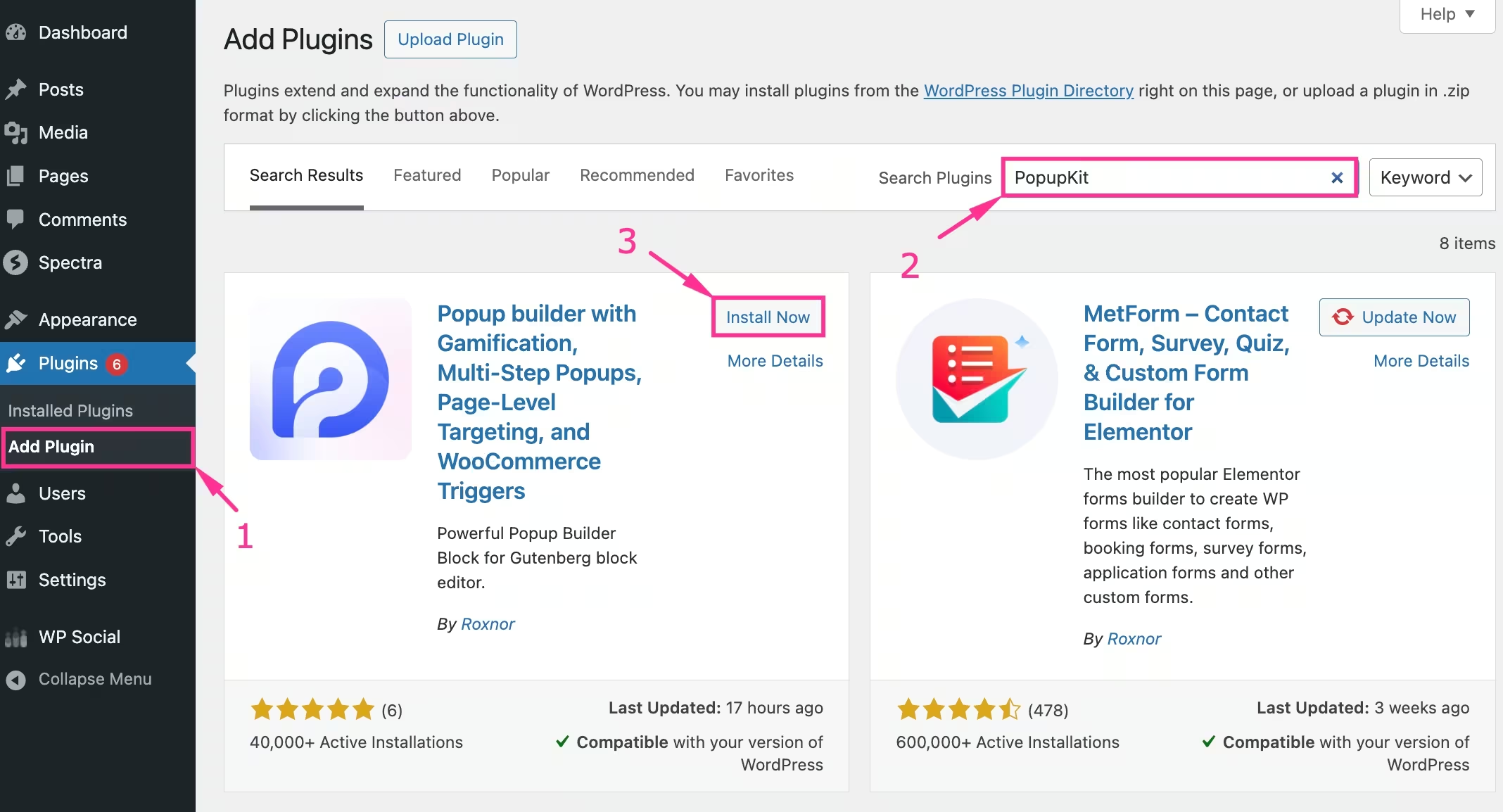
You can download its freemium version from the WordPress plugin directory by:
- Navigating to Plugins >> Add Plugin.
- Searching for PopupKit in the search box.
- Hitting the "Installera nu" button and activating the plugin after installation.
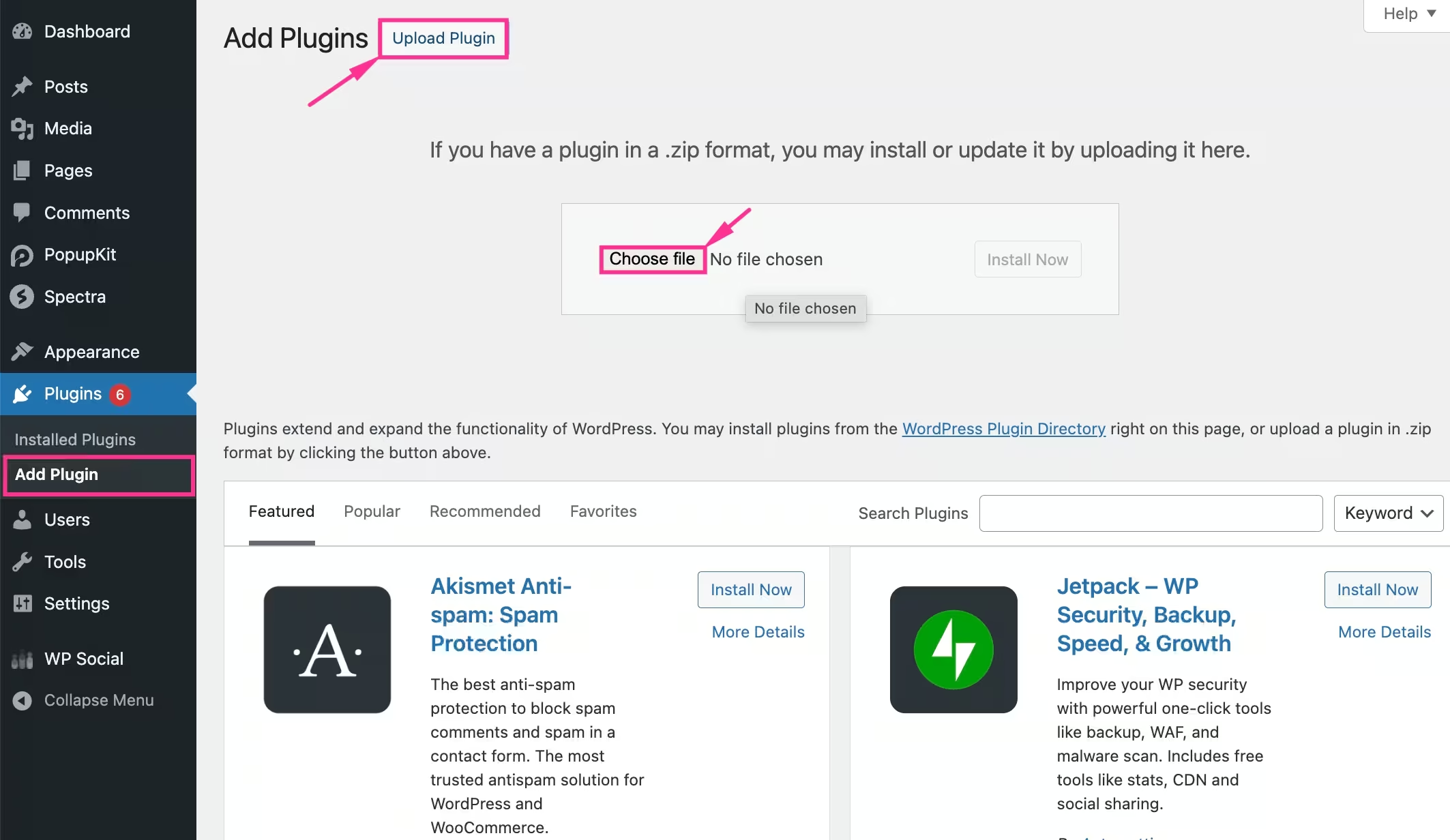
Again, you have to download its premium version by:
- Visiting the “Add Plugin” flik.
- Uploading PopupKit Pro from your device.
- Selecting the file.
- Installing and activating the plugin.
Step 2: Create popup with a template
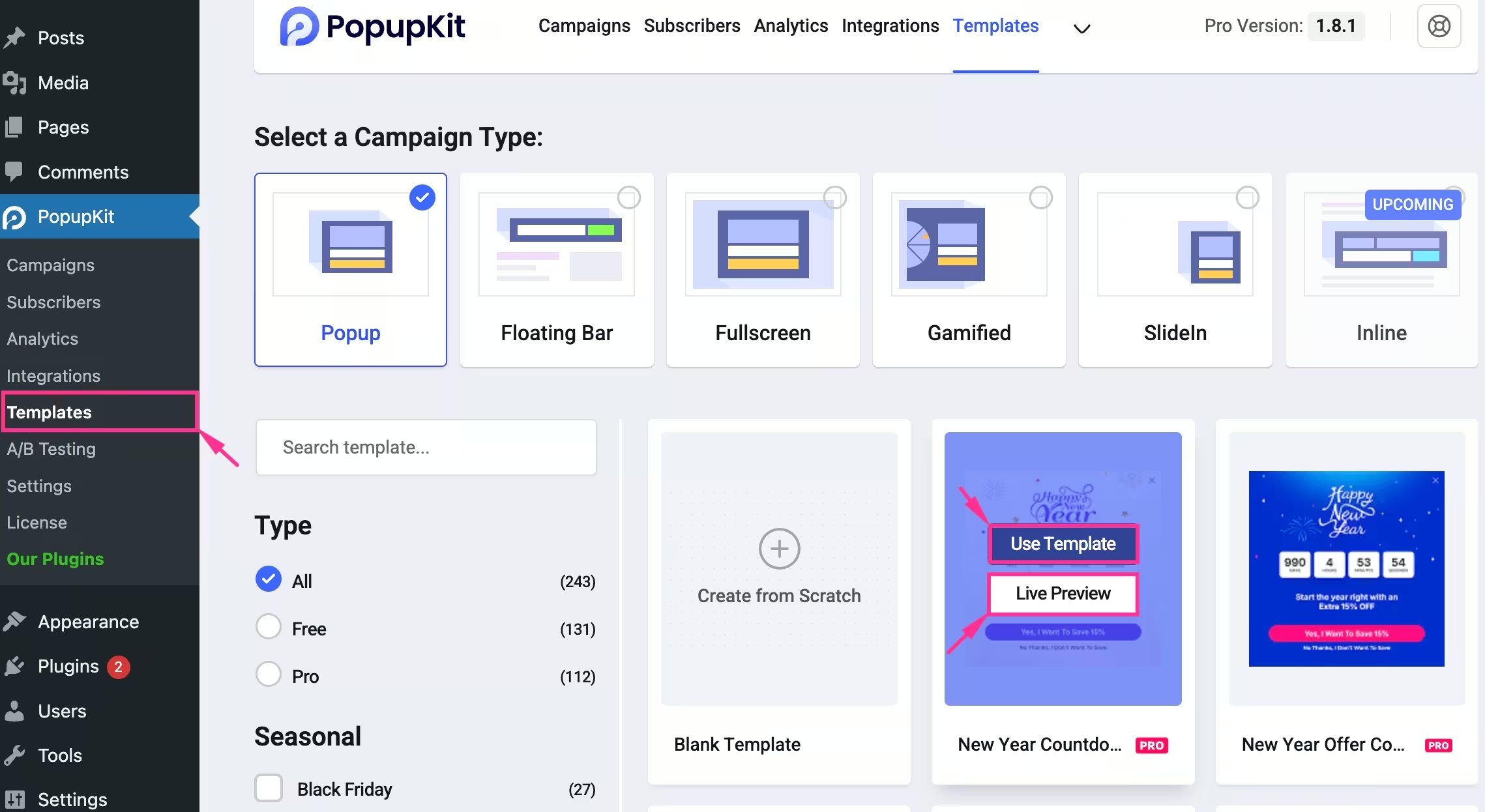
In the second step, you have to add a popup with templates. For that:
- Click the Templates tab under PopupKit.
- Select a suitable template after checking the Live Preview.
- Press the “Use Template” button to import a popup template.
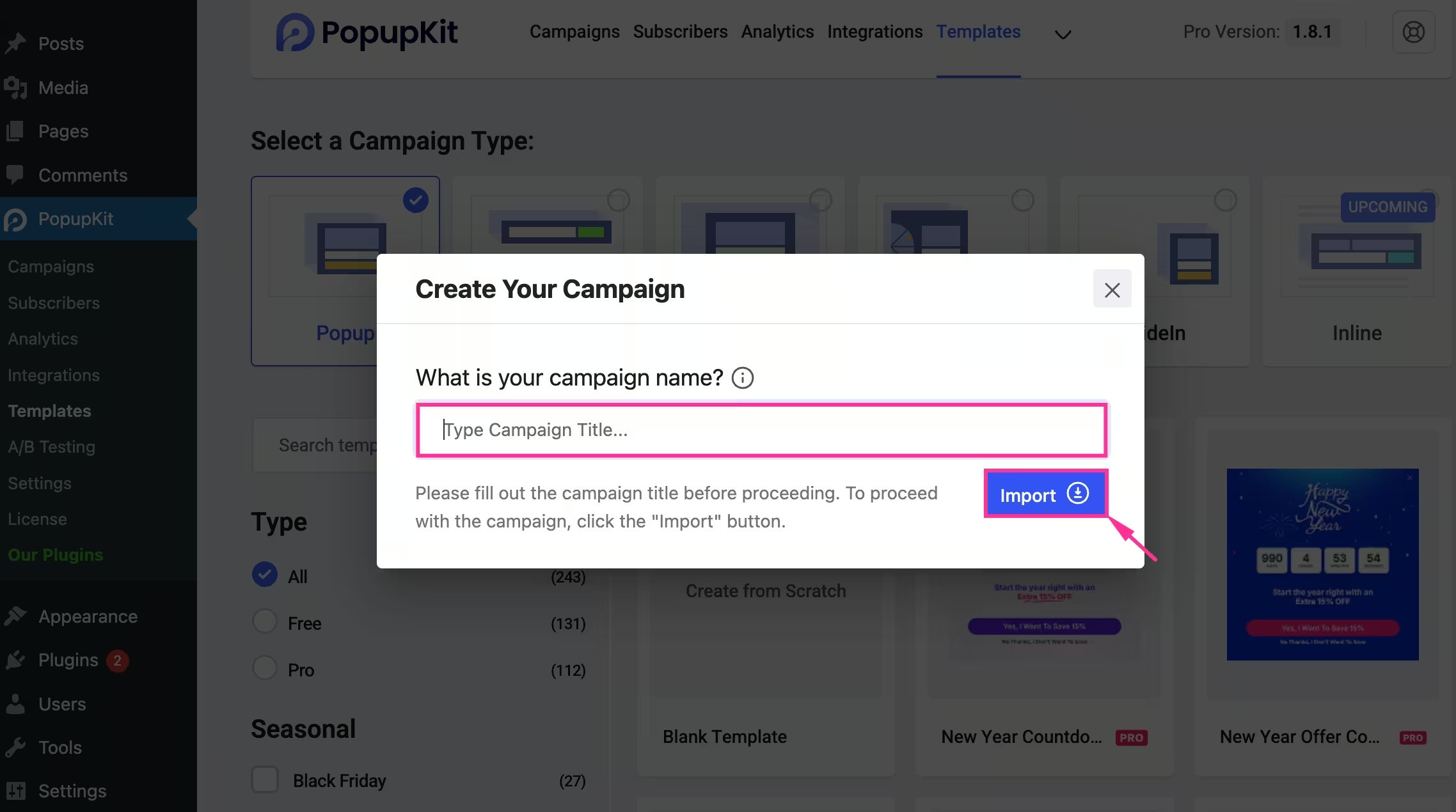
- Next to pressing the “Use Template” button, a tab asking for the campaign name will pop up.
- Ange din campaign name.
- Click the “Import” button. This will import the template into the Gutenberg editor.
Step 3: Set popup display frequency
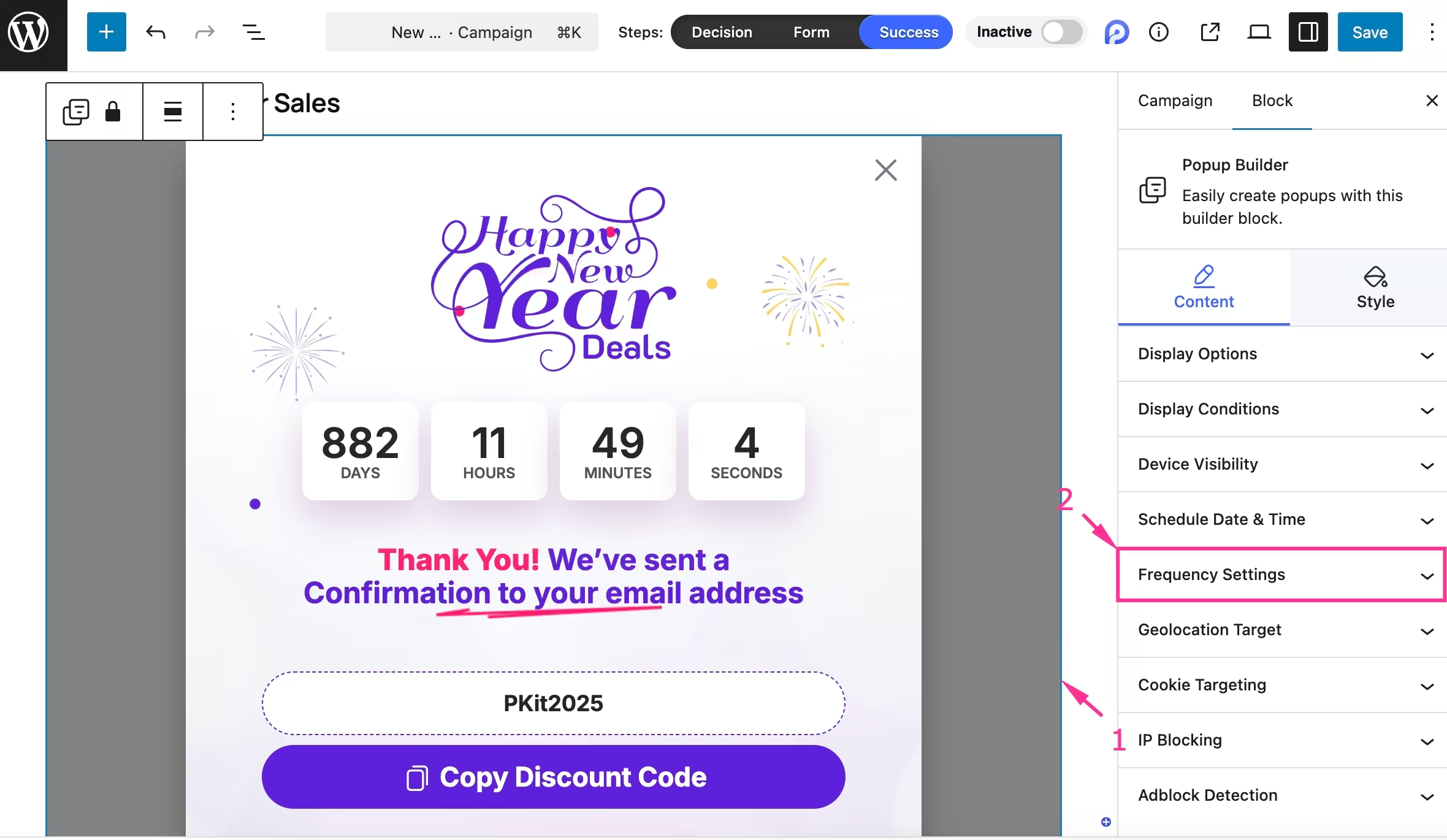
In the third step, you have to select the popup on the left side, and all campaign controls will be displayed on the right side. From there:
- Expand the “Frequency Settings” tab under Content.
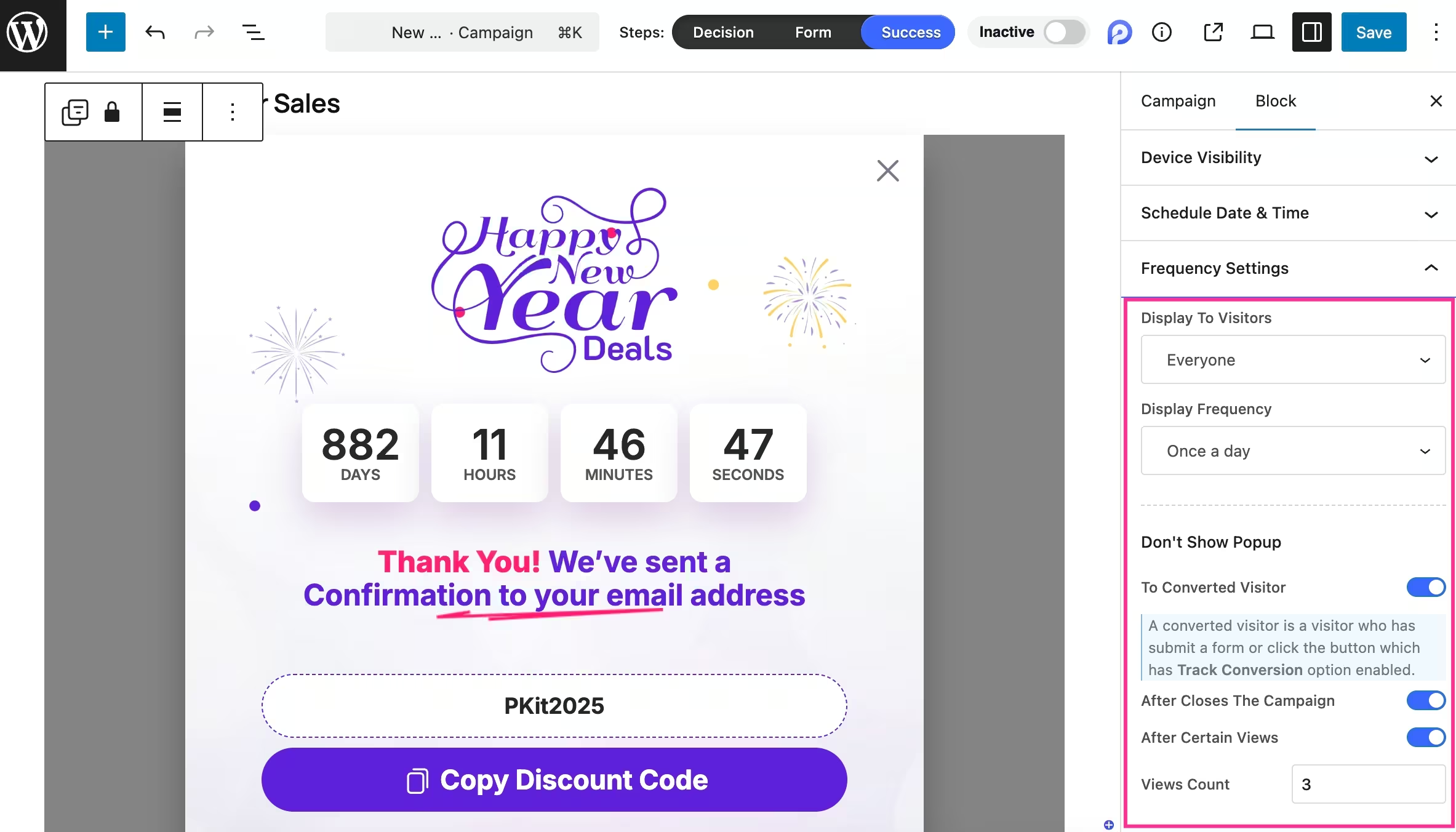
Customize the following fields to configure display frequency:
- Display to Visitors: Select whether you want to display it to everyone, return, or new visitors from the dropdown menu.
- Display Frequency: Choose how often you want to display this popup.
- Don’t Show Popup: Set the condition to not show popups to
- To Converted Visitor: Enable to prevent showing visitors who have already converted.
- After Closing The Campaign: Turn on the toggle to disable showing whoever closes the campaign.
- After Certain Views: Activate this option to not show popup after gaining certain views.
- Views Count: Set the number of views after disabling the popup display.
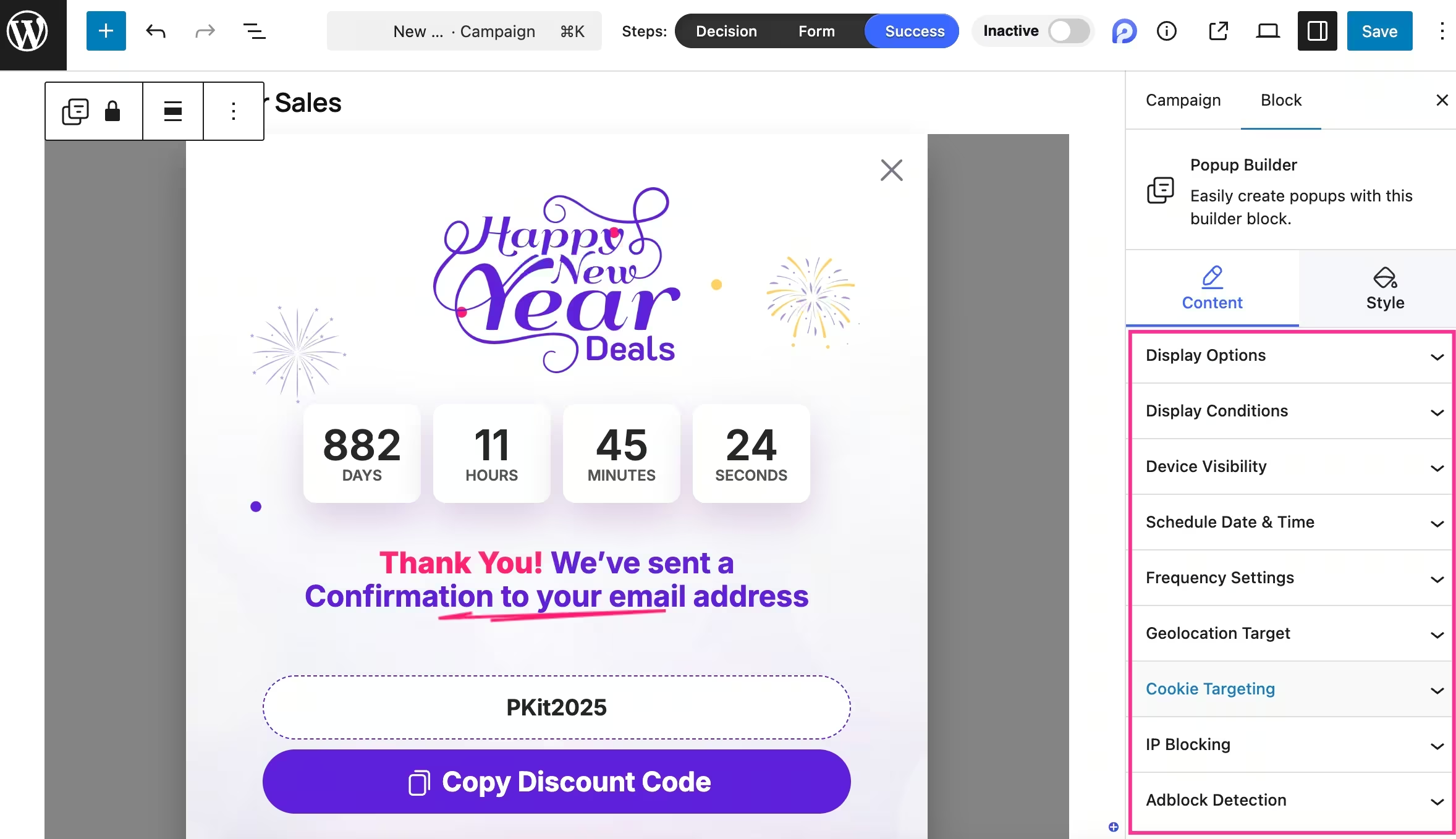
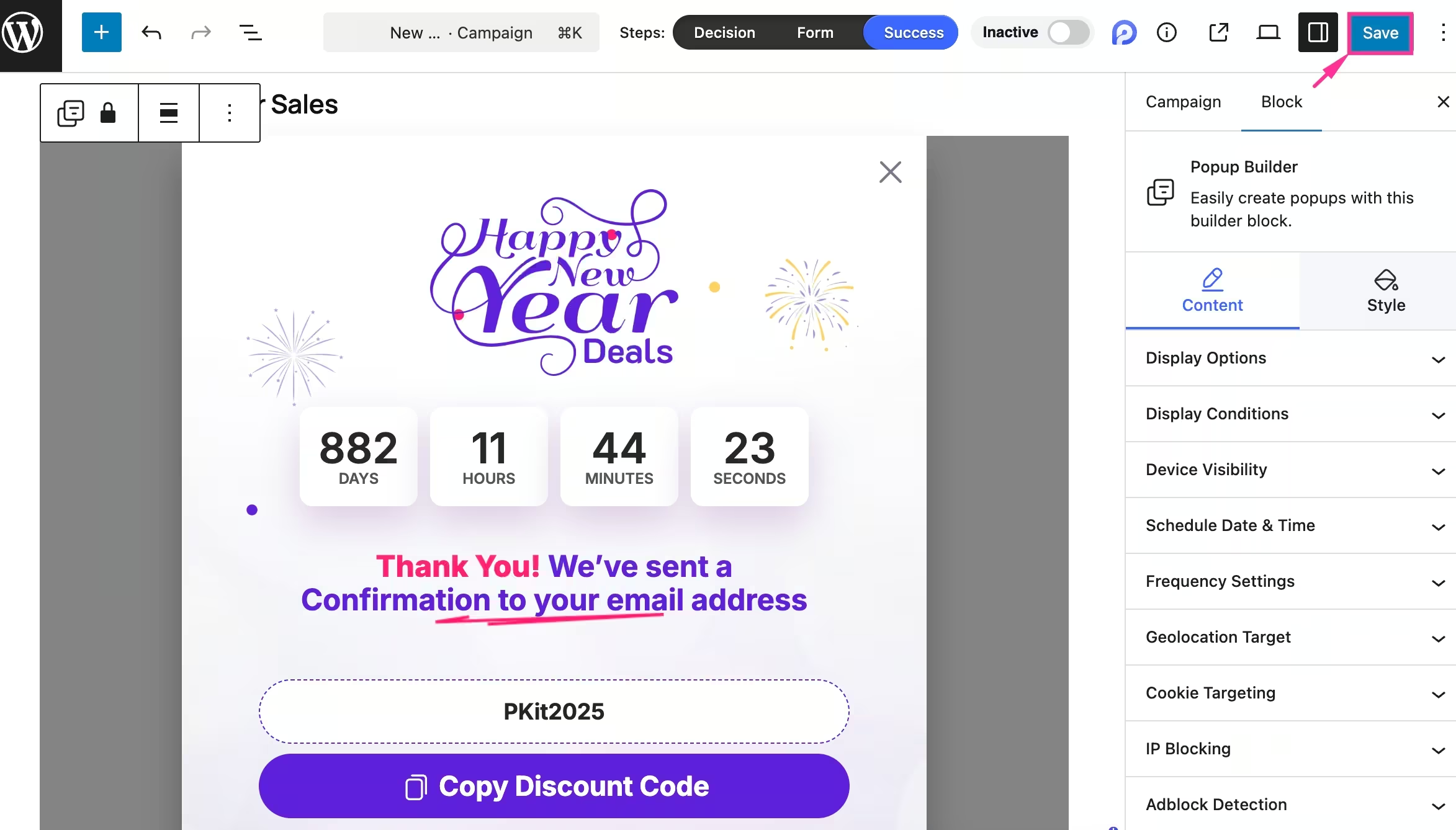
- Uppsättning Display Options, Display Conditions, Device Visibility, Schedule Date & Time, Geolocation Target, Cookie Targeting, IP Blocking, and Adblock Detection for this popup.
- Wrap up all the Content and Style customizations, and tryck på "Spara" button to make your popup campaign live.
Ways to evaluate the performance of popup frequency
You can measure popup performance through a few factors. Your popup frequency is working fine if it’s showing the following results:
- Reduced bounce rate.
- Less popup close rate.
- High scroll depth after the popup.
- Increasing return visitors and popup CTR.
Common mistakes in setting popup frequency
Here are the common popup setup mistakes that people often make:
- Showing popups on every page.
- Not excluding the converted customers.
- Settings same frequency for mobile and desktop.
- Accidentally resetting cookies.
Tips to A/B test popup frequency
Check how to A/B test popup frequency:
- Set one primary metric, such as signup rates, CTR, sales, etc.
- Create two versions with different popup frequencies.
- Divide traffic between two versions.
- Track popup metrics like conversion rate, close rate, bounce rate, and scroll depth.
- Run for a few weeks until sufficient data is collected.
- Analyze popup performance.
✅ Lär dig how to do A/B testing for popups in WordPress.
Vanliga frågor
How often should a popup appear to the same visitor?
A popup should typically appear once per visit or after a defined interval, like 24–72 hours, especially for returning visitors.
What is the best timing for website popups?
The best popup timing depends on user behavior. Generally, exit intent, page scrolled, or on-page load triggers usually perform better than immediate popups.
Can you set different popup frequencies for new and returning visitors?
Yes. With tools like PopupKit, you can set separate frequency rules for new, returning, and converted visitors.
Should you hide popups after a user converts?
Yes. Disabling popups for converted visitors improves user experience and prevents unnecessary interruptions.
Is popup display frequency important for mobile users?
Yes. Since mobile users are more sensitive to interruptions, you should optimize popup frequency for mobile users.
Summing Up
Setting the right popup display frequency is essential for balancing user experience and conversions. Instead of overwhelming visitors with repeated interruptions, frequency controls allow you to show popups only when they’re most relevant, which leads to better engagement, trust, and result.
With PopupKit, you can easily control website popup timing, target the right audience, and fine-tune display rules without touching a single line of code. Using PopupKit and following the guide above, you can quickly apply the right frequency settings and turn popups into conversion-driven assets.

Lämna ett svar