




Choosing the right WordPress form builder can be overwhelming, especially when two powerful plugins like MetForm 그리고 유창한 양식 seem similar at first glance. Both offer drag-and-drop building, beautifully designed templates, and essential integrations. Yet, when you look closer, each brings unique strengths that can influence your workflow, budget, and feature needs.
To help you make an informed decision faster, here’s a quick head-to-head comparison of MetForm vs Fluent Forms.
Quick Overview
MetForm is a leading drag-and-drop form builder that supports the Elementor editor. Whether you want to build forms with pre-built templates or from scratch, every option is available in this builder. It provides 37+ form templates that can be imported with a single click. Moreover, MetForm has EmailKit integration, an ultimate email customizer to create a custom notification email. From payment to CRM integration, all are available in this form builder at least price.
MetForm vs Fluent Forms: Quick Comparison
| Usecases | MetForm | 유창한 양식 |
|---|---|---|
| 상호 작용 | 사용자 친화적 | Difficult |
| 편집자 | Elementor editor | Custom editor |
| 메일침프 | 예 | 예 |
| 허브스팟 | 예 | 예 |
| Google 스프레드시트 | 예 | 예 |
| Email customizer integration | 예 | 사용 불가 |
| 스카우트 돕기 | 예 | 사용 불가 |
| 아웨버 | 예 | 사용 불가 |
| 묶음 | 예 | 사용 불가 |
| 가격 | Affordable | 값비싼 |
Verdict:
- MetForm is an affordable, functional, user-friendly, and Elementor-based form builder.
- Fluent Forms is also considerable if you don’t have budget issue and require unsupported integrations.
Quick Comparison: MetForm vs Fluent Forms
MetForm and Fluent Forms are the two well-recognized form builders in the WordPress ecosystem. Although they might look similar at first glance. But, they are giving tough competition to one another with winning features that leave you in confusion, which one is a wise pick?
So, before an in-depth comparison, let’s head to a quick face-off between these two WordPress form plugins:
| Usecases | MetForm | 유창한 양식 |
|---|---|---|
| 상호 작용 | 사용자 친화적 | Difficult |
| 편집자 | Elementor editor | Custom editor |
| 다단계 형태 | ✅ | ✅ |
| 피드백 폼 | ✅ | ✅ |
| Conditional form | ✅ | ✅ |
| 메일침프 | ✅ | ✅ |
| 느슨하게 | ✅ | ✅ |
| 메일시인 | ✅ | ✅ |
| 활성캠페인 | ✅ | ✅ |
| Form to post | ✅ | ✅ |
| 허브스팟 | ✅ | ✅ |
| 조호 | ✅ | ✅ |
| Google 스프레드시트 | ✅ | ✅ |
| Email customizer integration | ✅ | ❌ |
| 스카우트 돕기 | ✅ | ❌ |
| 아웨버 | ✅ | ❌ |
| 묶음 | ✅ | ❌ |
| Pricing starts at | $49 | $79 |
MetForm:
MetForm is a leading drag-and-drop form builder that supports the Elementor editor. Whether you want to build forms with pre-built templates or from scratch, every option is available in this builder. It provides 37+ form templates that can be imported with a single click. Moreover, MetForm has EmailKit integration, an ultimate email customizer to create a custom notification email.
From payment to CRM integration, all are available in this form builder at least price. MetForm includes 20+ integrations, including 10+ CRM & newsletter integrations. Besides, it comes with a bundle deal where you will get Elementor 애드온, WooCommerce 빌더, 구텐베르크 페이지 빌더, WordPress 이메일 맞춤설정 도구, 팝업 빌더, along with MetForm, and many more solutions in one bundle. Also, a 평생 거래 is available for this bundle too.
Fluent Forms:
Fluent Forms is another popular form plugin that offers a custom drag-and-drop editor. From basic contact form to conversational form, every form creation option is available in this builder. Like MetForm, it also comes with template support. It means you can get started with any type of form with 내장 템플릿 or from scratch.
However, a bundle deal is not available for Fluent Forms. Again, premium subscriptions are a bit pricy compared to MetForm. Still, it gives good competition to MetForm with its strong user base.
User Interface: Ease of Use
User-friendliness is a crucial aspect that you should consider before picking a form builder. So, let’s check out how friendly MetForm and Fluent Forms are in terms of form creation and customization:
MetForm:
MetForm offers an intuitive and user-friendly interface that lets you add a form from scratch or use prebuilt templates. It offers any type of form templates for contact, admission, event, job application, etc. To access these form templates, navigate to Forms under MetForm and press “Add New Form”. This will open up a popup where you will get blank and built-in templates.
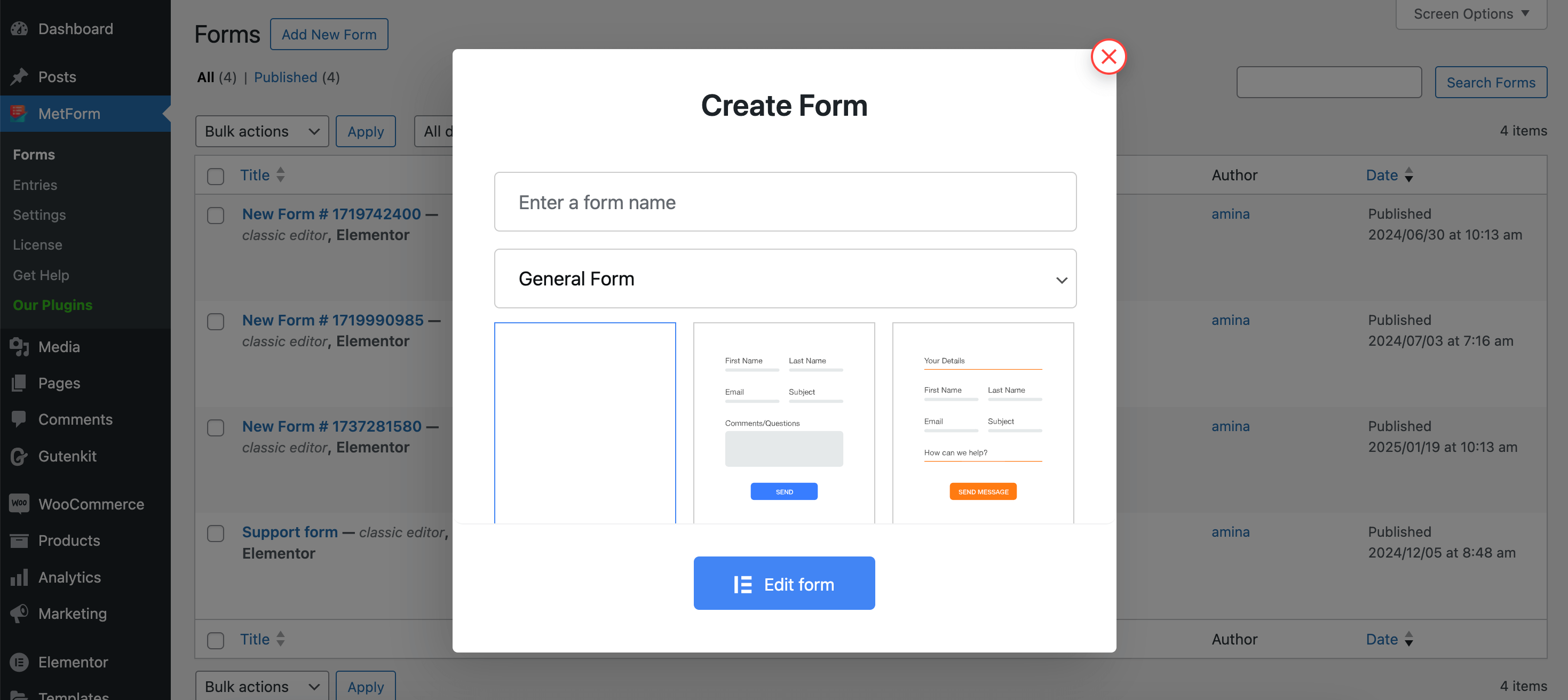
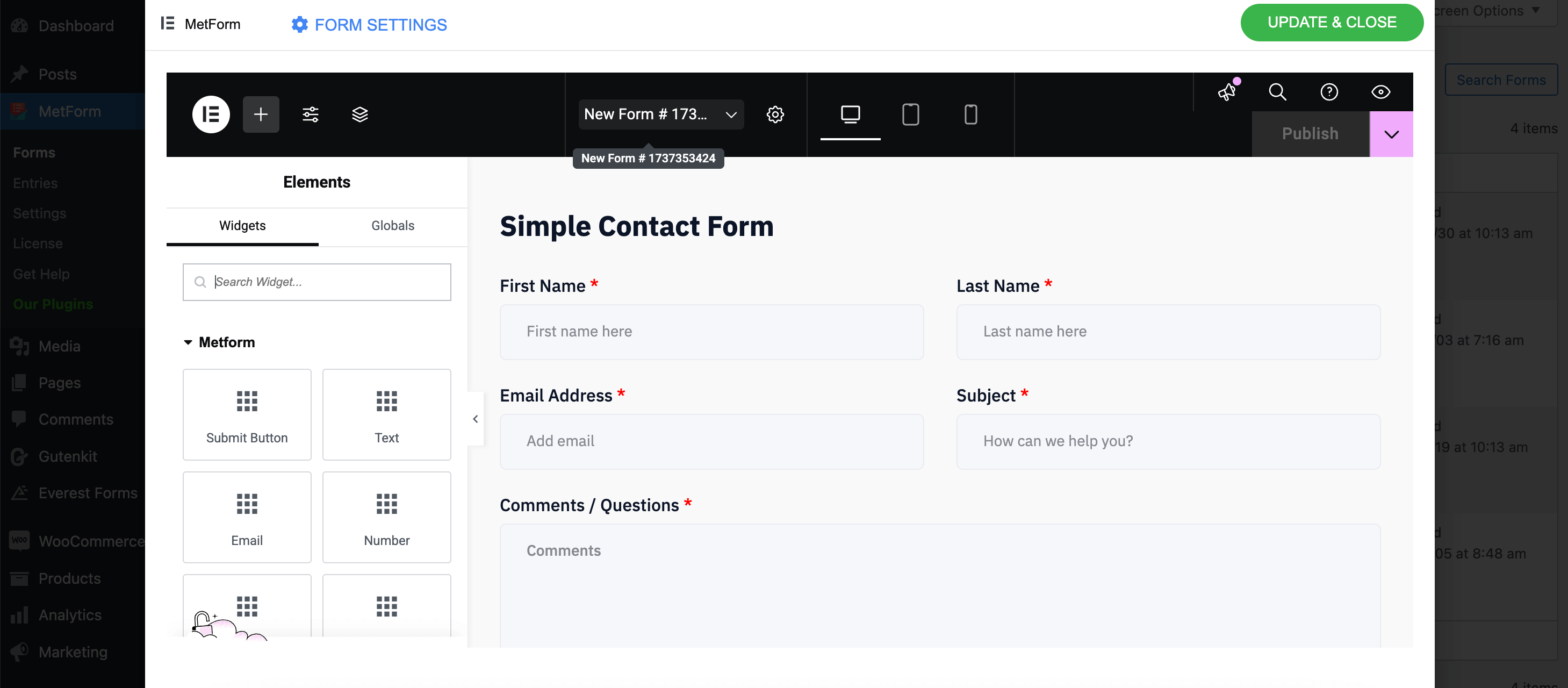
After selecting a pre-built template, you will be taken to the Elementor editor, from where you can add and customize elements by dragging and dropping. Its form field customizations will be done on the Elementor editor.
Fluent Forms:
Likewise, Fluent Forms also offers blank and prebuilt templates for form customization. To add a new template, you need to navigate to the “New Form” tab, and a popup tab for template creation will open up.
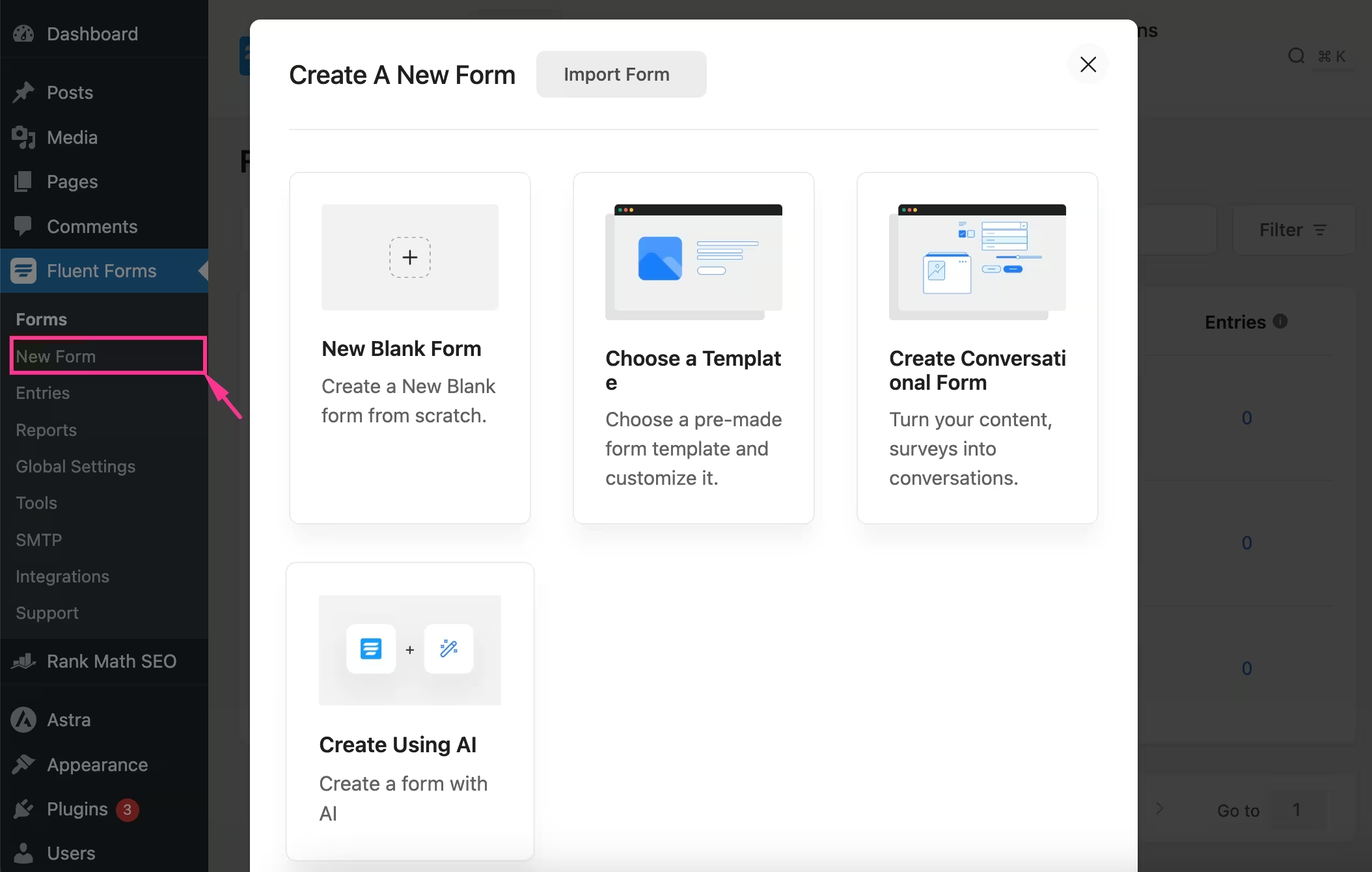
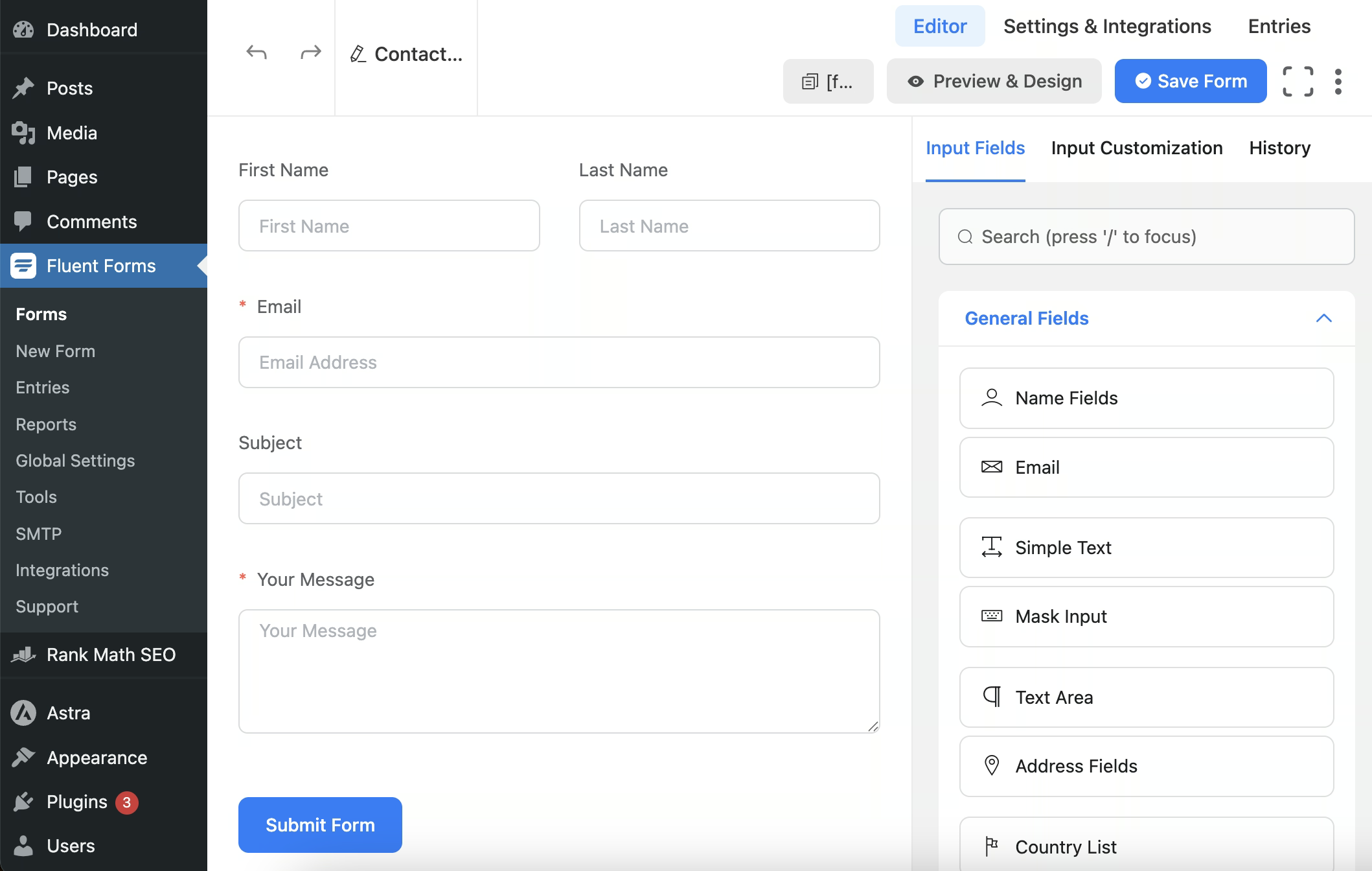
Unlike MetForm, it will redirect you to a separate editor inside the WordPress dashboard, from where you need to add and customize input fields by dragging and dropping.
Pre-built Templates
MetForm and Fluent Forms both include beautiful form templates with 100% customization support. Whether you want style or advanced customization, everything is possible using these form builders. Let’s check out more about their form templates:
MetForm:
MetForm provides more than 37 form templates that are completely customizable. All you have to do is import a form template and customize it as per your requirements. Also, everything can start from scratch with a blank template. Here are all the professional form templates it offers:
- Contact form.
- Booking form.
- Admission form.
- Event form.
- Job application form.
- Job listing form.
- Newsletter signup form.
- Patient form.
- Product order form.
- Rating form.
- Report a bug form.
- 등.
Fluent Forms:
Similar to MetForm, Fluent Forms is enriched with numerous templates that are categorized in Marketing, Product, Education, Nonprofit, IT, Finance, etc. In these categories, you will get more than 70 form templates. Let’s have a look at all the prebuilt and completely customizable form templates it comes with:
- Conversational form.
- Support form.
- Polling form.
- Complaint form.
- Product survey form.
- Donation form.
- Report a bug form.
- Loan application form.
- Partnership application form.
- 등.
Third-Party Integration
| 통합 | MetForm | 유창한 양식 |
|---|---|---|
| 메일침프 | ✅ | ✅ |
| Twilio | ✅ | ✅ |
| 페이팔 | ✅ | ✅ |
| 줄무늬 | ✅ | ✅ |
| 웹훅 | ✅ | ✅ |
| 아웨버 | ✅ | ❌ |
| 변환 키트 | ✅ | ✅ |
| 스카우트 돕기 | ✅ | ❌ |
| 허브스팟 | ✅ | ✅ |
| 활성캠페인 | ✅ | ✅ |
MetForm:
MetForm has 20+ third-party general, CRM, newsletter, marketing, and other form integrations. Most integrations are available in paid subscriptions. However, the required ones are also available in a free subscription. If you need advanced support, you have to upgrade to the pro versions. Compared with Fluent Forms, MetForm has AWeber and Help Scout subscriptions that Fluent Forms doesn’t have.
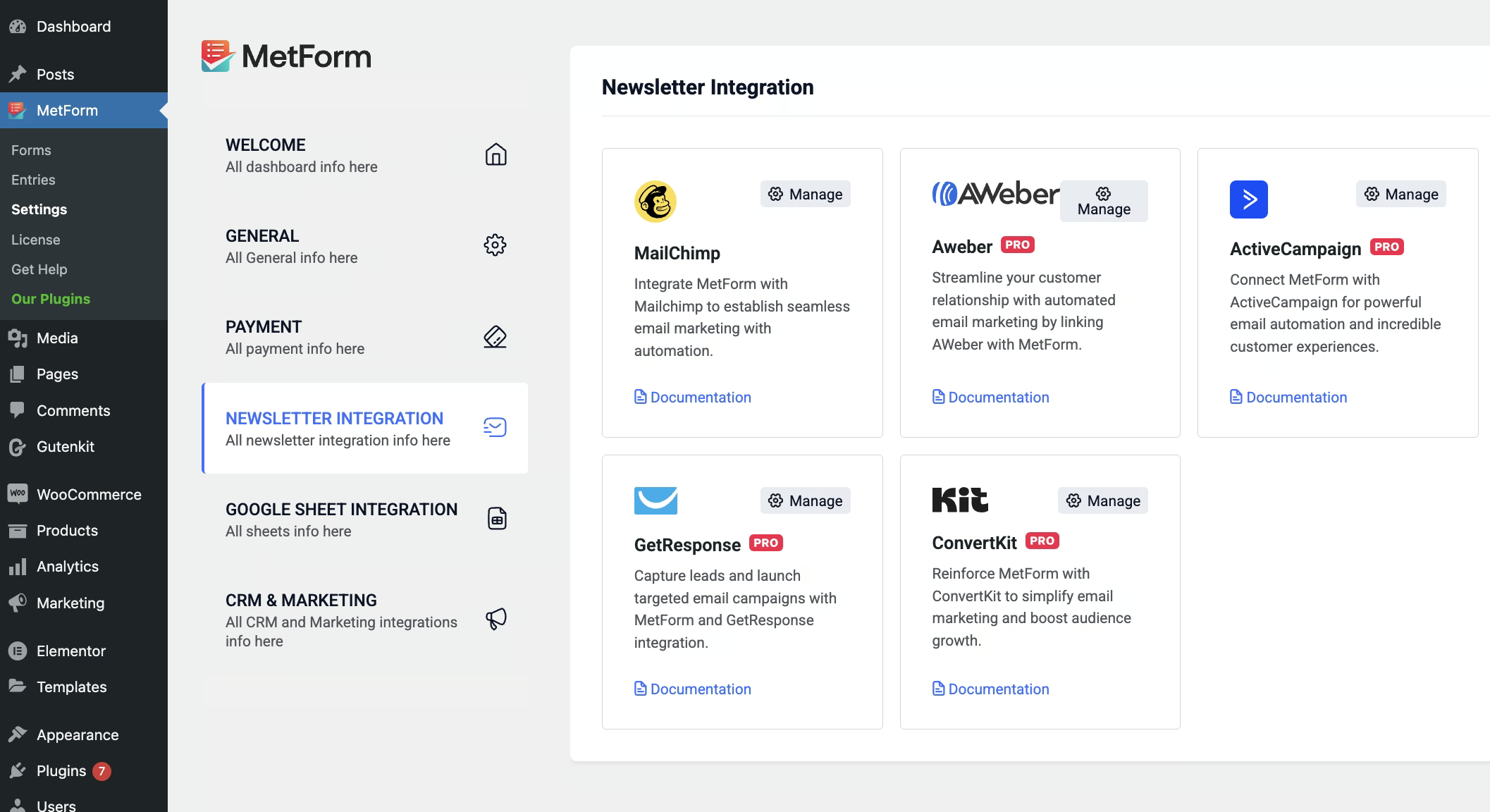
Fluent Forms:
Similar to MetForm, Fluent Forms also has the necessary third-party integrations. Although some essential integrations, such as AWeber and Help Scout are missing in this form plugin. All these integrations come inside a dedicated dashboard.
Support & Documentation
Customers always look for plugins with a strong support system. No matter how good a solution you’re providing, if your support system is poor, then customers will search for an alternative. That’s why it’s crucial to check support response beforehand so that you won’t suffer after purchasing.
Further, plugins should also be well-documented so that even beginners can find a proper guide. Have a look at how MetForm and Fluent Forms compete against one another with client support and documentation:
MetForm:
MetForm has a dedicated support team to answer and solve all your queries and problems. You have to open a support ticket for any help, and they will immediately respond with a solution. Besides, they have a powerful Facebook community where you can also seek support. Due to their prompt support, they have a 4.7 rating on WordPress.org profile.
Also, MetForm has a rich knowledge base where you will find all setup guides and tutorials. Despite of your expertise level, anyone can easily understand this documentation. So, they have quite a helpful support team that is always up for assistance.
Fluent Forms:
On the other hand, Fluent Forms also provides assistance through a support ticket. Besides, the option to ask for help from the community profile is also open. Their Facebook community is also engaging. Moreover, they have a detailed documentation page where you will find all guides. Like MetForm, they try to keep their documentation up-to-date with their updated interface.
Pricing Plans
MetForm and Fluent Forms are both budget-friendly solutions. Still, their pricing slightly varies based on packages. Hence, before selecting while it’s important to consider their pricing.
Let’s check out the subscriptions they offer:
MetForm:
MetForm provides three packages, including personal, professional, and agency. All licenses are available in annual and lifetime deals. Besides, it offers a 14-day money-back guarantee.
| Premium Subscriptions | Personal Plan | Professional Plan | 대행사 계획 |
|---|---|---|---|
| Yearly pricing | $49 | $119 | $249 |
| Lifetime pricing | $147 | $357 | $747 |
Fluent Forms:
Similarly, Fluent Forms also offers three premium subscriptions in total, along with a free plan. These plans have annual and lifetime subscriptions whose prices are comparatively higher than MetForm.
| Premium Subscriptions | Single Site License | Agency License | Unlimited License |
|---|---|---|---|
| Annual pricing | $79 | $159 | $299 |
| Lifetime pricing | $349 | $599 | $899 |
Others
| 특징 | MetForm | 유창한 양식 |
|---|---|---|
| Compatibility check | ✅ | ✅ |
| Regular update | ✅ | ✅ |
| 활성 설치 | 6,00,000+ | 6,00,000+ |
| 평가 | 4.7 | 4.8 |
| WPML support | ✅ | ✅ |
So, Who Wins?
Both MetForm and Fluent Forms are capable WordPress form builders, but the right choice depends on what matters most to your website.
If you prefer Elementor-based editing, want affordable pricing, need EmailKit integration, or like the idea of getting multiple solutions in a bundle, then MetForm clearly delivers more value. It offers strong third-party integrations, 37+ ready templates, fast support, and a beginner-friendly editing experience.
Fluent Forms remains a reliable alternative with its own robust template library and standalone editor, but with fewer integrations and higher pricing, it may not be the most cost-effective solution for all users.
In the end, MetForm stands out as the more flexible, budget-friendly, and feature-rich option, especially for Elementor users looking to scale forms without complexity.


답글 남기기