ElementsKit Lite가 작동하지 않습니다 – 문제 해결

elementskit-lite-is-not-working

ElementsKit 라이트는 모든 사람에게 잘 작동할 것으로 예상됩니다. 그러나 일부 외부 문제로 인해 플러그인 기능이 중단되고 오류가 표시될 수 있습니다. 결과적으로 ElementsKit 라이트가 작동하지 않을 수 있습니다.

웹사이트용 페이지를 생성하기 위해 플러그인을 방금 설치했는데 작동하지 않으면 실망스럽습니다. 이번 포스팅에서는 가능한 내용을 공유해보겠습니다. ElementsKit Lite가 작동하지 않는 이유 그리고 그 문제를 어떻게 해결할 수 있는지 알아보세요.

걱정 마! 지침을 따르기 위해 코더가 될 필요는 없습니다.

Quick Overview: Resolving ElementsKit Lite Loading Issues
If ElementsKit Lite is not working or the Elementor editor fails to load, the most common culprit is an exhausted WordPress memory limit or a direct plugin conflict. To resolve this, you need to increase your server’s PHP memory allowance and ensure all active plugins and themes in your environment are fully compatible and updated.

How to Troubleshoot and Fix ElementsKit:

✅ Increase Memory Limit: Edit your wp-config.php file to increase the WP_MEMORY_LIMIT to a minimum of 256M (though 512M is highly recommended for smooth performance).
✅ Check Theme Compatibility: Ensure you are using a well-coded, updated WordPress theme. Nulled, pirated, or heavily outdated themes often inject junk code that causes fatal PHP errors when installing new plugins.
✅ Deactivate Conflicting Plugins: Temporarily disable other third-party Elementor add-ons and strict security plugins to see if ElementsKit loads successfully. Re-enable them one by one to isolate the conflict.
✅ Clear Browser Cache: Open your WordPress backend in an Incognito or Private window. If the editor works perfectly there, clear your browser’s cached files and cookies to remove outdated scripts.
Verify Elementor Status: Because ElementsKit is an add-on, it relies entirely on the core Elementor plugin. Ensure Elementor itself is updated to the latest version and is loading properly on its own.

예를 들어, if you install a rigid firewall or security plugin that aggressively blocks background scripts, it might mistakenly flag and block ElementsKit’s asset loading. By deactivating the security plugin, testing the Elementor editor, and then whitelisting ElementsKit within the security settings, you can safely resolve the infinite loading loop without sacrificing site protection.

 Keeping your server resources adequate and maintaining a clean, legally licensed plugin ecosystem ensures that heavy page builder add-ons like ElementsKit run smoothly, preventing frustrating editor timeouts and fatal website errors.

ElementsKit Lite가 작동하지 않는 이유와 해결 방법

ElementsKit 라이트 플러그인이 귀하의 웹사이트에서 작동하지 않는 데는 뚜렷한 이유가 있을 수 있습니다. 여기에서는 WordPress 웹사이트에 새 플러그인을 사용하려고 할 때 발생했던 가장 일반적인 문제를 공유하겠습니다.

WordPress 메모리 제한

80%의 경우 메모리 제한으로 인해 새로운 WordPress 플러그인이 작동하지 않습니다. WordPress에는 특별한 제한이 있습니다. 기본적으로 WordPress에는 모두 32MB의 메모리 제한이 있습니다. 그러나 유명한 WordPress 호스팅을 사용하고 있다면 메모리 제한을 최대 64MB까지 늘립니다..

여기서 좋은 점은 귀하의 사이트에 WordPress 메모리 제한 문제가 있는 경우 쉽게 해결할 수 있다는 것입니다. 일부 기능을 편집하고 메모리 제한은 512MB일 수 있습니다..

WordPress 웹사이트의 현재 메모리 제한이 무엇인지 확실하지 않은 경우 다음과 같은 플러그인을 사용할 수 있습니다. 서버 IP 및 메모리 사용량 표시. 이 플러그인을 사용하면 어떤 플러그인이 얼마나 많은 메모리를 사용하고 있는지 쉽게 알 수 있습니다.

WordPress 메모리 제한을 늘리려면 wp-config.php 파일을 편집해야 합니다. WordPress 파일 디렉터리의 기본 위치에서 이 파일을 찾을 수 있습니다. 파일을 열고 “define('WP_MEMORY_LIMIT', '40M');과 같은 줄을 찾으세요. 이 줄에서는 메모리의 가치를 높이고 128M 대부분의 경우에 좋은 일을 해야 합니다.
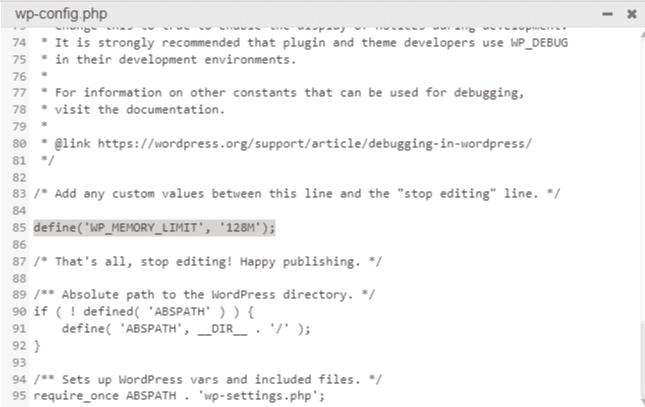
ElementsKit 라이트가 작동하지 않습니다

어려움을 겪고 계시다면 다음을 따르세요. 이 비디오 메모리 제한 편집 작업을 수행합니다.

자세한 지침을 따를 수도 있습니다. WordPress 메모리 제한을 늘리는 방법.

그러나 메모리 제한을 최대 512M까지 늘릴 수 있습니다.

테마 호환성 문제

때로는 모든 것이 잘 진행되고 있지만 여전히 ElementsKit 라이트가 귀하의 웹 사이트에서 작동하지 않는 경우가 있습니다. 이런 경우에는 테마 기능을 확인해야 합니다. 무료 WordPress 테마나 nulled 테마를 사용하는 경우 새 플러그인을 설치하려고 할 때 치명적인 오류가 표시될 가능성이 높습니다.

해야 한다는 것을 기억하세요. null이 포함된 WordPress 테마를 절대 사용하지 마세요. 이러한 테마에는 WordPress 웹 사이트에 악성 코드를 주입할 수 있는 정크 코드가 포함되어 있습니다. 또한 사이트에서 오류가 가장 자주 표시됩니다.

이 문제를 극복하려면 ElementsKit 호환 WordPress 테마를 사용해야 합니다. ElementsKit과 잘 어울리는 다양한 테마가 있습니다. 무료 옵션을 찾고 있다면 Hello Elementor 또는 Astra 테마 무료 버전으로 시작할 수 있습니다.

워드프레스 테마를 변경하는 동안, 웹사이트의 백업을 유지하세요. 또는 WordPress 스테이징 웹사이트를 만든 다음 테마를 사용해 볼 수 있습니다.

설치를 제대로 했다면, 테마 기능에는 문제가 없습니다.

다른 플러그인의 문제

귀하의 웹사이트에서 여러 WordPress 플러그인을 사용하고 계시죠? 때로는 ElementsKit과 호환되지 않는 플러그인을 사용하는 경우가 발생할 수 있습니다. 예를 들어, 업데이트되지 않은 특정 보안 플러그인이 있습니다. 이러한 플러그인은 ElementsKit 애드온의 기능을 차단할 수 있으며 제대로 작동하지 않습니다.

또한 웹 사이트에서 불법 복제된 WordPress 플러그인을 사용하는 경우 ElementsKit을 설치하려고 할 때 치명적인 오류가 표시될 수 있습니다. 만약 그런 일이 일어난다면, 널링된 플러그인을 제거해야 합니다.

매우 오래된 버전의 플러그인을 사용하는 경우 ElementsKit에 일부 오류가 발생할 수도 있습니다. 모든 플러그인의 최신 버전을 설치하는 것이 좋습니다. 왜냐하면 업데이트된 버전은 최소한의 코딩과 더 나은 기능을 가지고 있었기 때문입니다.

플러그인의 무료 버전이든 프로 버전이든 사이트 기능을 원활하게 유지하려면 업데이트해야 한다는 점을 기억하세요.

Elementor가로드되지 않습니다

ElementsKit은 Elementor 애드온입니다. ElementsKit의 라이트 버전은 Elementor 페이지 빌더의 기능을 사용합니다. 그래서 어떤 것이 있다면 Elementor 관련 문제, ElementsKit이 작동하지 않을 수 있음.

Elementor가 멈춘 경우 웹사이트에 설치된 다른 애드온 때문일 수 있습니다. 사이트에 설치한 플러그인의 Elementor 호환성을 확인하세요. 플러그인 중 호환성 문제가 있는 경우 해당 플러그인을 제거하고 다시 시도하세요.

그러나 웹 브라우저에 다른 확장 프로그램을 설치한 경우 이로 인해 문제가 발생할 수도 있습니다. 문제를 찾으려면 설치된 확장 프로그램을 확인하세요. 가능하다면 인증되지 않은 불필요한 확장을 모두 제거하세요.

Browser Cache Conflict

Sometimes, an outdated browser cache causes ElementsKit Lite to get stuck on an infinite loading screen. When you update your plugins, your browser might still try to load older, conflicting JavaScript or CSS files saved from previous visits. 

To quickly check if this is the issue, open your WordPress dashboard in an Incognito or Private window. If the Elementor builder loads perfectly there, simply go to your browser settings, clear your cached images, files, and cookies, and restart the browser.

Insufficient Hosting Resources

Feature-rich page builders require a healthy amount of server power, and strict limits on basic or shared hosting plans can cause ElementsKit Lite to time out before fully loading. To ensure your environment can handle the builder, you or your hosting provider will need to increase your server’s PHP limits. 

Specifically, ensure you are running PHP 7.4 or higher, and increase your WordPress memory limit to at least 256M (ideally 512M). Additionally, raising your max_execution_time to 300 and max_input_vars to 3000 will prevent the server from cutting off complex page loads.

Elementor 웹 사이트 속도를 높이고 싶으십니까? 게시물을 확인하세요

Elementor 웹 사이트 속도를 높이는 10가지 쉬운 팁(업데이트됨)

당신은 또한 확인할 수 있습니다 Elementor의 지침 문제를 해결하려면. 

ElementsKit pro를 사용해야 하는 이유는 무엇입니까?

위의 지침을 사용하면 ElementsKit Lite가 작동하지 않는 경우 문제를 해결할 수 있습니다. 이는 ElementsKit의 무료 버전을 사용할 수 있음을 의미합니다. 하지만 고급 기능을 사용하려면 Pro 버전을 사용해야 합니다.

프로 버전 설치 귀하의 웹사이트는 무한한 기회를 창출할 것입니다. 메가 메뉴, 사용자 정의 머리글 바닥글 작성기, 고급 시차, 조건부 콘텐츠, 수많은 준비된 템플릿 등과 같은 기능을 즐길 수 있습니다.

흥미로운 소식을 전해드리겠습니다. 우리 블로그 커뮤니티의 일원으로서, 프로 버전에서 20% 할인을 누릴 수 있습니다. 결제 페이지에서 'community20' 쿠폰 코드를 사용하세요.

 Frequently Asked Questions on ElementsKit Lite

Why is the ElementsKit widget panel missing inside the Elementor editor? 

This usually happens if the widgets have been manually disabled in the backend. Navigate to ElementsKit > 위젯 in your WordPress dashboard and ensure the toggle switches for the specific elements you want to use are turned , then save your changes.

Does ElementsKit Lite require the latest version of WordPress to function?

Yes, running outdated core WordPress software can cause API incompatibilities with modern plugins. Always keep WordPress, Elementor, and ElementsKit updated to their latest respective versions to prevent fatal backend errors.

How can I identify exactly which plugin is conflicting with ElementsKit? 

Use the process of elimination. Deactivate all plugins on your site except for Elementor and ElementsKit. If the editor loads fine, reactivate the other plugins one by one, checking the Elementor editor each time. The plugin that causes the editor to break upon reactivation is the source of the conflict.

Will upgrading to ElementsKit Pro automatically fix my Lite version’s loading issues?

No. ElementsKit Pro is an extension that actually requires the Lite version to be active to work. If your server is already timing out or failing to load Lite, installing Pro will not bypass the issue. You must fix the root cause, usually server limits or conflicts, first.

What should I do if my browser console shows an “Uncaught TypeError” related to ElementsKit? 

This JavaScript error often points to an outdated script being served by a cache. Purge all of your website’s caching plugins, clear your CDN cache (like Cloudflare) if you use one, and ensure your local browser cache is completely cleared.

Why do my ElementsKit icons show up as blank squares on the live site? 

This is typically a Font Awesome loading issue or a Cross-Origin Resource Sharing (CORS) policy block. Ensure that Font Awesome is enabled in your Elementor settings, and verify that your “WordPress Address” and “Site Address” in the general settings match exactly (e.g., both include https://).

 Can minification settings in caching plugins break ElementsKit? 

Yes. Aggressive JavaScript or CSS minification from plugins like WP Rocket, LiteSpeed Cache, or Autoptimize can sometimes break the visual layout or functionality of complex modules. If you experience missing styles, try excluding ElementsKit assets from the minification rules in your caching plugin’s settings.

마무리

이 지침을 올바르게 따르면 ElementsKit Lite가 작동하지 않는 것과 관련된 문제는 발생하지 않습니다. 귀하의 웹사이트를 깨끗하게 유지하려면 null 또는 불법 복제된 플러그인과 테마를 피하는 것이 좋습니다.

이 가이드를 따른 후에도 여전히 플러그인이 작동하지 않으면 문의해 주세요. Wpmet 지원 문제를 해결하는 데 도움을 드릴 것입니다.


Hasib 아바타

하시브

Hasib is a WordPress Enthusiast, Content Marketer, and Copywriter. He is a marketer by passion and cyclist by hobby.

코멘트

답글 남기기

이메일 주소는 공개되지 않습니다. 필수 필드는 *로 표시됩니다

목차