

Sale icon Wpmet Turns 8! Up to85% Off
ENDING IN:
World Cup Logo
00 DAY
:
00 HOUR
:
00 MIN
:
00 SEC
Grab Your Deal Today Arrow Icon

ElementsKit Lite が動作しない – 問題を修正する

elementskit-lite-is-not-working

ElementsKit lite は誰にとっても問題なく動作するはずです。ただし、外部の問題によってはプラグインの機能が中断され、エラーが表示される場合があります。その結果、ElementsKit lite が動作しない場合があります。

ウェブサイトのページを作成するためにプラグインをインストールしたのに、それが機能しないとイライラします。この記事では、考えられる解決策を共有します。 ElementsKit lite が動作しない理由 そしてそれらの問題をどのように解決できるか。

心配ない!ガイドラインに従うためにプログラマーである必要はありません。

Quick Overview: Resolving ElementsKit Lite Loading Issues
If ElementsKit Lite is not working or the Elementor editor fails to load, the most common culprit is an exhausted WordPress memory limit or a direct plugin conflict. To resolve this, you need to increase your server’s PHP memory allowance and ensure all active plugins and themes in your environment are fully compatible and updated.

How to Troubleshoot and Fix ElementsKit:

✅ Increase Memory Limit: Edit your wp-config.php file to increase the WP_MEMORY_LIMIT to a minimum of 256M (though 512M is highly recommended for smooth performance).
✅ Check Theme Compatibility: Ensure you are using a well-coded, updated WordPress theme. Nulled, pirated, or heavily outdated themes often inject junk code that causes fatal PHP errors when installing new plugins.
✅ Deactivate Conflicting Plugins: Temporarily disable other third-party Elementor add-ons and strict security plugins to see if ElementsKit loads successfully. Re-enable them one by one to isolate the conflict.
✅ Clear Browser Cache: Open your WordPress backend in an Incognito or Private window. If the editor works perfectly there, clear your browser’s cached files and cookies to remove outdated scripts.
Verify Elementor Status: Because ElementsKit is an add-on, it relies entirely on the core Elementor plugin. Ensure Elementor itself is updated to the latest version and is loading properly on its own.

例えば、 if you install a rigid firewall or security plugin that aggressively blocks background scripts, it might mistakenly flag and block ElementsKit’s asset loading. By deactivating the security plugin, testing the Elementor editor, and then whitelisting ElementsKit within the security settings, you can safely resolve the infinite loading loop without sacrificing site protection.

 Keeping your server resources adequate and maintaining a clean, legally licensed plugin ecosystem ensures that heavy page builder add-ons like ElementsKit run smoothly, preventing frustrating editor timeouts and fatal website errors.

ElementsKit Lite が動作しない理由とその修正方法

ElementsKit lite プラグインが Web サイトで動作しないのには、明確な理由が考えられます。ここでは、WordPress ウェブサイトに新しいプラグインを使用しようとしたときに発生する最も一般的な問題を共有します。

WordPressのメモリ制限

80% の場合、メモリ制限により新しい WordPress プラグインが機能しません。 WordPress には特別な制限があります。デフォルトでは、WordPress にはすべて 32MB のメモリ制限があります。ただし、有名な WordPress ホスティングを使用している場合は、 メモリ制限を最大 64MB まで増やす.

ここで良いのは、サイトに WordPress のメモリ制限の問題がある場合、簡単に修正できることです。いくつかの関数を編集するだけで済みます。 メモリ制限は 512MB にすることができます.

WordPress ウェブサイトの現在のメモリ制限がどのくらいかわからない場合は、次のようなプラグインを使用できます。 サーバーIPとメモリ使用量の表示。このプラグインを使用すると、どのプラグインがどのくらいのメモリを使用しているかを簡単に知ることができます。

WordPressのメモリ制限を増やすには、wp-config.phpファイルを編集する必要があります。このファイルはWordPressファイルディレクトリのベースにあります。ファイルを開いて、「define('WP_MEMORY_LIMIT', '40M');」のような行を見つけます。この行では、 メモリの値を増やして 128M ほとんどの場合はうまくいくはずです。
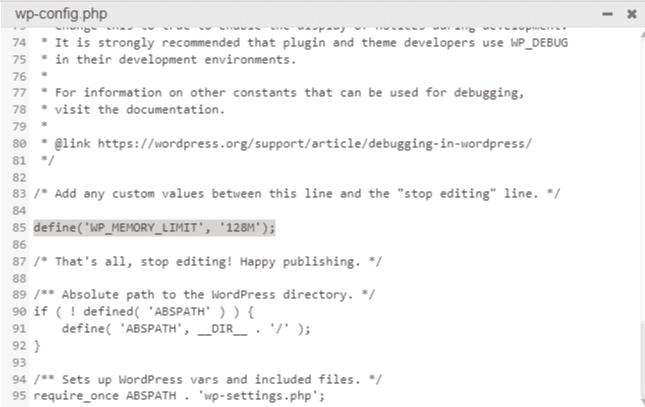
ElementsKit lite が動作しない

何か問題がある場合は、フォローしてください このビデオ メモリ制限編集タスクを実行します。

詳細なガイドラインに従うこともできます WordPressのメモリ制限を増やす方法。

ただし、メモリ制限を最大 512M まで増やすことができます。

テーマの互換性の問題

場合によっては、すべてがうまくいっているにもかかわらず、ElementsKit lite が Web サイトで動作しないことがあります。このような場合は、テーマの機能を確認する必要があります。無料の WordPress テーマまたは null テーマを使用している場合、新しいプラグインをインストールしようとすると致命的なエラーが表示される可能性が高くなります。

覚えておいてください。 null の WordPress テーマは決して使用しないでください。このようなテーマには、WordPress Web サイトにマルウェアを注入する可能性のあるジャンク コードが含まれています。また、サイト内でエラーが頻繁に発生します。

この問題を解決するには、ElementsKit と互換性のある WordPress テーマを使用する必要があります。 ElementsKit と連携して機能するテーマが幅広くあります。無料のオプションをお探しの場合は、Hello Elementor または Astra テーマの無料バージョンから始めることができます。

WordPressのテーマを変更する際に、 ウェブサイトのバックアップを取っておく。または、WordPress ステージング Web サイトを作成して、テーマを試すこともできます。

インストールを正しく行うと、 テーマの機能には問題はありません.

他のプラグインによる問題

ウェブサイトで複数の WordPress プラグインを使用していますよね?場合によっては、ElementsKit と互換性のないプラグインを使用している可能性があります。たとえば、更新されていない特定のセキュリティ プラグインがあります。このようなプラグインは ElementsKit アドオンの機能をブロックし、正しく動作しなくなる可能性があります。

また、Web サイトで海賊版の WordPress プラグインを使用している場合、ElementsKit をインストールしようとすると致命的なエラーが表示される可能性があります。それが起こった場合、 null になったプラグインをアンインストールする必要があります.

非常に古いバージョンのプラグインを使用している場合、ElementsKit でエラーが発生する可能性があります。すべてのプラグインの最新バージョンをインストールすることをお勧めします。なぜなら、更新されたバージョンには最小限のコーディングとより優れた機能が含まれていたからです。

プラグインの無料版であってもプロ版であっても、サイトの機能をスムーズに保つためには更新する必要があることに注意してください。

ElementsKit lite が動作しない

Elementor が読み込まれていません

ElementsKit は Elementor アドオンです。 ElementsKit のライト バージョンは、Elementor ページ ビルダーの機能を使用します。それで、もし何かあれば、 Elementor、ElementsKit に関する問題が動作しない可能性がある.

Elementor が停止する場合は、Web サイトにインストールされている他のアドオンが原因である可能性があります。サイトにインストールしたプラグインの Elementor 互換性を確認します。いずれかのプラグインに互換性の問題がある場合は、それをアンインストールして、もう一度試してください。

ただし、Web ブラウザに別の拡張機能をインストールしている場合は、問題が発生する可能性があります。インストールされている拡張機能を確認して問題を見つけます。可能であれば、非正規の不要な拡張機能をすべて削除してください。

Browser Cache Conflict

Sometimes, an outdated browser cache causes ElementsKit Lite to get stuck on an infinite loading screen. When you update your plugins, your browser might still try to load older, conflicting JavaScript or CSS files saved from previous visits. 

To quickly check if this is the issue, open your WordPress dashboard in an Incognito or Private window. If the Elementor builder loads perfectly there, simply go to your browser settings, clear your cached images, files, and cookies, and restart the browser.

Insufficient Hosting Resources

Feature-rich page builders require a healthy amount of server power, and strict limits on basic or shared hosting plans can cause ElementsKit Lite to time out before fully loading. To ensure your environment can handle the builder, you or your hosting provider will need to increase your server’s PHP limits. 

Specifically, ensure you are running PHP 7.4 or higher, and increase your WordPress memory limit to at least 256M (ideally 512M). Additionally, raising your max_execution_time to 300 and max_input_vars to 3000 will prevent the server from cutting off complex page loads.

Elementor Web サイトを高速化したいですか?投稿を確認してください

Elementor ウェブサイトを高速化するための 10 の簡単なヒント (更新)

を確認することもできます。 エレメンターのガイドライン 問題を解決するために。 

ElementsKit pro を使用する必要があるのはなぜですか?

上記のガイドラインに従って、ElementsKit lite が動作しない場合の問題を修正できます。つまり、ElementsKit の無料版を使用できるようになります。ただし、高度な機能を使用するには、プロバージョンを使用する必要があります。

プロバージョンをインストールする あなたのウェブサイトは無限の機会を生み出します。メガ メニュー、カスタム ヘッダー フッター ビルダー、高度な視差、条件付きコンテンツ、大量の既製テンプレートなどの機能をお楽しみいただけます。

楽しいニュースをお届けします。私たちのブログコミュニティの一環として、 プロバージョンでは 20% 割引をお楽しみいただけます。チェックアウトページで「community20」クーポンコードを使用してください。

 Frequently Asked Questions on ElementsKit Lite

Why is the ElementsKit widget panel missing inside the Elementor editor? 

This usually happens if the widgets have been manually disabled in the backend. Navigate to ElementsKit > ウィジェット in your WordPress dashboard and ensure the toggle switches for the specific elements you want to use are turned の上, then save your changes.

Does ElementsKit Lite require the latest version of WordPress to function?

Yes, running outdated core WordPress software can cause API incompatibilities with modern plugins. Always keep WordPress, Elementor, and ElementsKit updated to their latest respective versions to prevent fatal backend errors.

How can I identify exactly which plugin is conflicting with ElementsKit? 

Use the process of elimination. Deactivate all plugins on your site except for Elementor and ElementsKit. If the editor loads fine, reactivate the other plugins one by one, checking the Elementor editor each time. The plugin that causes the editor to break upon reactivation is the source of the conflict.

Will upgrading to ElementsKit Pro automatically fix my Lite version’s loading issues?

No. ElementsKit Pro is an extension that actually requires the Lite version to be active to work. If your server is already timing out or failing to load Lite, installing Pro will not bypass the issue. You must fix the root cause, usually server limits or conflicts, first.

What should I do if my browser console shows an “Uncaught TypeError” related to ElementsKit? 

This JavaScript error often points to an outdated script being served by a cache. Purge all of your website’s caching plugins, clear your CDN cache (like Cloudflare) if you use one, and ensure your local browser cache is completely cleared.

Why do my ElementsKit icons show up as blank squares on the live site? 

This is typically a Font Awesome loading issue or a Cross-Origin Resource Sharing (CORS) policy block. Ensure that Font Awesome is enabled in your Elementor settings, and verify that your “WordPress Address” and “Site Address” in the general settings match exactly (e.g., both include https://).

 Can minification settings in caching plugins break ElementsKit? 

Yes. Aggressive JavaScript or CSS minification from plugins like WP Rocket, LiteSpeed Cache, or Autoptimize can sometimes break the visual layout or functionality of complex modules. If you experience missing styles, try excluding ElementsKit assets from the minification rules in your caching plugin’s settings.

まとめ

このガイドラインに正しく従えば、ElementsKit lite が動作しないという問題は発生しません。ウェブサイトをクリーンに保つために、null または海賊版のプラグインやテーマを避けることを強くお勧めします。

このガイドに従ってもプラグインが動作しない場合は、お問い合わせください。 Wpmet のサポート 彼らはそれを修正するのを手伝ってくれます。


Hasibのアバター

ハシブ

Hasib is a WordPress Enthusiast, Content Marketer, and Copywriter. He is a marketer by passion and cyclist by hobby.

コメント

コメントを残す

メールアドレスが公開されることはありません。 が付いている欄は必須項目です

目次