





A WooCommerce product table turns your store into a fast and fuss-free shopping experience. Instead of making your customers scroll forever, you give them a clean table to compare for easier decision-making.
With over 70% of shoppers preferring quick-view layouts, this simple upgrade makes your store easier to browse. WooCommerce product table isn’t just for aesthetics, it’s for the comfort of your customers.
In this guide, you’ll know the 7 best WooCommerce product table builders that excel in 2026. At the end of this blog, you’ll know which table plugin suits your needs.
Quick Overview
A WooCommerce product table transforms the default grid layout into a fast, scannable table for quick-view and comparison-friendly browsing. They are very useful for:
✅ Wholesale or B2B shops
✅ Catalog-style websites
✅ Food ordering systems like restaurant
✅ Stores with huge inventories
✅ Service-based or customizable product setups
You can try these 7 product table builders for your WooCommerce needs:
✅ TableKit – best for any types of Gutenberg tables.
✅ WooCommerce Product Table (Barn2) – good for WooCommerce product tables & quick order forms.
✅ JetProductTables (Crocoblock) – ideal for WooCommerce product tables with presets.
✅ Ninja borde – good for data tables with import from external source.
✅ PVT – Product Variation Table for WooCommerce – good option for product variations table.
✅ Product Table by Tableberg – ideal for filterable and sortable product table data in Gutenberg.
✅ Product Table for WooCommerce by CodeAstrology – ideal for add-to-cart and bulk order.
What Does a WooCommerce Product Table Builder Do?
A WooCommerce product table builder converts the default grid/shop layout into a structured table.
It could be in this structure:
rows = products, columns = price, SKU, image, add-to-cart, attributes, etc.
Its core capabilities in your eCommerce store include:
- List many products on one page. Compact but still scannable rows.
- Show variation controls and let customers add straight from the table. It could be a one-page ordering or a bulk add-to-cart.
- Provide search, filters, and sortable columns so customers find products fast.
- Expose customizable columns for images, attributes, custom fields, stock, SKU, ratings, etc.
- Integrate with other WooCommerce extensions, like add-ons, subscriptions, hurtigt kig, and quotes.
- Offer responsive behavior and good front-end performance for large product sets.
Product table plugins shine in stores where speed, clarity, and bulk decision-making matter. They’re perfect for:
- Wholesale or B2B shops managing high-volume orders
- Catalog-style websites that need fast, efficient browsing
- Food ordering systems, restaurant menus, and subscription items
- Electronics, parts, and accessory stores with huge inventories
- Service-based or customizable product setups
In short, WooCommerce table builders are used for an interactive and data-driven shopping experience.
Comparison of the 7 Best WooCommerce Product Table Builders
Not all WooCommerce product table builders are highly commendable, but here are some for your WooCommerce needs.
But first, here’s a quick glance at the 7 plugins.
| Plugin | Bedst til | Customization & Flexibility | Brugervenlighed | Fordele | Ulemper |
|---|---|---|---|---|---|
| TableKit | General data tables, content tables, comparison tables, etc, for the Gutenberg editor. | High flexibility and customization options | Simple interface ideal for beginners and experienced users. | Great Gutenberg table builder blocks- Supports rich content (images, icons, buttons). | Not designed for WooCommerce product catalogs |
| WooCommerce Product Table (Barn2) | Full WooCommerce product tables & quick order forms | High customization options | Beginner-friendly once configured | Powerful product table features (filters, search, quick order) with excellent performance with large catalogs- Great for B2B/wholesale and restaurants | – Premium only and very costly for simple tables |
| JetProductTables (Crocoblock) | WooCommerce product tables with presets & Elementor/blocks | High flexibility, especially with JetPlugins | Moderate learning curve | Integrates well with Elementor & JetPlugins ecosystem with flexible columns & presets | Interface can be complex for beginners, and some features require additional Crocoblock plugins |
| Ninja borde | Flexible data tables that support import from external source | High flexibility | Simple interface | Strong visual table builder and styling options | Feature set not as deep as dedicated WooCommerce table plugins |
| PVT – Product Variation Table for WooCommerce | Tables focused on product variations | Moderate flexibility | Moderate learning curve | Ideal for variation-heavy stores, and good for showing size/color grids | Not a full product catalog table plugin, and limited general table features. |
| Product Table by Tableberg | Simple WooCommerce product tables via Gutenberg | Moderate flexibility | Simple interface | Filterable and sortable product table data, and ideal for simple catalogs | Limited deeper WooCommerce integrations |
| Product Table for WooCommerce (CodeAstrology) | Basic WooCommerce product tables | Moderate flexibility | Easy to set up with a moderate learning curve | Simple way to list products in table format with search and filter features | Limited UI customization |
1. TableKit
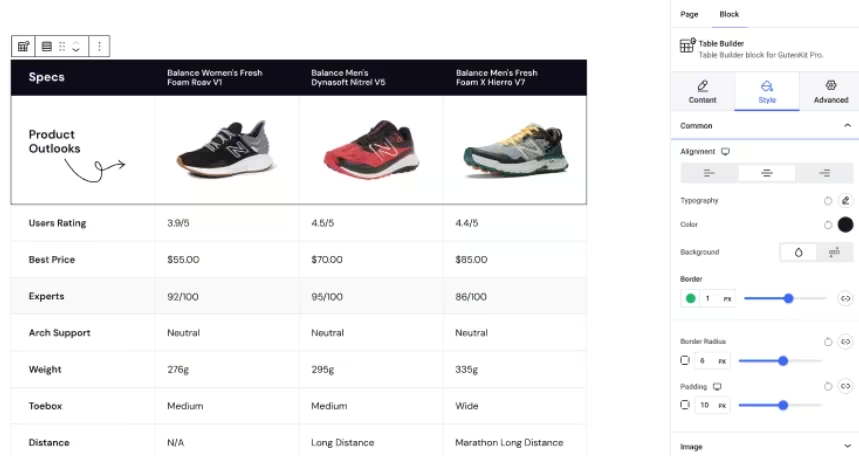
TableKit is designed to help you create advanced, customizable tables inside the Gutenberg editor. It eliminates the need for HTML, CSS, or even external plugins.
Unlike the default Gutenberg table block, which is limited, TableKit adds professional layouts, styling controls, and pre-designed templates.
This Gutenberg-based table builder gives you visual to design different types of tables, such as:
- Review table
- Pristabel
- Sammenligningstabel
- FAQ table
- Data table
- Inventory table
- Any content-focused layout that looks like a structured table

It works by just dragging the block into your Gutenberg editor to start customizing your table. What’s even more interesting is your chance to add stunning animation effects.
So, you’re not just building an ordinary and plain-looking table, but a table with wow factor to amaze your visitors. You can display your table at any point on your page to create a smooth content flow.
| Core Features | How |
|---|---|
| Advanced Styling Controls | Customize borders, spacing, hover effects, colors, typography, badges, and more. |
| Responsive Table Options | Choose stacked layout, horizontal scroll, or hide/show columns on mobile. |
| Cell-Level Customization | Add icons, checkmarks, buttons, highlights, and formatted text inside any cell. |
| Unlimited Columns & Rows | Create simple or complex table layouts without limitations. |
| Icon & Badge Support | Add visual markers like ✔, ✖, stars, tags, and icons to emphasize features. |
| CTA & Button Integration | Insert “Buy Now,” “Add to Cart,” or action buttons directly inside table cells. |
| Lightweight & Performance-Focused | Optimized for speed with no heavy scripts or external builders. |
| Sorting and filtering functionality | Ensure accessibility to the large data table in the viewport for all visitors |
2. WooCommerce Product Table (Barn2)
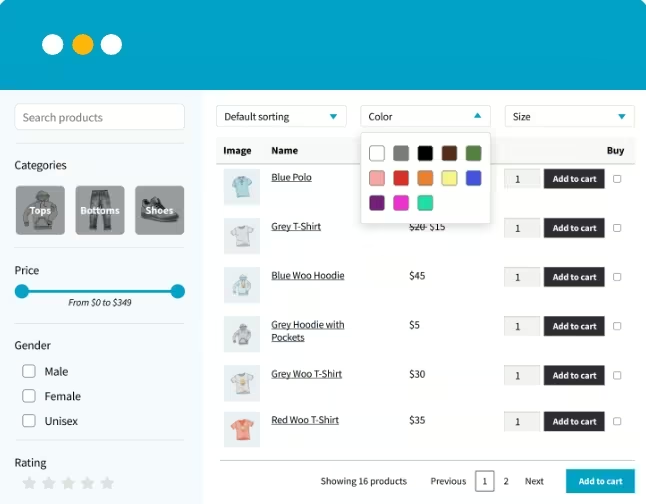
This table plugin changes how products are displayed. Instead of the standard “grid of product cards,” it displays products in an interactive table/list format.
Barn 2 has designed this table plugin to help stores with many product variations, wholesale stores, B2B shops, restaurant menus, or any site where a list table is more functional than the grid images. This is to ensure that product browsing, bulk ordering, and catalog-style listing are much easier.
| Feature | How |
|---|---|
| One-Page Ordering | Add multiple products, including variations, to a customer’s cart from a single product table. |
| Instant Search & Filters | Uses AJAX for real-time and instant search, sorting, and filtering. |
| Customizable Tables | Display exactly the data you want, like images, SKU, stock levels, attributes, custom fields, or even embedded videos. |
| Handles Unlimited Products | Load thousands of products smoothly using built-in lazy loading and optimized performance. |
| Seamless Integrations | Works flawlessly with popular extensions like Product Add-Ons, Quick View, Dynamic Pricing, and more. |
3. JetProductTables (Crocoblock)
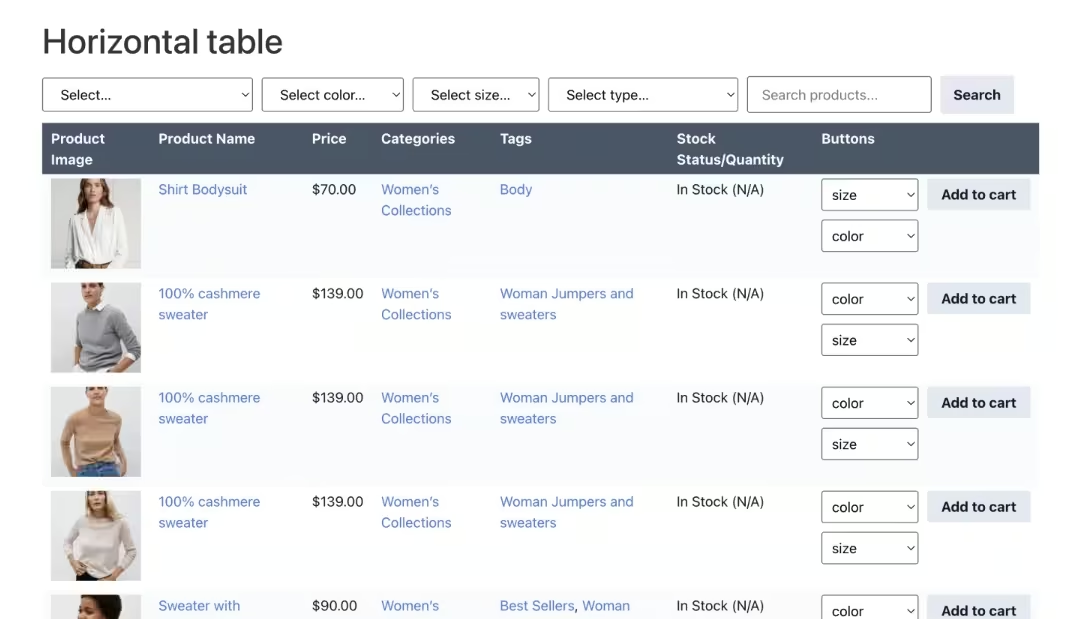
Just like any product table, JetProductTables is designed to display products in a table or list format, instead of the default grid/card layout.
Like TableKit, this plugin has a user-friendly interface and does not require coding skills. This works by adding Gutenberg blocks and using a shortcode to any location on the webpage. It also works for the Elementor interface because of its page-builder widgets.
This plugin works well for large catalogs, B2B/wholesale stores, produktsammenlignings, menus, or any catalog-style listing.
| Feature | How |
|---|---|
| Customizable Columns | Choose which data to show: product name, SKU, price, image, stock, attributes, descriptions, categories, or custom metadata. |
| Flexible Layouts & Responsive | Tables adapt to desktop & mobile. Layout options include scrollable tables, collapsible rows, or card-style view. |
| Sorting, Searching & Filtering | Customers can find products instantly without page reloads because of AJAX function. |
| Add-to-Cart & Variations | Customers can add products or variations directly from the table, ideal for bulk or wholesale orders. |
| Reusable Templates & Presets | Save table configurations as presets to reuse across pages, categories, or posts. |
4. Ninja borde
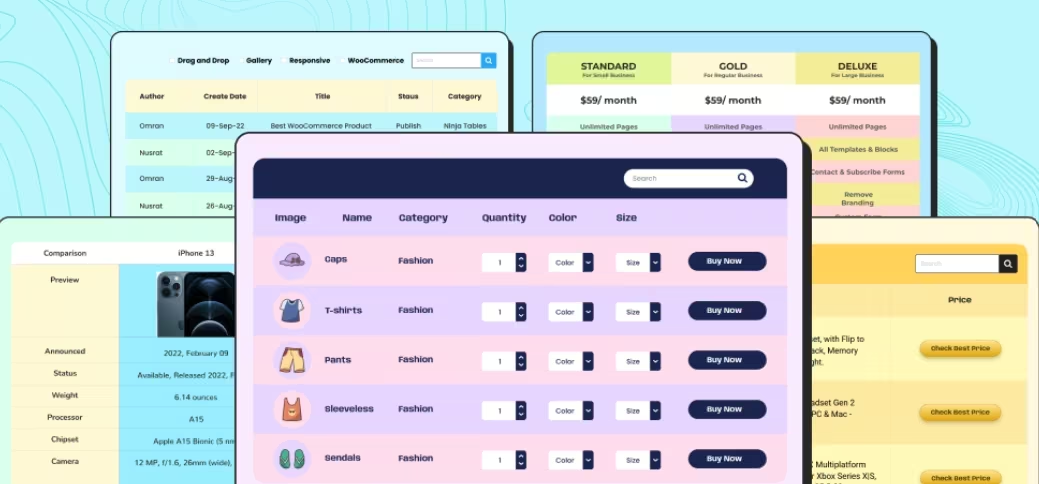
The Ninja Tables plugin allows users to build and embed a data table without the need for code. It has a drag-and-drop interface and prebuilt templates.
It works for many kinds of data tables, like product lists, pricing tables, comparison tables, posts, or custom content, reviews, statistics, and more. You can import and showcase external data from Google Sheets or CSV files for large data sets, “directory‑style” sites, or data-heavy content.
| Feature | How |
|---|---|
| Unlimited Data & Flexible Data Sources | You can import data from CSV, JSON, and external sources like Google Sheets. |
| Integration with WooCommerce & WordPress Content | Create tables that display your WooCommerce products, or lists of posts/custom post types. |
| Searchable, Sortable, and Filterable Tables | Has search and filter functionality so visitors can quickly find what they need in the table. |
| Responsive & Customizable Styling | Offers various table styles, color schemes, and responsive settings for desktop and mobile views. |
5. PVT – Product Variation Table for WooCommerce
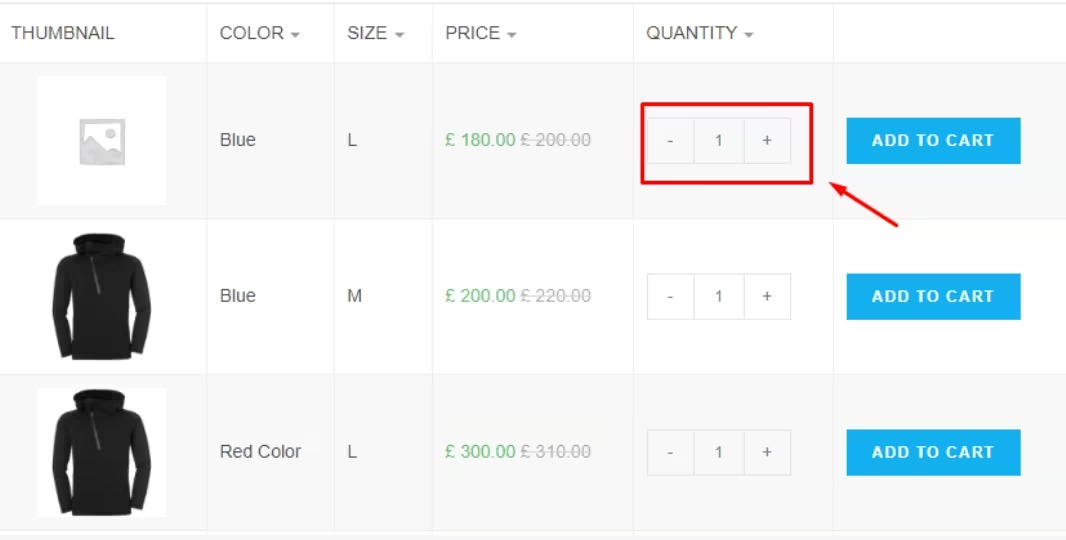
PVT is a plugin for WooCommerce/WordPress that replaces the standard variation‑selection dropdowns on variable products. It eliminates forcing your customers to pick attributes like size and color from the dropdowns.
PVT displays all product variations in a table for easier comparison and selects the variation the customer wants. You can choose which columns you want to show, like thumbnail, variation title, pris, SKU, stock, etc.
| Feature | How |
|---|---|
| Bulk Add-to-Cart & Multi-Variation Selection | Customers can select multiple variations at once and add them to the cart in a single action. |
| Flexible Display Settings & Controls | Users can enable/disable the table on a per‑product or per‑category basis, and display the variation table in any section of the page. |
| Search / Filter Within Variations | Customers can search and filter the variation table to find their desired variation more easily. |
| Optional Coexistence With Default Dropdowns | Configure PVT to show both the standard variation dropdown and the table for a flexible display of variations. |
| Table Behavior & Responsiveness | You can keep the table layout for mobile devices, horizontal scrollbars, and responsive behavior on different screen sizes. |
6. Product Table by Tableberg
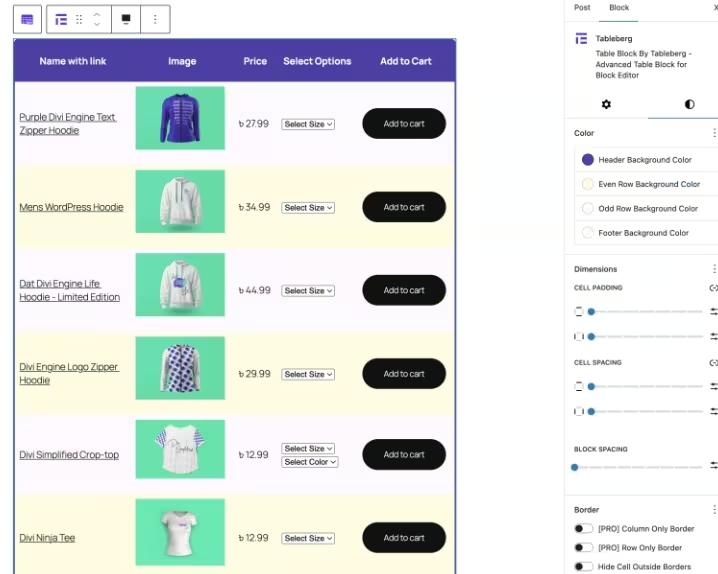
The plugin is designed to work on the Gutenberg editor. Users can add the table block to any page or post. It replaces the traditional grid layout and compares products side-by-side for easy table viewing.
The Tableberg table has fast AJAX-driven interactions og en fully responsive design. It is ideal for creating product catalogs, quick-order forms, and comparison tables within WordPress.
Additionally, this plugin is suitable for wholesale/bulk ordering, large catalogs, quick-shop pages, restaurant menus, digital-download shops, etc.
| Feature | How |
|---|---|
| Customizable Columns | You can choose which product fields to show, like product name, image, price, variations, etc. |
| Searchable, Sortable & Filterable Tables | Shoppers search, sort, and filter products for an easier and faster browsing experience. |
| Add to Cart from Table | Visitors can add products or variations to the cart directly from the table. |
| Responsive & Mobile-Friendly Design | Tables adapt to different device screens, ensuring usability on desktop, tablet, or mobile. |
7. Product Table for WooCommerce by CodeAstrology
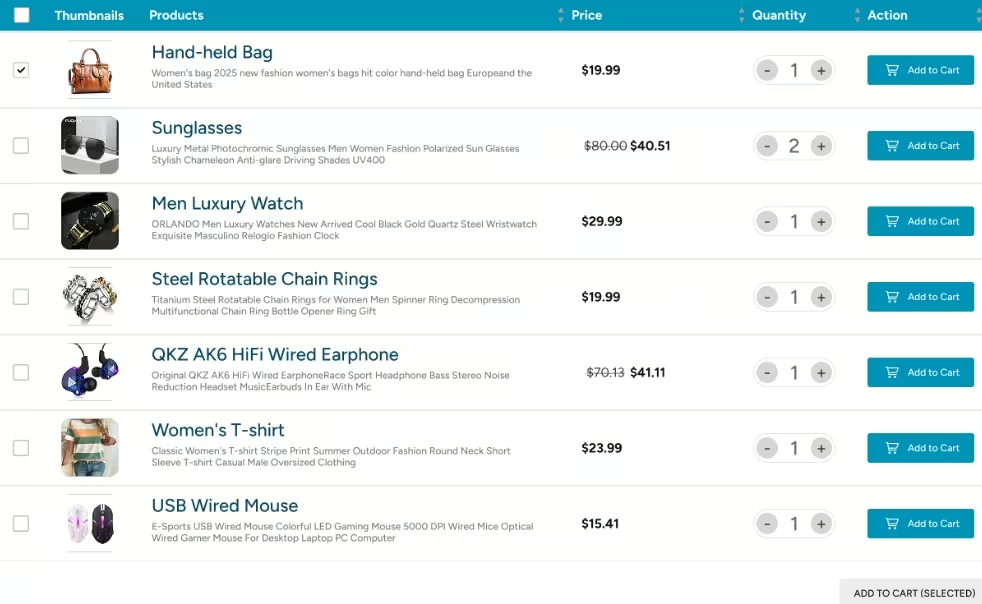
The table from CodeAstrology can showcase your products in a fully searchable and filterable table layout. You can use a shortcode to insert tables anywhere on your page or post.
Users can create fast, organized, and user-friendly tables for different needs. This plugin is suitable for creating tables for restaurant orders, selling digital music, offering wholesale items, booking courses, eller listing books.
Additionally, the table from CodeAstrology has pre-built templates and table styling, so users can switch to different templates. What’s more interesting about this plugin is that shoppers can do easy quick-buy and multi-purchase.
| Feature | How |
|---|---|
| Add to Cart / Bulk Order from Table | Customers can add multiple items to the cart directly from the table view. |
| Support for Variable Products / Variations | You can list each variation separately in individual rows if desired. |
| Control Over Which Products Show | Easily include or exclude products by category, tag, ID, stock status, etc. You can decide how many products per page to load and manage the scope of the table. |
| Responsive and Theme-Compatible | Designed to work with most WooCommerce-compatible themes, and tables remain usable on mobile devices. |
| Custom Columns & Taxonomies | Supports displaying custom fields or custom taxonomies, like brand, color, and custom attributes, in columns to create specialized catalogs. |
How to Choose a WooCommerce Product Table Builder
Choosing the right plugin comes down to matching the tool to your store’s needs. Perform these steps for a clearer understanding of how you choose your product table builder:
1. Define your business goal:
Know what your business is all about, like whether you are doing quick ordering or wholesaling. Assess which functionality you need, like you want to prioritize add-to-cart, bulk add, and variation handling.
2. Catalog size & performance needs:
Determine your catalog size. If you are doing small catalogs under a few thousand SKUs, you may choose the simple table plugin. If you are doing large catalogs or complex queries, you may need to explore plugins that support server-side processing, AJAX loading, etc.
3. Search & filter sophistication:
Know if you will need faceted filtering and advanced dropdown filters. If so, you may look for a plugin that has strong filter controls and taxonomy/attribute filters.
4. Integration requirements:
Check if you need different extensions, like product add-ons, subscriptions, bookings, multi-currency, quote plugins, like MetForm. If you do, look for a plugin that supports compatibility with different essential extensions.
5. Editor & workflow preferences:
Know the type of WooCommerce website you want to build. It could be a Gutenberg-first site, Elementor-based, or a shortcode-based website.
6. Developer vs non-developer setup:
Some plugins are plug-and-play with visual builders. Others offer deep hooks and templating for developer customization. If you don’t have enough skills, you can opt for a plugin that is beginner-friendly.
7. Support, documentation, and updates:
Check the plugin to see if they have reliable support, updated documents, and can support 24/7. It is a non-negotiable, especially for any plugin issues that may occur.
8. Budget & licensing:
Know your budget and the size of your business. You only need a simple plugin if you prefer a simple WooCommerce website. You can compare single-site vs. unlimited-site licensing and renewal costs.
Ofte stillede spørgsmål
Q: Will a product table plugin ruin my store’s SEO?
A: No! If the table outputs proper HTML (not hidden content via JS only) and uses semantic markup, it can be SEO-friendly. Make sure product pages remain indexable, and that structured data (schema/product markup) still applies to products. Test with SEO tools.
Q: Can I show variations and let customers buy multiple SKUs at once?
A: Yes! Several plugins support showing variations in a table and allow quantity selection per variation or bulk add-to-cart.
Q: Which plugin is best for wholesale or B2B?
A: Plugins that support one-page order forms, bulk-quantity inputs, and visible stock/SKU columns are ideal.
Q: Do these plugins work on mobile?
A: Most modern product table plugins are responsive. Look for responsive options like collapsible columns, stacked rows, or mobile-optimized templates.
Q: How do I test a product table plugin safely?
A: Use a staging environment with a copy of your catalog. Test filters, add-to-cart flows, integration with payments, and performance under typical loads.
So, What is Your Choice?
The choice for your WooCommerce product table depends on your WooCommerce needs and some other factors. You can create a plugin checklist based on your store’s demands, so it will be easier for you to decide.
You can try all these best product table plugins, as they all have a free plan to see how they work with your demands. Evaluate their performances and decide. But if you are looking for a product table builder that works perfectly in the Gutenberg editor, TableKit is our best recommendation.

Skriv et svar