


Building an agricultural technology website is easier than ever with WordPress. Instead of creating every page, section, and layout from scratch, you can speed up the entire process with a professionally designed template that’s completely customizable.
Whether you’re creating a website for an agritech startup, smart farming business, or agricultural consultancy, Kit de Elementos provides everything you need to build a responsive and modern website with Elementor.
In this tutorial, you will learn how to create an agricultural technology website in just a few simple steps.
How to create an agricultural technology website with WordPress?
An agricultural technology website helps agritech startups, smart farming businesses, and agricultural consultants showcase their services, projects, and solutions online. With WordPress, Elementor, and ElementsKit, you can build a responsive website without coding by importing and customizing the Techagri template.
Quick Steps to Create an Agricultural Technology Website
- Instale o ElementsKit – Add ElementsKit and ElementsKit Pro to your WordPress website.
- Open Elementor – Create a new page and launch the Elementor editor.
- Import Techagri Template – Choose the Techagri template from the ElementsKit Template Library.
- Customize the Website – Replace demo content, images, colors, typography, buttons, and other elements with your branding.
- Add Other Pages – Import ready-made pages for About Us, Services, Projects, Blog, and Contact.
- Publish the Website – Add the pages to your navigation menu and publish your completed agricultural technology website.
Exemplo
An agritech startup offering IoT-based farming solutions can use the Techagri template to quickly create a website that highlights its services, projects, agricultural innovations, and contact information.
Resumo
You can create an agricultural technology website without coding by combining WordPress, Elementor, and ElementsKit. The Techagri template provides ready-made pages and sections that you can customize to match your agricultural business and publish quickly.
How to create an agricultural technology website
Building an agricultural technology website is much easier when you use a ready-made Elementor template instead of designing everything from scratch. With Kit de Elementos, you can import a professionally designed agriculture template, customize it to match your business without writing any code.
Learn how to create an agricultural technology website after getting all prerequisites:
Prerequisites to create an agricultural technology website
Before you start building your agricultural technology website, make sure you have the necessary tools ready. Here are the prerequisites to create an agricultural technology website:
- A Site WordPress with administrator access.
- Elementor (Versão gratuita) is installed and activated to build and customize pages visually.
- Kit de Elementos e Elements Kit Pro to access the Techagri template and advanced Elementor widgets.
- A reliable web hosting provider and domain name if you’re creating a new website.
- Your brand assets, such as your logo, images, service details, and contact information, to replace the demo content.
Once everything is ready, you can build an agricultural technology website using the pre-designed Techagri template of ElementsKit in just a few simple steps:
Step 1: Install ElementsKit
First, install an Elementor addon that comes with agricultural templates. For that, navigate to Plugins → Add New Plugin and install and activate ElementsKit and ElementsKit Pro.
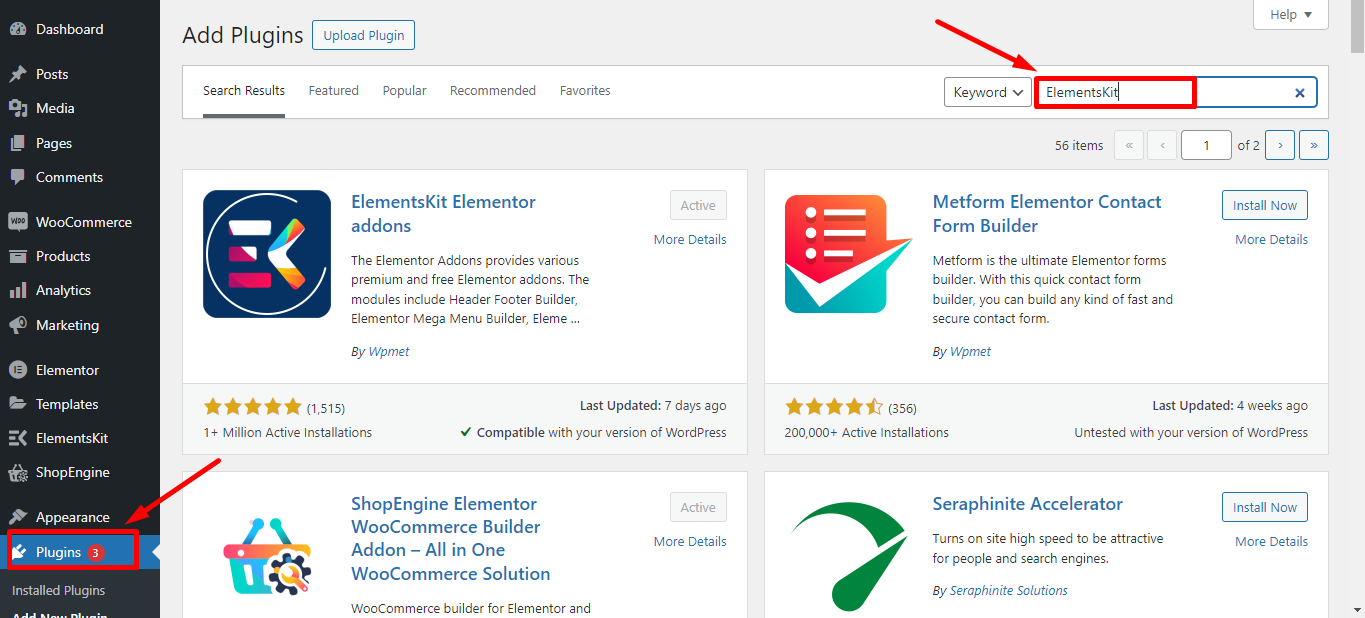
Step 2: Open the Elementor editor
After that, visit “Add Page” under Pages that will take you to a new page to create your agricultural technology website built with the ElementsKit template.

Now, click the “Edit with Elementor” to access your Elementor editor.

Step 3: Import the agri template from template library
In the third step, click the ElementsKit icon to enjoy all the templates provided by ElementsKit.

You will be redirected to a template library enriched with prebuilt templates, pages, and sections. From there, click the “Templates” and select the “Techagri” template provided by ElementsKit.

Now, you will see 9 templates for different pages of your agricultural website.

Step 4: Customize the agriculture template
In this step, you have to customize the content and style of each section one by one. For example, select the heading section, and all the customization options will be visible on the left side, such as:
- Title: Edit heading title, link, title HTML tag, etc, for the title.
- Subtitle: Enable to show subtitle under title.
- Title description: Add title description by expanding this tab.
- Shadow text: Include shadow text.
- Separator: Enable to add separator.

After that, navigate to the style tab and adjust alignment, color, hover color, text shadow, margin, padding, etc. for General, Title, Focused Title. and Title description.

Similarly, you can customize other sections of your agricultural website home page.

Step 5: Set other pages for the agri website
A complete agricultural technology website needs more than just a homepage. Since the Techagri template includes multiple ready-made pages, you can quickly build the rest of your website without designing everything from scratch.
From the Elementor Template Library, import the remaining templates, such as:
- Sobre nós: Introduce your company, mission, and agricultural expertise.
- Serviços: Showcase smart farming solutions, precision agriculture, IoT services, drone monitoring, or consulting.
- Projects: Highlight completed agricultural technology projects and success stories.
- Blogue: Publish farming tips, industry news, and agri-tech innovations.
- Contato: Let visitors easily reach your business through contact forms, maps, and business information.
Once you’ve imported each page, replace the demo text, images, icons, and buttons with your own branding. You can also update colors, typography, and layouts from Elementor to match your business identity.
Finally, navigate to Appearance → Menus and add all your newly created pages to the navigation menu so visitors can browse your website effortlessly.
Step 6: Live your agricultural website
Once everything looks perfect, click Publish on each page and your agricultural technology website is ready for visitors.
Perguntas frequentes
Can you create an agricultural technology website without coding?
Yes. Using Kit de Elementos e Elementor, you can create and customize an agricultural technology website through a drag-and-drop interface without any programming knowledge.
Can you customize the Techagri template?
Absolutely. Every section, including text, images, colors, typography, buttons, icons, and layouts, can be customized directly from the Elementor editor.
Is the agricultural website mobile responsive?
Yes. The Techagri template is fully responsive and automatically adapts to desktops, tablets, and smartphones.
Can you add more pages later?
Yes. You can create new pages anytime using Elementor or import additional templates from the ElementsKit Template Library as your business grows.
Empacotando
Creating an agricultural technology website doesn’t have to be complicated. With the right combination of WordPress, Elementor, and ElementsKit, you can launch a professional website that showcases your services, innovations, projects, and expertise without writing any code.
Simply import the Techagri template, customize it to match your brand, and publish your website in just a few steps. As your business grows, you can easily update existing pages or add new ones using Elementor’s visual editor.


Deixe um comentário